Official source note
gcp data engineer bigquery optimization is the main focus of this page, and the safest way to study it is to keep the exam hub open while you work through the official facts and the service selection patterns. Google describes GCP Professional Data Engineer as a certification that validates practical cloud literacy, service selection, and scenario thinking. The main Cert Pass hub remains /exams/google-gcp-professional-data-engineer.
Exam facts
- Exam name: GCP Professional Data Engineer
- Exam slug: google-gcp-professional-data-engineer
- Vendor: Google
- Cert Pass landing page: /exams/google-gcp-professional-data-engineer
- Study hub: /exams/google-gcp-professional-data-engineer
- Official vendor page: Google Cloud Professional Data Engineer
Why this article exists
The goal here is not to collect trivia. The goal is to build the habit of reading a scenario, identifying the category, and choosing the simplest service that directly fits the requirement.
Fast study map
Use the exam hub twice during review: /exams/google-gcp-professional-data-engineer and /exams/google-gcp-professional-data-engineer. Those internal links should act as the stable anchor for practice, revision, and final review.
GCP Data Engineer BigQuery Optimization Guide 2026
BigQuery is one of the most important services in the GCP Professional Data Engineer exam because it sits at the center of analytics, reporting, and many data modeling decisions. The exam rarely asks for a memorized feature list. It asks whether a candidate can choose the right BigQuery pattern for scan reduction, query acceleration, governance, or workload design.
The best BigQuery answers are usually simple. Partition when the query filters by time or range. Cluster when the query filters by columns inside each partition. Use materialized views when the same aggregation runs repeatedly. Use BI Engine when dashboard speed matters. Use policy tags, authorized views, or row level security when access control is the main concern.
Exam Facts
| Detail | Value |
|---|---|
| Exam | GCP Professional Data Engineer |
| Exam code | google-gcp-professional-data-engineer |
| Vendor | |
| Questions | 50 |
| Time limit | 90 minutes |
| Passing score | 70 percent |
| Retirement date | None published |
| Replacement exam | None published |
Domain Breakdown
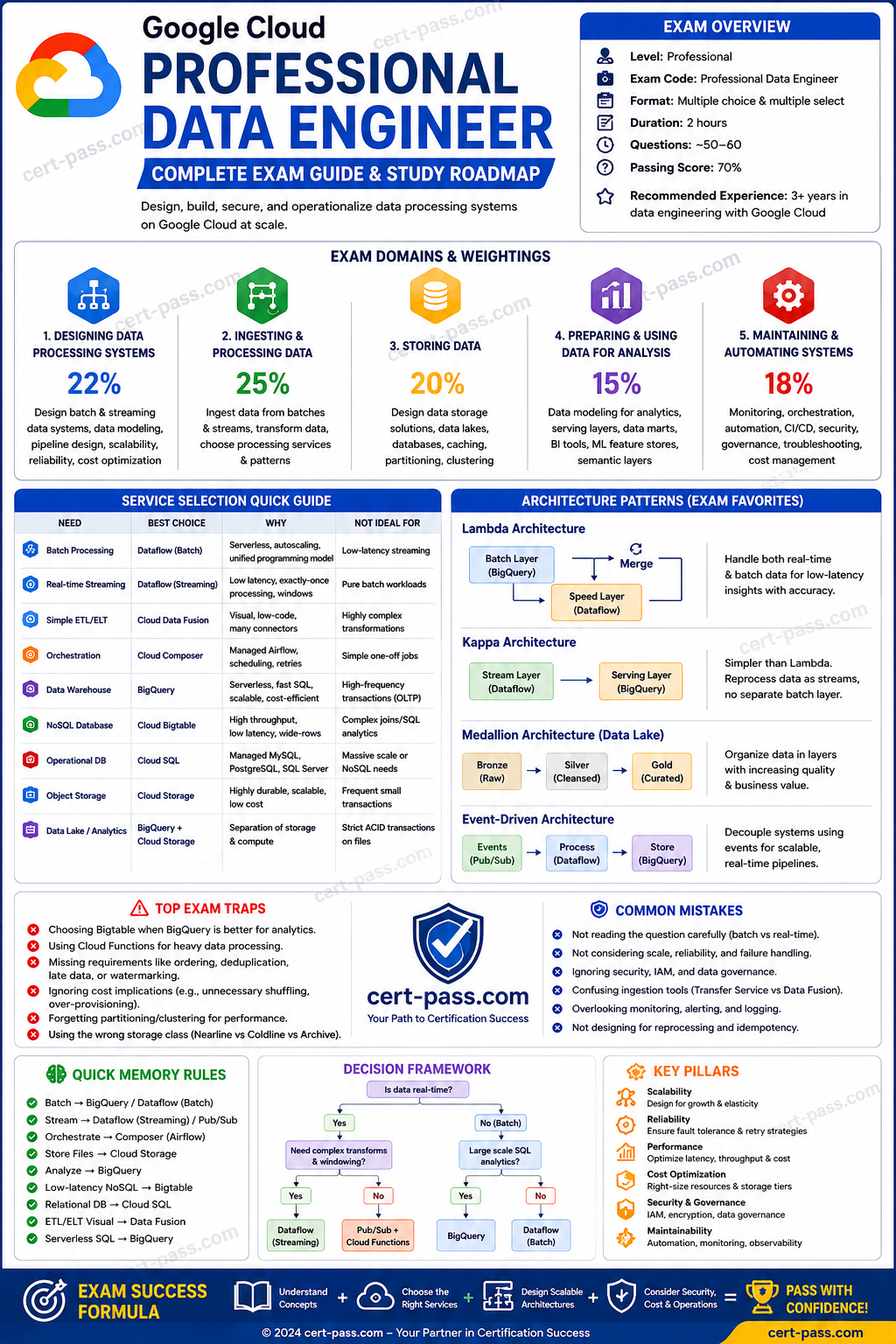
| Domain | Weight | What to focus on |
|---|---|---|
| Ingesting and processing the data | 25.0 percent | Pub/Sub, Dataflow, event processing, and handoff into BigQuery |
| Designing data processing systems | 22.0 percent | Service choice, design tradeoffs, migration, and warehouse architecture |
| Storing the data | 20.0 percent | BigQuery layout, table design, and serving options |
| Maintaining and automating data workloads | 18.0 percent | Workflow reliability, repeatability, and validation |
| Preparing and using data for analysis | 15.0 percent | Analytics access, reporting, and governance |
Why BigQuery matters so much on the exam
BigQuery is the default analytical destination in many scenarios because it removes much of the infrastructure burden of a traditional warehouse. The exam uses that fact in two ways. First, it checks whether a candidate recognizes BigQuery as the right target for SQL analytics and reporting. Second, it checks whether the candidate knows how to optimize BigQuery once data lands there.
A common mistake is to think that BigQuery optimization is only about SQL syntax. In reality, the exam is asking about table design, access patterns, storage layout, and repeated query behavior. A query that filters on the right partition column is often more important than a query that is slightly more elegant. A well designed table can save more money than a clever query rewrite.
Partitioning first
Partitioning is the first optimization to consider when a table contains time series or range based data. If most queries filter on a date, timestamp, or integer range, partitioning reduces the amount of data scanned. The exam often phrases this as a table with years of history where users only query recent windows.
The rule to remember is simple. Use partitioning when the filter naturally follows a partition column. If the scenario says queries filter by order date, event date, or ingestion date, partitioning is usually the best answer. If the query does not filter on the partition column, the benefit disappears, so the prompt wording matters.
Partitioning is also important for maintenance. It makes retention and lifecycle patterns easier to manage because old data can be isolated more cleanly. That can matter when the scenario includes cost pressure or data retention rules.
Clustering second
Clustering improves pruning within partitions. It is most helpful when users frequently filter, join, or aggregate by a small set of high cardinality columns. If a table is already partitioned by date, clustering by customer id, product id, or account id can improve query efficiency when those fields are common filters.
The exam often compares partitioning and clustering in the same prompt. Partitioning answers the question of how to separate data broadly. Clustering answers the question of how to organize data within that partition. If the prompt only mentions a date filter, partitioning is usually enough. If it mentions date plus a common dimension filter, clustering may be added on top.
A useful way to think about it is that partitioning narrows the dataset by a large slice, while clustering narrows it by more precise access patterns inside the slice.
Materialized views for repeated aggregation
Materialized views are one of the cleanest answers for repeated, stable aggregation queries. If the same dashboard or report runs many times per day and the logic does not change often, a materialized view can precompute the result and reduce repeated compute cost.
The exam likes this pattern when it says that many users run the same summary query and the warehouse spends too much time recomputing the same output. In that case, materialized views are more appropriate than rewriting every dashboard query manually. They are especially helpful when the underlying logic is repetitive and well defined.
The key distinction is that materialized views are best for repeated patterns, not for highly ad hoc analysis. If the query shape changes constantly, the benefit is smaller. If the aggregation is predictable, materialized views are a strong choice.
BI Engine for interactive analytics
BI Engine is the correct answer when the scenario is about accelerating dashboard response time and supporting fast, repeated interactive queries. It is especially relevant when the prompt mentions Looker or another BI tool and users need much faster tile refreshes.
BigQuery performance can be improved in several ways, but BI Engine is the feature most closely aligned with dashboard acceleration. It works best when the workload repeatedly queries a known subset of data and expects a low latency user experience.
The exam may try to tempt the candidate with a materialized view. That may help in some cases, but if the focus is interactive dashboard speed, BI Engine is the more direct answer.
Cost control in BigQuery
BigQuery cost questions usually reduce to one idea: scanned bytes matter. If a query reads less data, it usually costs less. That means selecting only needed columns instead of using SELECT *, partitioning large tables, clustering on common filters, and using materialized views where appropriate.
Cost control also includes choosing the right pricing model for predictable workloads. If usage is steady and the organization wants more predictable spend, reservations or committed capacity may be appropriate. The exam may present a team with a stable, recurring workload and ask how to avoid surprise on demand charges.
Storage lifecycle considerations can also appear, especially when older data can be kept in cheaper storage classes or moved out of the active path. The important idea is to match storage and compute behavior to the business need instead of over provisioning the warehouse.
Access control and governed sharing
BigQuery is not only about performance. It is also a governance platform. The exam can ask how to share data safely with internal users, regional teams, or partner groups.
Authorized views are useful when the scenario requires a controlled subset of rows or columns to be shared without exposing the base table directly. Row level security is a table level policy that filters rows based on user context or group membership. Policy tags are appropriate when specific columns contain sensitive data that should not be visible to every analyst.
The best answer depends on what must be restricted. If a prompt says that different users should see different rows in the same table, row level security is a strong candidate. If it says that only certain columns should be masked or hidden, policy tags are a better fit. If the prompt says a curated subset should be exposed through a safer interface, an authorized view is often correct.
BigQuery ML as an exam topic
BigQuery ML shows up when the requirement is to train or use simple machine learning models directly inside the warehouse. If the data already lives in BigQuery and the scenario says that the team wants to train, evaluate, or score without exporting data to another platform, BigQuery ML is worth considering.
This is especially relevant when the problem is predictive analytics rather than full model lifecycle management. If the scenario asks for broader deployment, monitoring, or operational model serving, Vertex AI may be a better fit. If the scenario wants SQL native modeling with minimal movement of data, BigQuery ML is often the simplest answer.
Common BigQuery exam scenarios
| Scenario | Usually best answer | Why |
|---|---|---|
| Large table filtered by date | Partition the table | Reduces scanned data for time based queries |
| Partitioned table filtered by customer id | Add clustering | Improves pruning inside each partition |
| Repeated daily dashboard aggregation | Materialized view | Precomputes stable aggregations |
| Slow Looker dashboard tiles | BI Engine | In memory acceleration for interactive reporting |
| Sensitive columns shared with analysts | Policy tags or authorized views | Limits access without exposing the base table |
| Users need different rows from the same table | Row level security | Centralized row filtering |
| Predictive model directly in SQL | BigQuery ML | Keeps data in the warehouse |
The exam often mixes these patterns inside one prompt. The best answer is the one that solves the dominant requirement, not every secondary concern.
Troubleshooting and optimization mindset
The most useful BigQuery mindset is to ask what the warehouse is doing for each query. Is it scanning too much data. Is it recomputing the same result too often. Is it serving a dashboard that needs faster response. Is it exposing data too broadly. Is the model built where the data already lives.
This mindset helps eliminate wrong answers quickly. A prompt about query cost usually points to table design and scan reduction. A prompt about dashboard speed points to BI Engine or materialized views. A prompt about secure access points to views, policy tags, or row level security. A prompt about direct model training in SQL points to BigQuery ML.
Study priorities for BigQuery
- Learn the difference between partitioning and clustering.
- Practice deciding when a materialized view is better than a standard table.
- Study BI Engine as a dashboard acceleration tool.
- Understand policy tags, authorized views, and row level security.
- Review BigQuery ML use cases.
- Practice scenarios that focus on query cost and scanned bytes.
Final guidance
BigQuery is one of the clearest examples of exam reasoning on the GCP Professional Data Engineer certification. The service is simple to name, but the correct optimization choice depends on the question details. Candidates who understand layout, access patterns, and dashboard behavior tend to do well.
For a focused path into the rest of the exam, start at the GCP Professional Data Engineer landing page.
Extended official revision notes
Google Cloud Professional Data Engineer Exam Course
1. Exam Overview
What the exam is testing
The Google Cloud Professional Data Engineer exam validates whether you can design, build, operationalize, secure, monitor, optimize, and troubleshoot data processing systems on Google Cloud. The exam is not mainly a memorization test. It tests whether you can read a business scenario, identify the real constraint, eliminate tempting but wrong services, and choose the most managed, secure, reliable, scalable, and cost-effective Google Cloud architecture.
The current official standard exam guide organizes the exam into five domains:
- Designing data processing systems
- Ingesting and processing the data
- Storing the data
- Preparing and using data for analysis
- Maintaining and automating data workloads
The standard exam is 2 hours, contains 40-50 multiple-choice and multiple-select questions, and is available in English and Japanese. The certification is valid for 2 years. Google also offers a shorter renewal exam for active certificate holders.
How to think like the exam
In most questions, the correct answer is the option that best balances the following priorities:
- Meet the business requirement first. Do not optimize cost if the scenario says the system is mission critical and needs low latency or high availability.
- Use managed services when possible. Prefer BigQuery, Dataflow, Pub/Sub, Dataplex, Cloud Composer, Cloud Data Fusion, or managed databases over self-managed infrastructure unless the scenario explicitly requires custom frameworks or legacy compatibility.
- Use least privilege and governance by design. Correct answers often include IAM, service accounts, policy tags, authorized views, row-level security, Cloud KMS, VPC Service Controls, Dataplex, and audit logging.
- Select the service by access pattern. Storage questions are usually about reads, writes, latency, consistency, scale, relational requirements, and analytics requirements.
- Avoid operational burden. If two options work, the exam usually favors the one with less manual administration and fewer custom scripts.
- Watch the words. Terms such as streaming, near real time, ACID, global consistency, time-series, low latency, petabyte analytics, serverless, batch, orchestration, CDC, data residency, and PII usually point to specific services.
How to use this course
Use this file as a compressed revision guide. Start with the exam domains, then study the service-selection tables, then practice the architecture patterns and traps. The question bank behind this course repeatedly emphasizes BigQuery, Dataflow, Pub/Sub, Cloud Storage, Cloud SQL, Bigtable, Spanner, Dataplex, Cloud Composer, Dataform, IAM, policy tags, authorized views, Analytics Hub, BI Engine, and monitoring/optimization patterns. Those are the highest-yield services and decisions for this exam.
2. Exam Domains
| Domain | Official Weight | Priority | What matters most |
|---|---|---|---|
| Designing data processing systems | ~22% | Very high | Security, compliance, governance, reliability, portability, migrations, project/dataset/table architecture |
| Ingesting and processing the data | ~25% | Highest | Dataflow, Pub/Sub, Beam, Dataproc, Data Fusion, pipeline design, batch vs streaming, orchestration, CI/CD |
| Storing the data | ~20% | Very high | BigQuery, Cloud Storage, BigLake, Bigtable, Spanner, Cloud SQL, Firestore, Memorystore, data lake/warehouse design |
| Preparing and using data for analysis | ~15% | Medium | BI patterns, BigQuery performance, BigQuery ML, data sharing, Analytics Hub, masking, DLP, reports |
| Maintaining and automating data workloads | ~18% | High | Cost, reservations, Composer DAGs, monitoring, troubleshooting, fault tolerance, quotas, restarts, replication |
Priority notes
The highest-value preparation sequence is:
- Ingesting and processing because it is the largest domain and appears in many scenario questions.
- Designing systems because it drives architecture, security, compliance, and migration decisions.
- Storing data because service selection is one of the most common exam traps.
- Maintaining and automating because the exam frequently asks how to reduce cost, automate pipelines, monitor failures, and recover safely.
- Preparing and using data for analysis because it often appears as BigQuery performance, BI, sharing, masking, and ML-readiness scenarios.
3. Start-to-Finish Study Path
Phase 1: Foundation
Learn the core Google Cloud data platform map:
- Cloud Storage: durable object storage, landing zones, data lakes, lifecycle policies, raw files.
- BigQuery: serverless data warehouse for analytics, SQL, partitioning, clustering, BI, sharing, ML.
- Pub/Sub: asynchronous messaging and streaming ingestion backbone.
- Dataflow: Apache Beam-based managed batch and streaming processing.
- Dataproc: managed Spark/Hadoop for existing Spark, Hadoop, Hive, or custom ecosystem workloads.
- Cloud Composer: managed Apache Airflow for DAG orchestration.
- Dataform: SQL-based transformations and dependency management in BigQuery.
- Cloud Data Fusion: visual/low-code ETL and integration.
- Dataplex: data lake governance, cataloging, discovery, zones, policy-based governance.
- Cloud SQL / AlloyDB / Spanner / Bigtable / Firestore / Memorystore: operational databases selected by workload pattern.
Foundation goal: when you see a scenario, quickly map it to the correct managed service.
Phase 2: Intermediate
Study decision patterns:
- Batch vs streaming.
- Data warehouse vs data lake vs lakehouse.
- Relational vs NoSQL vs object storage.
- OLTP vs OLAP.
- Low latency serving vs analytical scanning.
- Event ingestion vs workflow orchestration.
- Transformation vs orchestration.
- Governance enforcement vs naming conventions.
- Regional data residency vs global access.
- Persistent clusters vs ephemeral job clusters.
Intermediate goal: eliminate wrong answers based on access pattern, operational burden, security, and cost.
Phase 3: Advanced
Focus on architecture and tradeoffs:
- End-to-end ingestion: source → Pub/Sub/Storage/Datastream → Dataflow/Data Fusion/Dataproc → BigQuery/BigLake/Cloud Storage.
- Change data capture: Datastream into Cloud Storage or BigQuery-oriented pipelines.
- Real-time analytics: Pub/Sub + Dataflow + BigQuery.
- Historical migration: Storage Transfer Service, BigQuery Data Transfer Service, Database Migration Service, Transfer Appliance.
- Data governance: Dataplex + IAM + policy tags + row-level security + DLP + audit logs.
- Cost and performance: partitioning, clustering, materialized views, BI Engine, reservations, query optimization.
- Reliability: idempotent pipelines, dead-letter topics, retries, checkpoints, validation, monitoring, multi-region strategy.
Advanced goal: choose the best architecture under multiple constraints.
Phase 4: Final Review
During the last week:
- Memorize service-selection rules.
- Review BigQuery partitioning, clustering, authorized views, policy tags, BI Engine, reservations, and materialized views.
- Review Dataflow streaming concepts: windows, triggers, late data, watermarks, exactly-once-style processing behavior, dead-letter handling, and idempotent sinks.
- Review storage selection: BigQuery vs Bigtable vs Spanner vs Cloud SQL vs Firestore vs Cloud Storage.
- Review security patterns: least privilege, service accounts, CMEK, DLP, row/column security, audit logging, VPC Service Controls.
- Review operational patterns: Cloud Monitoring, Cloud Logging, Composer DAG retries, quotas, BigQuery job history, cost controls.
4. Core Concepts by Domain
Domain 1: Designing data processing systems
Concepts
This domain tests whether you can design secure, compliant, reliable, flexible, portable, and migration-ready data systems.
Key ideas:
- Map business requirements to architecture before choosing tools.
- Separate environments such as development, test, and production using projects, datasets, service accounts, and IAM boundaries.
- Enforce least privilege at the narrowest practical level.
- Govern sensitive data using policy tags, row-level security, authorized views, Cloud DLP, and Cloud KMS.
- Design for data residency by choosing correct BigQuery dataset locations, Cloud Storage bucket locations, and regional services.
- Build validation and reconciliation into migration plans.
- Prefer managed, repeatable, auditable patterns over manual scripts.
Services
| Requirement | Service or feature to think about |
|---|---|
| Fine-grained access in BigQuery | IAM, authorized views, row-level security, column-level security, policy tags |
| PII discovery or masking | Cloud DLP / Sensitive Data Protection, BigQuery masking policies |
| Encryption key control | Cloud KMS, CMEK |
| Governance and catalog | Dataplex, Dataplex Catalog |
| Data residency | Region-specific datasets and buckets |
| Bulk data transfer | Storage Transfer Service, Transfer Appliance |
| Database migration | Database Migration Service |
| CDC from databases | Datastream |
| Warehouse migration | BigQuery Data Transfer Service, staged loads, validation queries |
Patterns
Secure analytics pattern
- Store raw data in restricted datasets.
- Apply least privilege IAM.
- Use policy tags for sensitive columns.
- Use row-level security for business unit or geography restrictions.
- Expose curated datasets or authorized views to analysts.
- Audit access with Cloud Audit Logs and BigQuery job history.
Data residency pattern
- Keep raw data in the required region.
- Avoid copying sensitive data across regions unless explicitly allowed.
- Share only aggregated, anonymized, or policy-approved data when global reporting is needed.
- Validate that BigQuery dataset location, Cloud Storage bucket location, and processing region align.
Migration pattern
- Analyze current state and stakeholder requirements.
- Choose migration tool based on source and volume.
- Perform staged loads.
- Reconcile row counts, checksums, and business aggregates.
- Run parallel validation before cutover.
- Switch consumers only after validation passes.
Traps
- Choosing naming conventions instead of IAM or policy enforcement.
- Granting BigQuery Admin to analysts for convenience.
- Copying regulated data to another region just to simplify reporting.
- Migrating with a one-time copy and no validation.
- Using Pub/Sub for historical bulk migration when Storage Transfer Service, BigQuery Data Transfer Service, Database Migration Service, or Transfer Appliance fits better.
- Building custom governance scripts instead of using Dataplex, IAM, policy tags, DLP, and audit logs.
Domain 2: Ingesting and processing the data
Concepts
This is the largest exam domain. It tests whether you can plan, build, deploy, and operationalize batch and streaming pipelines.
Key ideas:
- Pub/Sub ingests events. It is not a transformation engine or scheduler.
- Dataflow transforms batch and streaming data. It is the default managed service for Apache Beam pipelines.
- Dataproc runs Spark/Hadoop workloads. Use it for existing Spark/Hadoop/Hive ecosystems or custom cluster-level dependencies.
- Cloud Data Fusion provides visual ETL. Use it when low-code integration and connectors matter.
- Cloud Composer orchestrates workflows. It coordinates jobs; it should not perform heavy transformations inside DAG code.
- Dataform manages SQL transformations in BigQuery. Use it for SQL modeling, dependencies, testing, and repeatable BigQuery transformations.
Services
| Scenario | Best fit | Why |
|---|---|---|
| Streaming events from apps or devices | Pub/Sub | Decoupled, durable event ingestion |
| Real-time transformation and enrichment | Dataflow | Managed Beam streaming with windows, triggers, state, late data handling |
| Existing Spark jobs with custom libraries | Dataproc | Managed Spark/Hadoop compatibility |
| Low-code ETL with connectors | Cloud Data Fusion | Visual pipeline design and integration |
| SQL transformations in BigQuery | Dataform | Versioned SQL workflows and dependency management |
| Scheduling complex multi-step workflows | Cloud Composer | Airflow DAG orchestration |
| Lightweight service orchestration | Workflows | Serverless orchestration of APIs and services |
| CDC from operational databases | Datastream | Change streams for replication and analytics ingestion |
| Kafka integration | Pub/Sub Kafka connector or managed integration pattern | Avoid self-managing unless required |
Patterns
Streaming analytics pattern
- Producers publish events to Pub/Sub.
- Dataflow reads Pub/Sub messages.
- Dataflow validates, enriches, windows, and handles late data.
- Invalid records go to a dead-letter topic or error table.
- Clean results are written to BigQuery or Bigtable depending on access pattern.
- Monitoring alerts on backlog, errors, latency, and failed workers.
Batch file ingestion pattern
- Files land in Cloud Storage.
- Cloud Composer or Eventarc triggers processing.
- Dataflow, Dataproc, Data Fusion, or BigQuery loads transform the data.
- BigQuery stores curated analytics tables.
- Dataform manages SQL models and tests.
CDC analytics pattern
- Datastream captures database changes.
- Changes land in Cloud Storage or feed downstream pipelines.
- Dataflow or BigQuery transformations merge updates into curated tables.
- Validate latency, ordering, duplicates, and schema evolution.
Traps
- Using Cloud Composer as the data processing engine instead of orchestrator.
- Using Pub/Sub as a database or long-term store.
- Choosing Dataproc for new simple serverless pipelines when Dataflow is more managed.
- Choosing Dataflow for a legacy Spark job that must preserve Spark APIs and dependencies; Dataproc is usually better.
- Ignoring late-arriving data in streaming questions.
- Writing custom retry scripts instead of using managed retries, dead-letter topics, idempotent processing, and monitoring.
- Loading malformed records directly into production tables instead of quarantine/error tables.
Domain 3: Storing the data
Concepts
This domain tests service selection and data platform design. Most storage questions are solved by identifying the access pattern.
Ask these questions:
- Is it analytics or transactions?
- Is it structured, semi-structured, unstructured, or file/object data?
- Is the workload read-heavy, write-heavy, or mixed?
- Is strong global consistency required?
- Is millisecond key-value access required?
- Is SQL relational modeling required?
- Is horizontal scale more important than joins?
- Is the primary access pattern large scans or point lookups?
Services
| Service | Use when | Avoid when |
|---|---|---|
| BigQuery | Petabyte-scale SQL analytics, BI, ELT, warehouse, federated analytics | OLTP transactions, low-latency point updates, application serving database |
| Cloud Storage | Raw files, landing zone, data lake objects, backups, archives | Relational queries, high-frequency row updates, transactional workloads |
| BigLake | Governed lakehouse access over data lakes and BigQuery | Simple object storage without governance needs |
| Bigtable | Massive scale, low-latency key-value/wide-column, time-series, IoT, high write throughput | Ad hoc SQL analytics, joins, transactions across rows |
| Spanner | Globally scalable relational database with strong consistency and high availability | Simple single-region relational apps where Cloud SQL is enough |
| Cloud SQL | Managed MySQL/PostgreSQL/SQL Server for traditional relational apps | Global horizontal relational scale or massive analytics |
| AlloyDB | High-performance PostgreSQL-compatible operational workloads | Non-PostgreSQL workloads or analytical warehouse use cases |
| Firestore | Serverless document database for mobile/web apps with flexible documents | Analytical scans, relational joins, warehouse workloads |
| Memorystore | Managed Redis/Memcached caching, session state, low-latency cache | Durable source of truth or analytics |
| Dataplex | Governed data lake/platform management, cataloging, zones | Replacing storage or processing engines |
Patterns
Warehouse pattern
- Use BigQuery for curated analytical tables.
- Partition by time or ingestion date for large time-based data.
- Cluster by frequently filtered/joined columns.
- Use materialized views or summary tables for repeated expensive aggregations.
- Use authorized views, row-level security, and policy tags for controlled access.
Lakehouse pattern
- Land raw data in Cloud Storage.
- Govern discovery and access with Dataplex and BigLake.
- Process raw to curated zones using Dataflow, Dataproc, Data Fusion, or BigQuery.
- Serve analytics in BigQuery.
Operational serving pattern
- Use Cloud SQL or AlloyDB for traditional relational application databases.
- Use Spanner for global relational scale with strong consistency.
- Use Bigtable for extremely high-throughput key-value/time-series workloads.
- Use Firestore for serverless document-based mobile/web apps.
- Use Memorystore for caching, not durable storage.
Traps
- Choosing BigQuery for user-facing low-latency transactional workloads.
- Choosing Cloud Storage when users need SQL analytics and BI without defining BigQuery or BigLake access.
- Choosing Cloud SQL for global scale and multi-region strong consistency when Spanner is the better fit.
- Choosing Bigtable when the question requires joins, SQL, or multi-row transactions.
- Choosing Firestore for analytical reporting.
- Treating Memorystore as durable storage.
- Ignoring lifecycle policies and storage class cost optimization for Cloud Storage.
Domain 4: Preparing and using data for analysis
Concepts
This domain tests whether you can prepare data for BI, ML, sharing, visualization, and secure analysis.
Key ideas:
- BigQuery is central for analytical preparation.
- Performance tuning often involves partitioning, clustering, pruning, query rewrite, materialized views, BI Engine, and avoiding SELECT *.
- Security for analysis often uses row-level security, column-level security, policy tags, authorized views, masking, IAM, and DLP.
- BigQuery ML is useful when the model can be trained and used directly in BigQuery with SQL.
- Vertex AI is more appropriate for advanced custom ML workflows, feature stores, training pipelines, deployment, and MLOps.
- Analytics Hub is used for controlled data sharing and publishing datasets.
Services
| Requirement | Best fit |
|---|---|
| Fast BI dashboard over BigQuery | BI Engine, materialized views, aggregated tables, partitioning/clustering |
| Repeated expensive aggregations | Materialized views or scheduled summary tables |
| Controlled dataset sharing | Analytics Hub, authorized views, dataset access controls |
| Mask or classify PII | Cloud DLP / Sensitive Data Protection, policy tags, masking |
| SQL-based ML directly on warehouse data | BigQuery ML |
| Advanced custom ML lifecycle | Vertex AI |
| Prepare unstructured text for RAG | Embeddings, vector search patterns, preprocessing pipelines, governed storage |
Patterns
BI performance pattern
- Partition large fact tables by date.
- Cluster by high-cardinality filter or join columns where useful.
- Precompute common aggregates.
- Use materialized views for repeated deterministic aggregations.
- Enable BI Engine for interactive dashboards.
- Avoid scanning unnecessary columns and partitions.
Secure sharing pattern
- Publish curated datasets rather than raw sensitive data.
- Use Analytics Hub for managed sharing.
- Use authorized views to expose limited views.
- Use policy tags and masking for sensitive columns.
- Use row-level security for tenant, region, or department filtering.
ML preparation pattern
- Use BigQuery to clean, join, and prepare structured features.
- Use BigQuery ML for SQL-native models and simple forecasting/classification/regression.
- Use Vertex AI for custom training, feature management, pipelines, endpoints, and MLOps.
- For unstructured data/RAG, prepare chunking, metadata, embeddings, access controls, and retrieval quality validation.
Traps
- Solving every slow dashboard with more slots before optimizing table design and query patterns.
- Exposing raw datasets when curated views or shared listings are safer.
- Using BigQuery ML for complex custom ML lifecycle requirements better served by Vertex AI.
- Forgetting PII masking and column-level controls in analytics environments.
- Using CSV exports as the primary sharing mechanism when Analytics Hub or BigQuery sharing is better.
Domain 5: Maintaining and automating data workloads
Concepts
This domain tests operational excellence: automation, cost, monitoring, troubleshooting, capacity, fault tolerance, and repeatability.
Key ideas:
- Use Cloud Composer for DAG-based orchestration.
- Use Dataform for repeatable SQL transformations in BigQuery.
- Use Cloud Monitoring and Cloud Logging for observability.
- Use BigQuery admin tools, job history, INFORMATION_SCHEMA, audit logs, reservations, and slot metrics for BigQuery troubleshooting.
- Use reservations and Editions for predictable BigQuery capacity management.
- Use partitioning, clustering, query optimization, and lifecycle policies before blindly scaling resources.
- Use retries, idempotency, checkpoints, dead-letter topics, and alerting for failure management.
Services
| Operational need | Service or feature |
|---|---|
| DAG scheduling and dependencies | Cloud Composer |
| SQL transformation dependencies | Dataform |
| API/service orchestration | Workflows |
| Pipeline metrics and alerts | Cloud Monitoring |
| Logs and error analysis | Cloud Logging |
| BigQuery troubleshooting | BigQuery admin panel, job history, INFORMATION_SCHEMA, audit logs |
| Capacity management | BigQuery Editions, reservations, slots |
| Cost controls | Budgets, labels, partitioning, clustering, lifecycle policies, reservations |
| Fault tolerance | Retries, checkpoints, dead-letter queues, idempotent writes, regional design |
Patterns
Reliable DAG pattern
- Keep DAG tasks small and idempotent.
- Use retries with backoff.
- Store secrets in Secret Manager, not in code.
- Use service accounts with least privilege.
- Monitor SLA misses, retries, and failures.
- Do not run large transformations inside the scheduler process.
BigQuery cost pattern
- Partition large tables by date or ingestion time.
- Cluster when filters repeatedly use specific columns.
- Avoid SELECT *.
- Use dry runs and query estimates.
- Use materialized views or summary tables for repeated calculations.
- Use reservations for predictable capacity or workload isolation.
- Use labels for chargeback and monitoring.
Failure recovery pattern
- Detect with Cloud Monitoring and Logging.
- Quarantine bad data.
- Use idempotent reprocessing.
- Use checkpoints or replayable sources.
- Validate output completeness and quality.
- Alert owners and maintain runbooks.
Traps
- Using cron on a VM instead of Cloud Composer or managed scheduling for critical pipelines.
- Scaling BigQuery slots without checking partition pruning, clustering, and query design.
- Using persistent Dataproc clusters for infrequent jobs when ephemeral clusters reduce cost.
- Ignoring quotas and billing alerts.
- Not designing pipelines to restart safely.
- Monitoring only infrastructure metrics while ignoring data quality and business-level pipeline metrics.
5. Service Selection Guide
BigQuery vs Cloud Storage vs BigLake
| Need | Choose | Why |
|---|---|---|
| SQL analytics over structured data | BigQuery | Serverless warehouse optimized for analytical SQL |
| Raw files and low-cost durable object storage | Cloud Storage | Best landing zone and data lake object store |
| Governed analytics over lake data | BigLake | Provides lakehouse-style governance and BigQuery integration |
| BI dashboards with interactive SQL | BigQuery + BI Engine | Optimized for analytics and BI acceleration |
| Archive historical files cheaply | Cloud Storage lifecycle classes | Cost-effective long-term object storage |
Dataflow vs Dataproc vs Cloud Data Fusion vs Dataform
| Need | Choose | Do not choose |
|---|---|---|
| New batch/stream processing with managed Beam | Dataflow | Dataproc, unless Spark/Hadoop compatibility is required |
| Existing Spark/Hadoop/Hive jobs | Dataproc | Dataflow, if rewriting would add risk |
| Visual ETL with connectors and low-code development | Cloud Data Fusion | Hand-coded Dataflow, unless custom code is required |
| SQL transformations in BigQuery | Dataform | Composer DAG code for SQL dependency modeling |
| Heavy transformation logic inside scheduler | Dataflow/Dataproc/BigQuery/Dataform | Cloud Composer alone |
Pub/Sub vs Cloud Composer vs Workflows
| Need | Choose | Why |
|---|---|---|
| Event ingestion and decoupling | Pub/Sub | Messaging backbone for asynchronous events |
| Scheduled DAGs with dependencies | Cloud Composer | Managed Apache Airflow |
| Lightweight API orchestration | Workflows | Serverless orchestration without Airflow overhead |
| Streaming transformation | Dataflow reading Pub/Sub | Pub/Sub alone does not transform |
Cloud SQL vs AlloyDB vs Spanner
| Need | Choose | Why |
|---|---|---|
| Traditional managed relational database | Cloud SQL | Simple managed MySQL/PostgreSQL/SQL Server |
| High-performance PostgreSQL-compatible workload | AlloyDB | Better performance and availability for PostgreSQL-compatible apps |
| Globally distributed relational database with strong consistency | Spanner | Horizontal scale, global availability, strong consistency |
| Analytical warehouse | BigQuery | Operational databases are not optimized for petabyte analytics |
Bigtable vs Firestore vs Memorystore
| Need | Choose | Why |
|---|---|---|
| Massive key-value/wide-column reads/writes, time-series, IoT | Bigtable | Low-latency high-throughput NoSQL at scale |
| Mobile/web document database | Firestore | Serverless document model and app synchronization patterns |
| Cache/session store | Memorystore | Managed Redis/Memcached low-latency cache |
| SQL analytics | BigQuery | NoSQL/caches are wrong for warehouse analytics |
BigQuery security features
| Requirement | Feature |
|---|---|
| Hide sensitive columns | Policy tags, column-level security, masking |
| Restrict rows by user/tenant/region | Row-level security |
| Share only a curated subset | Authorized views |
| Detect/classify sensitive data | Cloud DLP / Sensitive Data Protection |
| Control encryption keys | Cloud KMS / CMEK |
| Audit usage | Cloud Audit Logs, BigQuery job history |
BigQuery performance and cost features
| Requirement | Feature |
|---|---|
| Reduce scanned data by date | Partitioning |
| Improve repeated filters/joins | Clustering |
| Accelerate repeated aggregations | Materialized views or summary tables |
| Improve dashboard performance | BI Engine |
| Predictable capacity and isolation | Reservations, slots, BigQuery Editions |
| Avoid accidental large scans | Dry runs, maximum bytes billed, query review |
6. Architecture Patterns
Pattern 1: Real-time analytics pipeline
Scenario: App events must appear in dashboards within seconds or minutes.
Recommended solution: Pub/Sub → Dataflow → BigQuery → Looker/BI tool.
Why: Pub/Sub handles ingestion and decoupling. Dataflow handles streaming transformation, windows, late data, and enrichment. BigQuery serves analytics.
Why alternatives are wrong:
- Cloud Storage alone is not real-time processing.
- Cloud Composer is orchestration, not streaming transformation.
- Dataproc may work but adds operational burden unless Spark is required.
Pattern 2: Batch file ingestion to warehouse
Scenario: Partners upload daily CSV/JSON/Parquet files for reporting.
Recommended solution: Cloud Storage landing bucket → validation/quarantine → Dataflow/Data Fusion/BigQuery load → BigQuery curated tables → Dataform for SQL models.
Why: Cloud Storage is the correct landing zone. BigQuery is the correct analytics warehouse. Dataform manages repeatable SQL transformations.
Why alternatives are wrong:
- Directly loading unvalidated files into production tables risks bad data.
- Using Cloud SQL for analytics will not scale like BigQuery.
- Manual scripts are less repeatable and less observable.
Pattern 3: Existing Spark migration
Scenario: Company has many Spark jobs with custom libraries and wants to migrate quickly.
Recommended solution: Dataproc, ideally job clusters or ephemeral clusters where possible.
Why: Dataproc minimizes rewrite risk and supports Spark/Hadoop ecosystem workloads.
Why alternatives are wrong:
- Rewriting everything in Dataflow can be good long-term but may violate migration speed/risk constraints.
- Persistent clusters can waste cost for infrequent workloads.
Pattern 4: Governed data lake
Scenario: Many teams own datasets across Cloud Storage and BigQuery, with discovery and governance needs.
Recommended solution: Dataplex + Dataplex Catalog + BigLake/BigQuery + IAM/policy controls.
Why: Dataplex organizes data into governed zones, supports discovery, and enables federated governance.
Why alternatives are wrong:
- Naming conventions do not enforce governance.
- A single shared bucket without policy boundaries is insecure and hard to manage.
Pattern 5: Sensitive analytics with PII
Scenario: Analysts need customer insights but must not see raw PII.
Recommended solution: Detect/classify with DLP, restrict with IAM, policy tags, row-level security, authorized views, and masking. Share curated views or datasets.
Why: Security is enforced at the platform level.
Why alternatives are wrong:
- Exporting CSVs increases leakage risk.
- Trusting analysts not to query sensitive columns is not control.
- Granting broad admin access violates least privilege.
Pattern 6: Global relational workload
Scenario: A financial application needs relational transactions, high availability, and strong consistency across regions.
Recommended solution: Spanner.
Why: Spanner is designed for globally distributed relational workloads with strong consistency.
Why alternatives are wrong:
- Cloud SQL is not the best fit for global horizontal scale.
- BigQuery is analytical, not transactional.
- Bigtable lacks relational joins and SQL transaction model.
Pattern 7: IoT/time-series at massive scale
Scenario: Millions of devices send telemetry requiring low-latency point reads and high write throughput.
Recommended solution: Pub/Sub → Dataflow → Bigtable for serving, optionally BigQuery for analytics.
Why: Bigtable fits high-throughput time-series/key-value access. BigQuery fits analytical scans.
Why alternatives are wrong:
- Cloud SQL will not scale to massive write throughput as well.
- Memorystore is a cache, not durable storage.
Pattern 8: Dashboard acceleration
Scenario: Dashboards are slow and scan large BigQuery tables repeatedly.
Recommended solution: Review query design, partitioning, clustering, materialized views/summary tables, and BI Engine before increasing capacity.
Why: Most BI performance questions expect data modeling and query optimization first.
Why alternatives are wrong:
- Buying more slots may help but can hide inefficient table design.
- Exporting data to spreadsheets or CSV is not a scalable BI architecture.
Pattern 9: Repeatable SQL transformation
Scenario: Analytics engineers need versioned SQL models with dependencies and tests in BigQuery.
Recommended solution: Dataform.
Why: Dataform is designed for SQL workflow management in BigQuery.
Why alternatives are wrong:
- Composer can schedule the workflow but should not replace SQL model dependency management.
- Ad hoc queries are not repeatable or testable.
Pattern 10: Operational troubleshooting
Scenario: A pipeline failed overnight and downstream reports are incomplete.
Recommended solution: Use Cloud Logging, Cloud Monitoring, job history, Composer task logs, Dataflow job metrics, BigQuery INFORMATION_SCHEMA, and data validation checks. Reprocess idempotently from the last safe checkpoint.
Why: Troubleshooting must identify both infrastructure failure and data-quality impact.
Why alternatives are wrong:
- Restarting everything without understanding duplicates or partial writes can corrupt outputs.
- Monitoring only VM CPU misses managed service failures and data quality issues.
7. Exam Traps
Misleading wording
| Wording in question | What it usually means |
|---|---|
| Near real-time, streaming, late events | Pub/Sub + Dataflow |
| Existing Spark/Hadoop | Dataproc |
| Visual ETL, low-code, connectors | Cloud Data Fusion |
| SQL transformations in BigQuery | Dataform |
| Scheduled DAG, dependencies | Cloud Composer |
| API orchestration, lightweight workflow | Workflows |
| Petabyte SQL analytics | BigQuery |
| Raw landing zone, files, archive | Cloud Storage |
| Governed data lake | Dataplex / BigLake |
| Global relational consistency | Spanner |
| Traditional MySQL/PostgreSQL/SQL Server | Cloud SQL |
| High-performance PostgreSQL-compatible | AlloyDB |
| Wide-column/time-series massive writes | Bigtable |
| Mobile/web document database | Firestore |
| Cache/session | Memorystore |
| Share curated datasets | Analytics Hub / authorized views |
| PII detection or de-identification | Cloud DLP / Sensitive Data Protection |
| Sensitive columns in BigQuery | Policy tags / masking |
| Regional compliance | Regional datasets/buckets and avoid cross-region copies |
Wrong-but-plausible answers
- BigQuery Admin for analysts: works technically but violates least privilege.
- Naming conventions for security: not enforceable.
- Cloud Composer for transformations: Composer orchestrates; Dataflow, Dataproc, BigQuery, Dataform, or Data Fusion transform.
- Pub/Sub for storage: Pub/Sub is messaging, not a long-term database.
- Cloud Storage for interactive analytics: good for files, but analytics need BigQuery/BigLake patterns.
- BigQuery for OLTP: wrong for transactional application databases.
- Cloud SQL for global scale: Spanner is usually the better answer.
- Memorystore as source of truth: it is a cache.
- Manual scripts: usually wrong when managed services provide orchestration, monitoring, retries, and governance.
- More resources before optimization: often wrong for BigQuery performance and cost questions.
Common distractors
- Overly broad IAM roles.
- Exporting sensitive data to CSV.
- Copying data across regions without compliance approval.
- Persistent clusters for infrequent jobs.
- Ignoring partitioning/clustering.
- Ignoring dead-letter handling in streaming pipelines.
- Ignoring schema evolution and data validation.
- Using a custom VM service when a managed service exists.
- Optimizing cost while ignoring stated reliability or latency requirements.
Elimination strategy
When stuck, eliminate answers in this order:
- Security violations: broad admin roles, public buckets, no encryption/key control, raw PII exposure.
- Requirement mismatch: batch service for streaming need, analytics database for OLTP, cache as durable store.
- Operational burden: custom scripts, self-managed clusters, manual recovery when managed options exist.
- Compliance mismatch: wrong region, cross-border copy, missing auditability.
- Cost/performance mismatch: no partitioning, no lifecycle management, persistent idle clusters.
- Incomplete solution: answers that solve ingestion but not transformation, or storage but not access control.
8. Quick Memory Rules
Rules of thumb
- If it says streaming events → Pub/Sub + Dataflow.
- If it says existing Spark/Hadoop → Dataproc.
- If it says SQL analytics at scale → BigQuery.
- If it says raw files or landing zone → Cloud Storage.
- If it says governed lake → Dataplex + BigLake/BigQuery.
- If it says DAG orchestration → Cloud Composer.
- If it says SQL transformation dependencies → Dataform.
- If it says global relational strong consistency → Spanner.
- If it says traditional relational database → Cloud SQL.
- If it says high-performance PostgreSQL-compatible operational database → AlloyDB.
- If it says massive time-series/key-value → Bigtable.
- If it says mobile/web document database → Firestore.
- If it says cache/session → Memorystore.
- If it says PII detection → Cloud DLP / Sensitive Data Protection.
- If it says sensitive BigQuery columns → policy tags and masking.
- If it says curated sharing → Analytics Hub or authorized views.
- If it says slow BI → partition, cluster, materialized views, BI Engine, then capacity.
- If it says cost in BigQuery → reduce scanned bytes before adding slots.
- If it says infrequent Spark jobs → ephemeral Dataproc clusters.
- If it says mission critical pipeline → retries, idempotency, monitoring, alerts, dead-letter handling.
Fast service mapping
| If you see... | Think... |
|---|---|
| Watermarks, windows, late data | Dataflow |
| Pub/sub messages, decoupled producers | Pub/Sub |
| Airflow DAG | Cloud Composer |
| SQL DAG/modeling | Dataform |
| Kafka/Spark/Hadoop legacy | Dataproc or integration path |
| Visual pipeline designer | Cloud Data Fusion |
| Data catalog/discovery/governance zones | Dataplex |
| Authorized subset of BigQuery data | Authorized views |
| Column classification | Policy tags |
| Data marketplace/sharing | Analytics Hub |
| Dashboard acceleration | BI Engine |
| Repeated aggregation | Materialized view or summary table |
| Capacity isolation | BigQuery reservations |
| CDC | Datastream |
| Database migration | Database Migration Service |
| Large appliance transfer | Transfer Appliance |
Mini decision frameworks
Processing framework
- Need real-time? → Pub/Sub + Dataflow.
- Need existing Spark/Hadoop? → Dataproc.
- Need low-code ETL? → Cloud Data Fusion.
- Need BigQuery SQL modeling? → Dataform.
- Need orchestration? → Composer or Workflows.
Storage framework
- Analytics SQL? → BigQuery.
- Files/raw lake? → Cloud Storage.
- Governed lakehouse? → BigLake/Dataplex.
- Traditional relational? → Cloud SQL/AlloyDB.
- Global relational scale? → Spanner.
- Massive key-value/time-series? → Bigtable.
- Document app data? → Firestore.
- Cache? → Memorystore.
Security framework
- Identify data sensitivity.
- Apply least privilege IAM.
- Separate raw and curated zones.
- Use row/column controls.
- Mask or de-identify PII.
- Encrypt with Google-managed keys or CMEK when required.
- Audit access.
- Keep data in compliant regions.
BigQuery optimization framework
- Reduce scanned bytes.
- Partition and cluster.
- Avoid SELECT *.
- Precompute repeated results.
- Use materialized views/BI Engine for dashboards.
- Use reservations/slots for predictable capacity.
- Monitor jobs and cost.
9. Final Revision Notes
Highest-yield review points
- BigQuery is the center of analytics. Know partitioning, clustering, authorized views, row-level security, policy tags, masking, BI Engine, materialized views, reservations, and job troubleshooting.
- Dataflow is the center of managed streaming and Beam-based batch processing. Know windows, triggers, late data, dead-letter handling, and idempotent writes.
- Pub/Sub is ingestion and decoupling, not transformation or storage.
- Cloud Composer orchestrates workflows, not heavy transformations.
- Dataform is for BigQuery SQL transformation workflows.
- Dataproc is mainly for Spark/Hadoop compatibility.
- Dataplex is governance and discovery across distributed data assets.
- Storage selection depends on access pattern, not brand familiarity.
- Security answers should enforce controls, not rely on process or naming.
- Migration answers should include planning, staged execution, validation, and cutover.
- Cost answers should usually optimize design before increasing capacity.
- Reliability answers should include retries, idempotency, monitoring, alerting, and recovery strategy.
Last-day revision list
Review these until they are automatic:
- Pub/Sub + Dataflow + BigQuery for real-time analytics.
- Cloud Storage + BigQuery for batch analytics.
- Dataproc for existing Spark/Hadoop.
- Composer for DAGs; Dataform for SQL transformations.
- Dataplex for governed data platform and lake management.
- BigQuery vs Bigtable vs Spanner vs Cloud SQL vs Firestore.
- Policy tags vs row-level security vs authorized views.
- DLP vs KMS vs IAM.
- Partitioning vs clustering vs materialized views vs BI Engine vs reservations.
- CDC with Datastream.
- Migration tools: Storage Transfer Service, BigQuery Data Transfer Service, Database Migration Service, Transfer Appliance.
- Monitoring: Cloud Monitoring, Cloud Logging, BigQuery job history, Dataflow metrics, Composer task logs.
10. Exam-Day Checklist
Must-know topics
- Official five exam domains and approximate weights.
- How to design secure project/dataset/table architecture.
- IAM least privilege and service account patterns.
- BigQuery authorized views, row-level security, policy tags, masking.
- Cloud KMS/CMEK and encryption decision points.
- Cloud DLP / Sensitive Data Protection use cases.
- Regional data residency design.
- Batch vs streaming pipeline design.
- Pub/Sub concepts: topics, subscriptions, dead-letter topics, backlog.
- Dataflow concepts: Beam, windows, triggers, watermarks, late data, retries.
- Dataproc vs Dataflow vs Data Fusion vs Dataform.
- Cloud Composer DAG design and operational patterns.
- BigQuery loading, partitioning, clustering, performance, cost.
- BI Engine and materialized views.
- Analytics Hub and controlled data sharing.
- BigQuery ML vs Vertex AI decision points.
- Cloud Storage lifecycle and data lake design.
- BigLake and Dataplex governance patterns.
- Cloud SQL, AlloyDB, Spanner, Bigtable, Firestore, Memorystore selection.
- Migration tools and validation strategy.
- Monitoring and troubleshooting using Cloud Monitoring, Cloud Logging, and service-specific logs.
- BigQuery reservations, Editions, slots, quotas, and billing troubleshooting.
- Idempotent reprocessing and recovery from partial failures.
Final confidence checklist
Before the exam, you should be able to answer these without hesitation:
- What service do you choose for real-time event processing? Pub/Sub + Dataflow.
- What service do you choose for petabyte analytics? BigQuery.
- What service do you choose for existing Spark? Dataproc.
- What service do you choose for Airflow orchestration? Cloud Composer.
- What service do you choose for BigQuery SQL models? Dataform.
- What service do you choose for governed lake discovery? Dataplex.
- What service do you choose for global relational consistency? Spanner.
- What service do you choose for massive low-latency time-series writes? Bigtable.
- What feature controls sensitive BigQuery columns? Policy tags and column-level security/masking.
- What feature shares limited BigQuery results? Authorized views or Analytics Hub, depending on sharing scope.
- What do you check first for BigQuery cost? Bytes scanned, partitioning, clustering, query design.
- What do you add to streaming pipelines for bad records? Dead-letter topics or quarantine tables.
- What do you include in migrations? Staging, validation, reconciliation, and controlled cutover.
- What do you avoid in secure designs? Broad admin roles, raw exports, public buckets, and naming-only controls.
Appendix: Condensed Domain Drill
Designing data processing systems
- Design for security, compliance, reliability, portability, and migration.
- Use IAM, policy tags, row-level security, authorized views, DLP, KMS, audit logs.
- Separate dev/test/prod environments.
- Keep data in compliant regions.
- Validate migrations before cutover.
Ingesting and processing the data
- Use Pub/Sub for event ingestion.
- Use Dataflow for batch/stream transformations.
- Use Dataproc for Spark/Hadoop.
- Use Data Fusion for visual ETL.
- Use Composer for orchestration.
- Use Dataform for BigQuery SQL transformations.
- Design for late data, bad records, retries, and idempotency.
Storing the data
- BigQuery for analytics.
- Cloud Storage for raw object storage.
- BigLake/Dataplex for governed lakehouse.
- Bigtable for wide-column massive low-latency workloads.
- Spanner for global relational consistency.
- Cloud SQL/AlloyDB for managed relational operational workloads.
- Firestore for document app data.
- Memorystore for cache.
Preparing and using data for analysis
- Optimize BI with partitioning, clustering, materialized views, BI Engine.
- Share with Analytics Hub and authorized views.
- Protect PII with DLP, masking, and policy tags.
- Use BigQuery ML for SQL-native ML; Vertex AI for advanced ML workflows.
- Prepare RAG data with chunking, embeddings, metadata, and access controls.
Maintaining and automating data workloads
- Automate with Composer, Dataform, Workflows, CI/CD.
- Monitor with Cloud Monitoring and Logging.
- Troubleshoot with job histories, logs, metrics, audit logs, and quotas.
- Optimize cost before scaling resources.
- Use retries, idempotency, checkpoints, and dead-letter patterns.
- Build runbooks and alerts for failures.
Source Alignment Notes
This course was synthesized from the generated 1,100-question practice CSV and aligned to the current Google Cloud Professional Data Engineer standard exam guide. The repeated patterns in the source bank emphasized BigQuery, Dataflow, Pub/Sub, Cloud Storage, Cloud SQL, Bigtable, Spanner, Dataplex, Cloud Composer, Dataform, IAM, policy tags, authorized views, Analytics Hub, BI Engine, Cloud Monitoring, Cloud Logging, cost optimization, governance, and reliability patterns.
FAQ
What should be learned first?
Start with the official facts, the service families, and the service selection pairs that are easiest to confuse. Use /exams/google-gcp-professional-data-engineer as the home base for practice and revision.
Is the official vendor page useful?
Yes. It provides the vendor baseline for what the certification covers and helps anchor the study plan to official wording.
Final CTA
Return to /exams/google-gcp-professional-data-engineer whenever you need a clean reset before practice or final revision.