
Official source note
snowpro core tips and tricks is the main focus of this page, and the safest way to study it is to keep the exam hub open while you work through the official facts and the service selection patterns. Snowflake describes SnowPro Core COF-C03 as a certification that validates practical cloud literacy, service selection, and scenario thinking. The main Cert Pass hub remains /exams/snowflake-snowpro-core-cof-c03.
Exam facts
- Exam name: SnowPro Core COF-C03
- Exam slug: snowflake-snowpro-core-cof-c03
- Vendor: Snowflake
- Cert Pass landing page: /exams/snowflake-snowpro-core-cof-c03
- Study hub: /exams/snowflake-snowpro-core-cof-c03
- Official vendor page: Snowflake certification overview
Why this article exists
The goal here is not to collect trivia. The goal is to build the habit of reading a scenario, identifying the category, and choosing the simplest service that directly fits the requirement.
Fast study map
Use the exam hub twice during review: /exams/snowflake-snowpro-core-cof-c03 and /exams/snowflake-snowpro-core-cof-c03. Those internal links should act as the stable anchor for practice, revision, and final review.
Extended official revision notes
SnowPro Core COF-C03 Compressed Exam Course
The course consolidates the repeated patterns, correct-answer logic, and wrong-answer traps into one revision guide.
1. Exam Overview
The exam is the SnowPro Core Certification COF-C03. It validates whether you can reason about Snowflake as a cloud data platform: architecture, warehouses, storage, RBAC, governance, loading/unloading, connectivity, performance tuning, transformations, sharing, and recovery.
What the exam is really testing
The exam is less about memorizing syntax and more about choosing the best Snowflake-native design for a requirement. Most scenario questions follow this pattern:
- A business or technical requirement is described.
- Several familiar Snowflake features appear in the options.
- Only one option matches the requirement without adding unnecessary cost, risk, or administrative complexity.
- The wrong answers are plausible because they solve a nearby problem, not the exact problem.
Examples of the exam's mindset:
- If the problem is concurrency, think warehouse scaling or multi-cluster warehouses, not changing table storage.
- If the problem is data recovery inside retention, think Time Travel, not Fail-safe.
- If the problem is provider-to-consumer live data access without file copies, think Secure Data Sharing or Listings, not COPY INTO.
- If the problem is least privilege, think roles, role hierarchy, and scoped privileges, not direct grants to users.
- If the problem is selective point lookups, consider Search Optimization Service; if the problem is broad scans with poor pruning, think clustering or query design.
How to use this course
Read the course in this order:
- Learn the domain priorities.
- Review the service selection tables until you can eliminate wrong answers quickly.
- Study the architecture patterns and traps.
- Use the rapid-review checklist before mock exams.
- When practicing questions, explain why each wrong option is wrong. That is where most exam improvement happens.
2. Exam Domains
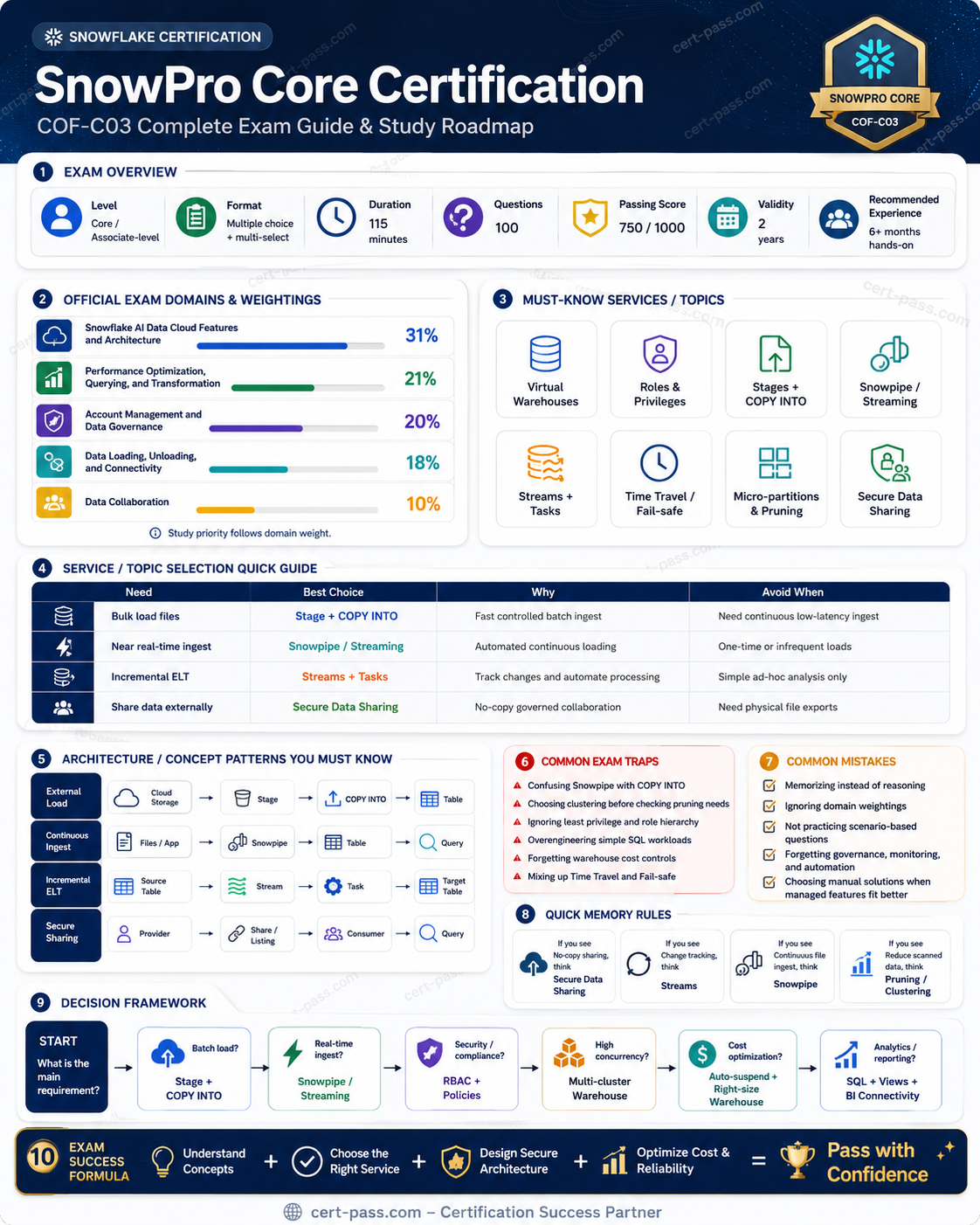
The source question bank follows the COF-C03 five-domain structure and weighting pattern.
| Official Domain | Target Weight | Rows in Source CSV | Source Distribution |
|---|---|---|---|
| Snowflake AI Data Cloud Features and Architecture | 31% | 326 | 31.0% |
| Account Management and Data Governance | 20% | 210 | 20.0% |
| Data Loading, Unloading, and Connectivity | 18% | 189 | 18.0% |
| Performance Optimization, Querying, and Transformation | 21% | 220 | 21.0% |
| Data Collaboration | 10% | 105 | 10.0% |
Priority notes
- Highest priority: Architecture and platform features. This is the largest domain and appears in many other domains indirectly: warehouses, storage, table types, Snowpark, Cortex, views, object hierarchy, and interfaces.
- Second highest priority: Performance and transformation. This domain tests reasoning: warehouse sizing versus pruning versus query design versus optimization features.
- Governance is high-value. RBAC, masking, row access, tags, resource monitors, Access History, ACCOUNT_USAGE, and governance patterns are frequent distractor areas.
- Loading/connectivity is operational. Know stages, file formats, COPY, Snowpipe, streams, tasks, dynamic tables, and connector choices.
- Data collaboration is smaller but very trap-heavy. Time Travel, Fail-safe, cloning, replication, secure sharing, reader accounts, listings, and Marketplace are commonly confused.
3. Start-to-Finish Study Path
Phase 1: Foundation
Learn the Snowflake architecture model:
- Database storage layer: micro-partitioned, compressed, columnar storage managed by Snowflake.
- Virtual warehouse compute layer: independent compute clusters that execute queries, loads, transformations, and Snowpark workloads.
- Cloud services layer: metadata, optimization, authentication, access control, infrastructure management, query parsing, and transaction coordination.
Study object hierarchy:
Organization → Account → Database → Schema → Tables / Views / Stages / File Formats / Streams / Tasks / Policies / Procedures
Core beginner decisions:
- Warehouse size changes compute available to a query; it does not change storage ownership.
- Multiple warehouses isolate workloads; they do not duplicate stored data.
- Auto-suspend and auto-resume reduce idle compute cost.
- Roles receive privileges; users receive roles.
- Tables store data; stages store files.
Phase 2: Intermediate
Focus on operational workflows:
- Load data with
COPY INTO <table>from stages. - Unload data with
COPY INTO <location>to stage or cloud storage. - Use file formats to control CSV, JSON, Parquet, compression, delimiters, headers, and parsing rules.
- Use Snowpipe for continuous file ingestion.
- Use streams and tasks for change tracking and scheduled orchestration.
- Use dynamic tables for declarative incremental transformation with target lag.
Phase 3: Advanced
Study scenario-driven tradeoffs:
- Clustering versus search optimization versus materialized views.
- Standard views versus secure views versus materialized views.
- Permanent versus transient versus temporary tables.
- Internal stages versus external stages versus external tables.
- Time Travel versus Fail-safe versus zero-copy cloning.
- Secure sharing versus listings versus reader accounts.
- Resource monitors versus budgets versus query history and warehouse metering.
Phase 4: Final review
Before the exam, drill the following:
- Which feature solves the problem directly?
- Does the answer add unnecessary administration?
- Is the issue compute, storage, metadata, access, governance, loading, or collaboration?
- Is the wrong answer a real Snowflake feature that solves a different problem?
- Does the question ask for immediate user-accessible recovery, provider-side disaster recovery, or Snowflake-managed emergency recovery?
4. Core Concepts by Domain
Domain 1: Snowflake AI Data Cloud Features and Architecture
Concepts
This domain is the backbone of the exam. It tests whether you understand how Snowflake is structured and how its platform features fit together.
Key concepts:
- Three-layer architecture: storage, compute, cloud services.
- Independent scaling of compute and storage.
- Virtual warehouses and multi-cluster warehouses.
- Object hierarchy and context: database, schema, role, warehouse.
- Table types: permanent, transient, temporary, external, Iceberg, hybrid.
- View types: standard, secure, materialized.
- Semi-structured data using VARIANT, OBJECT, ARRAY, and functions such as
FLATTEN. - Snowflake interfaces: Snowsight, SnowSQL, Snowflake CLI, connectors, drivers, APIs.
- Snowpark for programmatic development using languages such as Python, Java, and Scala.
- Snowflake Cortex and AI features for LLM and ML use cases.
- Snowflake Notebooks for interactive development and analysis.
Services and features
| Feature | Use when | Do not choose when |
|---|---|---|
| Virtual warehouse | You need compute for queries, loads, transformations, or Snowpark | You need to store files or govern access |
| Multi-cluster warehouse | Many concurrent queries queue on the same warehouse | One single complex query is slow |
| Auto-suspend | Warehouse is idle intermittently and cost matters | You need guaranteed always-warm low latency |
| Snowpark | You need programmatic processing inside Snowflake | You only need simple SQL transformations |
| Snowflake Cortex | You need built-in AI/LLM/ML functions in Snowflake | The issue is RBAC, loading, or sharing |
| Snowflake Notebooks | You need interactive analysis, Python, or exploratory workflows | You need a scheduled production ingestion service |
| Secure view | You need to hide view definition or protect exposed logic | You need persisted precomputed results |
| Materialized view | Repeated query pattern benefits from precomputed maintenance | Highly volatile data or arbitrary ad hoc queries dominate |
| External table | Query files in external cloud storage using metadata | You need to physically load data into Snowflake tables |
| Iceberg table | Open table format / interoperability with external engines matters | You only need normal managed Snowflake storage |
Patterns
- Workload isolation: use separate warehouses for ELT, BI, data science, and loading. This avoids one workload starving another.
- Compute cost control: use auto-suspend, auto-resume, right-sized warehouses, resource monitors, and workload-specific warehouses.
- Concurrency handling: multi-cluster warehouses add clusters for concurrent queries. Scaling up a warehouse helps individual query resources but does not always solve queuing.
- Semi-structured ingestion: store flexible JSON in VARIANT, then query paths or flatten arrays as needed.
- Platform-native AI: Cortex is the exam-safe answer when the scenario asks for Snowflake-native AI/LLM capabilities.
Traps
- Warehouse size versus multi-cluster: size helps one query; multi-cluster helps many concurrent queries.
- Storage versus compute: warehouses execute work; they do not own table storage.
- Stages versus tables: stages hold files; tables hold structured data.
- Secure view versus materialized view: secure view protects definition/exposure; materialized view precomputes results.
- Temporary versus transient: temporary is session-scoped; transient persists until dropped but has no Fail-safe.
- SnowSQL versus Snowsight: SnowSQL is CLI; Snowsight is browser UI.
Domain 2: Account Management and Data Governance
Concepts
This domain tests secure administration, access control, monitoring, and governance. The most important theme is least privilege through roles.
Key concepts:
- Role-based access control.
- System-defined roles such as
ORGADMIN,ACCOUNTADMIN,SECURITYADMIN,SYSADMIN,USERADMIN, andPUBLIC. - Custom functional roles and access roles.
- Granting privileges to roles, not directly to users.
- Role hierarchy and inherited privileges.
- Managed access schemas for centralized object grant control.
- Network policies, authentication, MFA/SSO concepts.
- Masking policies, row access policies, projection policies, aggregation policies, and join policies.
- Tags and object classification.
- Resource monitors and budgets.
ACCOUNT_USAGE,INFORMATION_SCHEMA, Access History, Query History, and Warehouse Metering.- Trust Center and security posture monitoring.
Services and features
| Feature | Best use | Common wrong use |
|---|---|---|
| RBAC roles | Least privilege, privilege inheritance, user access | Direct grants to users for long-term access |
SECURITYADMIN |
Manage grants and roles | Daily data engineering or BI querying |
ACCOUNTADMIN |
Top-level account administration | Routine development work |
| Managed access schema | Centralized grant management by schema owner | Temporary personal sandbox grants |
| Masking policy | Show different column values based on role/context | Filter rows from a table |
| Row access policy | Filter visible rows based on policy logic | Hide only part of a column value |
| Tags | Classify objects, track ownership, support governance | Enforce query performance directly |
| Resource monitor | Limit/alert warehouse credit consumption | Improve query pruning or join design |
ACCOUNT_USAGE |
Historical account-level metadata with latency | Real-time object metadata only |
INFORMATION_SCHEMA |
Current database-level metadata | Long historical metering trend analysis |
Patterns
- Least privilege pattern: grant object privileges to access roles, assign access roles to functional roles, and assign functional roles to users.
- Admin separation pattern: avoid using
ACCOUNTADMINfor routine tasks. Use lower administrative roles for security, users, warehouses, and objects. - Sensitive column pattern: use masking policies for PII columns and row access policies for row-level restrictions.
- Cost-control pattern: combine auto-suspend, warehouse sizing, multi-cluster where needed, resource monitors, query history, and warehouse metering.
- Governance metadata pattern: use tags for classification, ownership, data domains, and cost attribution.
Traps
- Masking versus row access: masking changes displayed values; row access filters rows.
- Resource monitor versus performance feature: resource monitors control credits, not query speed.
- ACCOUNT_USAGE versus INFORMATION_SCHEMA: account-level historical views often have latency; information schema is narrower and more current.
- More privileges do not fix performance: granting admin roles does not improve pruning or warehouse capacity.
- Direct grants are usually not exam-safe: the exam favors scalable role-based privilege models.
Domain 3: Data Loading, Unloading, and Connectivity
Concepts
This domain tests how data enters and leaves Snowflake and how clients connect to it.
Key concepts:
- Internal stages: Snowflake-managed file storage.
- External stages: cloud storage references such as S3, Azure Blob/ADLS, or Google Cloud Storage.
- Named stages, table stages, and user stages.
- File formats for CSV, JSON, Avro, ORC, Parquet, XML.
COPY INTO <table>for loading.COPY INTO <location>for unloading.VALIDATION_MODEand load history for troubleshooting.- Snowpipe for continuous file ingestion.
- Snowpipe Streaming for low-latency row ingestion.
- Streams for change tracking and tasks for scheduling/orchestration.
- Dynamic tables for declarative incremental transformations.
- Connectors, drivers, SnowSQL, Snowflake CLI, Python connector, JDBC/ODBC, Spark connector.
- Semi-structured data using VARIANT and
FLATTEN.
Services and features
| Requirement | Best answer | Why |
|---|---|---|
| Load files from a stage into a table | COPY INTO <table> |
Standard bulk load mechanism |
| Export table/query results to files | COPY INTO <location> |
Unloads data to stage/cloud storage |
| Store temporary files in Snowflake-managed storage | Internal stage | Snowflake manages storage for staged files |
| Reference cloud object storage files | External stage | Points Snowflake to external cloud storage |
| Query files without loading into Snowflake table | External table | Uses external file metadata |
| Continuous file ingestion | Snowpipe | Loads new staged files as they arrive |
| Low-latency streaming rows | Snowpipe Streaming | Avoids file-based ingestion latency |
| Track changed rows | Stream | Captures inserts/updates/deletes for consumption |
| Run scheduled SQL | Task | Executes SQL or procedures on schedule/dependency |
| Declarative incremental pipeline | Dynamic table | Snowflake maintains refresh based on target lag |
Patterns
- Bulk batch load: files land in internal/external stage → file format parses data →
COPY INTO tableloads rows → errors are validated or inspected. - Continuous file load: cloud events notify Snowpipe → staged files are automatically ingested.
- CDC-style transformation: stream tracks changes → task processes stream rows → target table is updated.
- Managed incremental transformation: dynamic table defines target query → Snowflake refreshes according to target lag.
- Semi-structured landing: ingest JSON to VARIANT → flatten or project columns when needed.
Traps
- Snowpipe is not for arbitrary app compute: it loads data, usually from files.
- COPY direction matters:
COPY INTO tableloads;COPY INTO locationunloads. - Stage is not a table: a stage stores files, not relational rows.
- External stage versus external table: external stage references storage; external table lets Snowflake query external files using metadata.
- Streams do not schedule work: streams track changes; tasks run work.
- Dynamic tables are not temporary tables: dynamic tables maintain transformation results; temporary tables disappear with the session.
- File format choices matter: CSV options do not solve Parquet logical type behavior, and JSON should usually land in VARIANT.
Domain 4: Performance Optimization, Querying, and Transformation
Concepts
This domain is heavily scenario-based. The exam wants you to identify the bottleneck correctly before choosing a feature.
Key concepts:
- Query profile interpretation.
- Warehouse sizing and scaling.
- Queuing, concurrency, and multi-cluster warehouses.
- Micro-partitions, metadata pruning, clustering keys, clustering depth.
- Search Optimization Service for selective point lookups and specific access patterns.
- Query Acceleration Service for eligible scan-heavy queries.
- Result cache, local disk cache, and metadata cache concepts.
- Materialized views and precomputation.
- Join design, exploding joins, selective filters, predicate pushdown.
- Window functions, aggregations, CTEs, and repeated subqueries.
- Streams/tasks/dynamic tables for transformations.
- Transaction behavior and query history.
Performance decision table
| Symptom in question | Think first | Do not jump to |
|---|---|---|
| Many queries are queued | Increase concurrency / multi-cluster warehouse | Clustering keys |
| One large query is slow due to insufficient resources | Scale warehouse size | Multi-cluster only |
| Date-filtered large table scans too many partitions | Clustering / query filters / pruning | More privileges |
| Repeated point lookups on selective columns | Search Optimization Service | Bigger warehouse as the only fix |
| Repeated expensive aggregate query | Materialized view or refactor | Secure share |
| Same query rerun with unchanged data | Result cache | Permanent indexing |
| Massive intermediate rows after join | Fix join predicate/cardinality | Fail-safe or Time Travel |
| Expensive repeated subquery | Refactor, temp/intermediate table, CTE/materialization where appropriate | Authentication change |
| Need scheduled transformation | Task or dynamic table | Snowpipe by itself |
Patterns
- Start with bottleneck identification: queuing, scanning, spilling, joins, remote I/O, or repeated computation.
- Use the Query Profile: it tells you where time and data movement occur.
- Design for pruning: selective predicates on columns aligned with micro-partitions reduce scanned data.
- Separate workloads: BI dashboards, ELT, and data science should not always share one warehouse.
- Avoid over-tuning early: Snowflake automatically maintains micro-partition metadata; manual clustering is useful only when natural clustering is insufficient.
- Precompute stable repeated results: materialized views can help when query patterns repeat and maintenance cost is justified.
Traps
- Traditional indexes are not the primary Snowflake pattern: Snowflake relies on micro-partitions, pruning, search optimization, and automatic optimization services.
- Scaling up versus scaling out: up helps a single query; out helps concurrency.
- Result cache is not permanent storage: it is invalidated when underlying data or conditions change.
- Materialized view versus secure view: one optimizes repeated computation; the other protects view details.
- Fail-safe does not fix query performance: it is a recovery mechanism.
- Clustering is not free: it may improve pruning but adds maintenance cost.
Domain 5: Data Collaboration
Concepts
This domain tests data sharing, Marketplace/listings, reader accounts, cloning, replication, Time Travel, and Fail-safe. It is smaller but full of easy-to-confuse recovery and sharing concepts.
Key concepts:
- Secure Data Sharing for live access to governed data without copying files.
- Direct shares and listings.
- Private listings for selected consumers.
- Public listings/Marketplace for discoverable data products.
- Reader accounts for consumers without Snowflake accounts.
- Provider and consumer roles in sharing.
- Secure views and policies in shared data products.
- Zero-copy cloning for fast environment copies.
- Time Travel for querying/restoring historical data within retention.
- Fail-safe for Snowflake-managed emergency recovery after Time Travel.
- Replication and failover for business continuity across accounts/regions/clouds where supported.
Services and features
| Requirement | Best answer | Why |
|---|---|---|
| Share live governed data with another Snowflake account | Secure Data Sharing | No file copies; consumer queries shared data |
| Publish data product to selected partners | Private listing | Controlled distribution |
| Make data product discoverable broadly | Public listing / Marketplace | Discoverability and distribution |
| Consumer has no Snowflake account | Reader account | Provider enables access for non-Snowflake consumer |
| Fast test/dev copy of production table/schema/database | Zero-copy clone | Metadata-based copy, storage-efficient initially |
| Recover dropped table inside retention | Time Travel | User-accessible historical recovery |
| Recovery after Time Travel retention ends | Fail-safe | Snowflake-managed, not normal user restore |
| Business continuity across regions/accounts | Replication/failover | Copies account/database objects as designed |
Patterns
- Data product distribution: build secure views/policies → create share/listing → grant to consumers → consumers query live data.
- Non-Snowflake consumer pattern: create reader account and expose shared data through provider-managed account.
- Recovery pattern: use Time Travel first; Fail-safe is last-resort Snowflake recovery.
- Environment cloning pattern: clone prod to dev/test for fast experimentation without full copy at creation time.
- DR pattern: replication/failover, not Time Travel alone.
Traps
- Secure sharing is not file export: it provides live access, not copied files.
- Reader account is not needed for every share: it is mainly for consumers without Snowflake accounts.
- Time Travel versus Fail-safe: Time Travel is user-accessible; Fail-safe is Snowflake-managed emergency recovery.
- Clone versus replication: clone is same-account/object copy pattern; replication/failover handles continuity across accounts/regions.
- Private listing versus public listing: private is selected consumers; public is discoverable.
5. Service Selection Guide
Warehouses and compute
| Need | Choose | Avoid |
|---|---|---|
| Reduce idle compute cost | Auto-suspend and auto-resume | Leaving warehouse always running |
| Many simultaneous dashboard queries | Multi-cluster warehouse | Only scaling up warehouse size |
| One complex query needs more CPU/memory | Larger warehouse size | Multi-cluster as the only answer |
| Isolate ETL from BI | Separate warehouses | One shared warehouse for all workloads |
| Enforce credit limit/alert | Resource monitor | Masking policy or clustering key |
Table types
| Table type | Use when | Key exam note |
|---|---|---|
| Permanent table | Normal durable managed data | Supports Time Travel and Fail-safe |
| Transient table | Rebuildable persistent data where Fail-safe is unnecessary | Lower storage protection; persists until dropped |
| Temporary table | Session-only intermediate data | Dropped when session ends |
| External table | Query files in external storage | Does not load data into Snowflake managed table |
| Iceberg table | Open table format/interoperability | Not the same as materialized view |
| Hybrid table | Transactional/operational style workloads where applicable | Not the default answer for analytics scans |
Views
| View type | Use when | Trap |
|---|---|---|
| Standard view | Logical SQL abstraction | Does not hide definition from privileged users like secure view |
| Secure view | Protect sensitive logic or secure shared data | Does not precompute for performance like materialized view |
| Materialized view | Repeated query pattern benefits from maintained results | Not for every ad hoc query; maintenance costs apply |
Loading and pipelines
| Requirement | Choose | Avoid |
|---|---|---|
| Batch load from stage | COPY INTO table |
Snowpipe when no continuous need exists |
| Continuous file ingestion | Snowpipe | Manual monthly COPY |
| Low-latency streaming ingestion | Snowpipe Streaming | File-only ingestion pattern |
| Change capture from table | Stream | Task alone |
| Scheduled SQL execution | Task | Stream alone |
| Managed incremental transformations | Dynamic table | Temporary table or manual repeated full refresh |
Governance
| Requirement | Choose | Avoid |
|---|---|---|
| Hide PII values by role | Masking policy | Row access policy |
| Restrict rows by user/role/region | Row access policy | Masking policy |
| Classify data by sensitivity/owner | Tags | Resource monitors |
| Centralize grants in a schema | Managed access schema | Random object-owner grants |
| Review historical queries/cost | ACCOUNT_USAGE / Query History / Warehouse Metering | INFORMATION_SCHEMA alone for long historical account trends |
| Limit credit consumption | Resource monitor | Warehouse size alone |
Collaboration and recovery
| Requirement | Choose | Avoid |
|---|---|---|
| Live governed sharing | Secure Data Sharing | File unloads unless explicitly required |
| Selected partners | Private listing | Public listing |
| Broad discovery | Public listing / Marketplace | Direct share only |
| Non-Snowflake consumer | Reader account | Requiring consumer to buy/manage Snowflake account |
| Recover within retention | Time Travel | Fail-safe first |
| Last-resort recovery after retention | Fail-safe | Treating it as user-queryable history |
| Fast dev/test copy | Zero-copy clone | Full physical copy at creation |
| Cross-region continuity | Replication/failover | Clone only |
6. Architecture Patterns
Pattern 1: Cost-efficient BI platform
Scenario: Dashboards run during business hours. Queries are short, but many users hit the system at once.
Recommended solution: Use a dedicated BI warehouse with auto-suspend/auto-resume and consider multi-cluster scaling if queuing occurs.
Why alternatives are wrong:
- Clustering may help scan reduction but does not directly solve many concurrent dashboard requests.
- Resource monitors alert/limit credits but do not add compute capacity.
- A larger warehouse may improve individual query execution but may not solve concurrency as well as multi-cluster.
Pattern 2: ELT workload isolation
Scenario: Nightly transformations slow down analyst dashboards.
Recommended solution: Separate warehouses for ELT and BI, each sized and suspended according to workload.
Why alternatives are wrong:
- Duplicating databases increases administration and does not solve compute contention cleanly.
- Granting more privileges does not improve execution resources.
Pattern 3: Governed PII access
Scenario: Analysts can query customer tables, but only a compliance role should see raw email, phone, or national ID values.
Recommended solution: Apply masking policies to sensitive columns and manage role grants carefully.
Why alternatives are wrong:
- Row access policies filter rows, not values inside a column.
- Secure views can help expose governed projections, but masking policies are more direct for column-level dynamic obfuscation.
Pattern 4: Regional row restrictions
Scenario: Users should see only rows for their assigned country or business unit.
Recommended solution: Use row access policies with role or mapping-table logic.
Why alternatives are wrong:
- Masking policies would still return the row.
- Tags classify data but do not filter query results.
Pattern 5: Continuous ingestion from cloud storage
Scenario: New files arrive in cloud storage throughout the day and must be loaded automatically.
Recommended solution: External stage + file format + Snowpipe with cloud notifications.
Why alternatives are wrong:
- Manual
COPY INTOworks for batch loads but is not automatic continuous ingestion. - Streams track table changes after data is in Snowflake; they do not load cloud files by themselves.
Pattern 6: CDC-style transformation
Scenario: After landing data into a raw table, only changed rows should be processed into a curated table.
Recommended solution: Use a stream to capture changes and a task to process them on a schedule or dependency chain.
Why alternatives are wrong:
- Snowpipe loads files but does not perform arbitrary CDC transformation logic.
- A view computes at query time and does not itself orchestrate processing.
Pattern 7: Declarative incremental pipeline
Scenario: The team wants to define target tables with SQL and let Snowflake maintain incremental refresh according to target lag.
Recommended solution: Dynamic tables.
Why alternatives are wrong:
- Temporary tables are session-scoped and not managed pipelines.
- Tasks require you to write and maintain orchestration logic manually.
Pattern 8: Large table with poor pruning
Scenario: Queries filter by event date/customer/date range, but scan most micro-partitions.
Recommended solution: Review query predicates and consider clustering when natural clustering is poor and filters are selective.
Why alternatives are wrong:
- Traditional indexes are not the standard Snowflake mechanism.
- Fail-safe and Time Travel do not affect pruning.
- Larger warehouse may mask the symptom but not reduce scanned data.
Pattern 9: Selective search workload
Scenario: Queries repeatedly look up a few rows by selective columns in a large table.
Recommended solution: Search Optimization Service where supported and justified by cost.
Why alternatives are wrong:
- Clustering is better for range/order pruning, not every point lookup pattern.
- Result cache only helps repeated identical queries under valid cache conditions.
Pattern 10: Data sharing product
Scenario: A provider wants consumers to access governed live data without receiving files.
Recommended solution: Secure Data Sharing, with secure views and policies where needed. Use listings for product distribution.
Why alternatives are wrong:
COPY INTOexports files and creates copies.- Replication is for continuity and duplication across accounts/regions, not the default sharing model.
Pattern 11: Recovery after accidental drop
Scenario: A table is dropped and the retention window has not expired.
Recommended solution: Time Travel restore.
Why alternatives are wrong:
- Fail-safe is not the normal user-accessible recovery path.
- Zero-copy clone is useful if you created one before or need a point-in-time copy, but Time Travel directly addresses recovery within retention.
Pattern 12: Fast non-production environment
Scenario: A development team needs a copy of production data quickly for testing.
Recommended solution: Zero-copy clone with careful governance and masking if sensitive data is involved.
Why alternatives are wrong:
- Full copy is slower and more expensive initially.
- Secure sharing is for provider-consumer sharing, not ordinary dev/test environment creation.
7. Exam Traps
Misleading wording patterns
- “Queries are queued” means concurrency pressure, not necessarily poor clustering.
- “A single complex query is slow” may mean warehouse size, query design, spilling, joins, or scan volume.
- “Sensitive values should be hidden” means masking policy, not row access policy.
- “Rows should be restricted” means row access policy, not masking policy.
- “Files arrive continuously” means Snowpipe, not manual COPY.
- “Changed rows should be processed” means streams plus tasks, not Snowpipe alone.
- “Live governed data without copying files” means Secure Data Sharing.
- “Recover inside retention” means Time Travel.
- “Snowflake-managed emergency recovery” means Fail-safe.
- “Command-line automation” means Snowflake CLI or SnowSQL depending on context; browser UI is Snowsight.
Wrong-but-plausible answers
| Wrong answer | Why it is tempting | Why it fails |
|---|---|---|
| Bigger warehouse for all slow workloads | More compute often helps | Does not fix pruning, bad joins, or concurrency by itself |
| Multi-cluster for one slow query | It sounds like more compute | It primarily helps concurrent query throughput |
| Clustering for queued dashboards | Clustering is a performance feature | Queuing is a compute concurrency symptom |
| Fail-safe for normal recovery | It is a recovery feature | Time Travel is the user-accessible recovery feature |
| Masking policy for row filtering | It is a governance feature | It changes column values, not row visibility |
| Row access policy for PII obfuscation | It is a security policy | It filters rows, not values |
| Secure view for precomputation | It sounds special and protected | Materialized view is for precomputed results |
| Internal stage for querying external files | It stores files | External table/query pattern is different |
| Direct grants to users | It seems quick | Not scalable least-privilege design |
| Reader account for every consumer | It enables access | Only needed when consumer lacks Snowflake account |
Elimination strategy
When stuck, classify the requirement:
- Compute issue? Warehouse size, multi-cluster, workload isolation, auto-suspend.
- Storage/query scan issue? Micro-partitions, pruning, clustering, query filters.
- Repeated query pattern? Result cache, materialized view, query refactor.
- Selective lookup? Search Optimization Service.
- Loading issue? Stage, file format, COPY, Snowpipe, validation.
- Transformation orchestration? Stream, task, dynamic table.
- Access/governance? Roles, masking, row access, tags, managed access, policies.
- Cost monitoring? Resource monitor, warehouse metering, query history.
- Sharing? Share, listing, reader account.
- Recovery/continuity? Time Travel, Fail-safe, clone, replication/failover.
Common mistakes candidates make
- Memorizing features without mapping them to scenarios.
- Treating every slow query as a warehouse sizing problem.
- Confusing concurrency with query complexity.
- Confusing stage, external table, and table.
- Forgetting that storage and compute scale independently.
- Choosing
ACCOUNTADMINfor routine tasks. - Ignoring role hierarchy and least privilege.
- Choosing Fail-safe before Time Travel.
- Thinking secure sharing copies data.
- Treating streams as schedulers or tasks as change trackers.
- Assuming result cache is always available.
- Overusing clustering without considering maintenance cost.
8. Quick Memory Rules
“If you see X, think Y”
| If you see... | Think... |
|---|---|
| Idle warehouse cost | Auto-suspend |
| Many short queries queuing | Multi-cluster warehouse |
| One heavy query slow | Warehouse size + query profile |
| Poor partition pruning | Clustering/filter design/micro-partitions |
| Point lookup on huge table | Search Optimization Service |
| Repeated aggregate query | Materialized view or refactor |
| Need live sharing, no copies | Secure Data Sharing |
| Selected partners | Private listing |
| Public discoverability | Public listing / Marketplace |
| Consumer has no Snowflake account | Reader account |
| Recover within retention | Time Travel |
| Emergency Snowflake recovery | Fail-safe |
| Fast dev copy | Zero-copy clone |
| Cross-region continuity | Replication/failover |
| Hide column values | Masking policy |
| Filter rows | Row access policy |
| Classify data | Tags |
| Limit credits | Resource monitor |
| Load files | COPY INTO table |
| Export files | COPY INTO location |
| Continuous file ingestion | Snowpipe |
| Streaming row ingestion | Snowpipe Streaming |
| Track changed rows | Stream |
| Schedule SQL | Task |
| Declarative incremental target | Dynamic table |
| Store JSON flexibly | VARIANT |
| Expand arrays | FLATTEN |
| Browser UI | Snowsight |
| CLI workflow | Snowflake CLI / SnowSQL |
| Interactive Python analysis | Snowflake Notebooks |
| Snowflake-native AI | Cortex |
Rules of thumb
- Compute is rented by warehouses; data is stored once in Snowflake-managed storage.
- Scale up for query power; scale out for concurrency.
- Use roles, not direct user grants.
- Mask columns; filter rows.
- Stages hold files; tables hold rows.
- COPY loads/unloads; Snowpipe automates continuous file loads.
- Streams track changes; tasks run logic.
- Dynamic tables manage incremental transformations declaratively.
- Time Travel first, Fail-safe last.
- Secure sharing gives live access; it is not an export.
- Clustering improves pruning when access patterns justify maintenance cost.
- Search optimization is for selective lookup patterns, not every scan.
9. Final Revision Notes
Highest-yield review points
- Know the three architecture layers and how compute/storage separate.
- Know virtual warehouse cost and scaling behavior.
- Distinguish warehouse size, multi-cluster, auto-suspend, and resource monitors.
- Know object hierarchy and context commands.
- Know permanent, transient, temporary, external, Iceberg, and hybrid table use cases.
- Know standard, secure, and materialized view differences.
- Master RBAC and least privilege.
- Distinguish masking policies, row access policies, and tags.
- Know ACCOUNT_USAGE versus INFORMATION_SCHEMA.
- Know
COPY INTOdirections. - Know internal stage, external stage, and external table differences.
- Know Snowpipe, streams, tasks, and dynamic tables.
- Know query profile, pruning, clustering, search optimization, query acceleration, and result cache.
- Know Time Travel, Fail-safe, zero-copy clone, replication, secure sharing, listings, and reader accounts.
- Know when Cortex, Snowpark, and Notebooks are the right answer.
Last-day revision list
- Draw the architecture layers from memory.
- Write the difference between masking and row access in one sentence.
- Write the difference between Snowpipe, stream, task, and dynamic table in one sentence each.
- Write the difference between Time Travel and Fail-safe.
- Write the difference between secure share, listing, and reader account.
- Review all “If you see X, think Y” mappings.
- Practice eliminating answers that solve adjacent problems but not the exact requirement.
10. Exam-Day Checklist
Must-know topics
- Snowflake three-layer architecture.
- Separation of storage, compute, and cloud services.
- Warehouse sizing, auto-suspend, auto-resume, scaling policy, multi-cluster behavior.
- Workload isolation with multiple warehouses.
- Storage concepts, micro-partitions, pruning, clustering.
- Permanent, transient, temporary, external, Iceberg, and hybrid tables.
- Standard, secure, and materialized views.
- VARIANT, OBJECT, ARRAY, FLATTEN, and semi-structured data loading.
- Snowsight, SnowSQL, Snowflake CLI, connectors, drivers, APIs.
- Snowpark, Snowflake Notebooks, Cortex, and AI/ML feature positioning.
- RBAC, role hierarchy, system roles, custom roles, least privilege.
- Managed access schemas and object ownership.
- Masking policies, row access policies, tags, classification.
- Resource monitors, budgets, query history, warehouse metering.
- ACCOUNT_USAGE and INFORMATION_SCHEMA differences.
- Internal stage, external stage, table stage, user stage.
- File formats and COPY validation/error handling.
- COPY INTO table versus COPY INTO location.
- Snowpipe and Snowpipe Streaming.
- Streams, tasks, dynamic tables.
- Query Profile, pruning, clustering, result cache, materialized views, search optimization, query acceleration.
- Secure Data Sharing, direct shares, listings, Marketplace, reader accounts.
- Time Travel, Fail-safe, zero-copy clone, replication/failover.
Final confidence checklist
You are ready when you can answer these without notes:
- What feature solves many queued dashboard queries?
- What feature solves one slow query that needs more compute?
- What feature hides PII values by role?
- What feature restricts visible rows by region?
- What feature loads files automatically as they arrive?
- What feature tracks changed rows?
- What feature schedules SQL execution?
- What feature maintains SQL-defined incremental transformation results?
- What feature recovers a dropped table during retention?
- What feature supports last-resort recovery after retention?
- What feature lets consumers query live provider data without copies?
- What feature is used for selected partner distribution?
- What feature enables access for consumers without Snowflake accounts?
- What feature is best for selective point lookup acceleration?
- What feature is best for repeated precomputed query patterns?
Compact Decision Framework
When answering any COF-C03 scenario, use this five-step method:
- Identify the requirement type: architecture, governance, loading, performance, collaboration, or recovery.
- Find the direct Snowflake-native feature: do not choose a generic workaround when a specific feature exists.
- Check the scope: column versus row, compute versus storage, batch versus continuous, user recovery versus Snowflake recovery.
- Eliminate overpowered answers: admin roles, bigger warehouses, full copies, public listings, or replication are often excessive.
- Prefer managed, least-privilege, cost-aware designs: these are usually the exam-safe choices.
Mini Practice: Reasoning Examples
Example 1
A dashboard workload has many short queries that wait in queue during business hours.
- Best reasoning: concurrency bottleneck.
- Best feature: multi-cluster warehouse.
- Wrong trap: clustering, because the issue is queuing rather than scan pruning.
Example 2
A table contains PII and analysts should see masked values unless they have a privileged role.
- Best reasoning: column-level value protection.
- Best feature: masking policy.
- Wrong trap: row access policy, because rows are still visible; only values should change.
Example 3
New JSON files arrive in cloud storage every few minutes and must be loaded automatically.
- Best reasoning: continuous file ingestion.
- Best feature: external stage + file format + Snowpipe.
- Wrong trap: stream, because streams track table changes after loading.
Example 4
A provider wants selected partners to discover and access a governed data product.
- Best reasoning: controlled data product distribution.
- Best feature: private listing or secure share depending on wording.
- Wrong trap: public listing, because selected partners implies controlled/private distribution.
Example 5
A dropped table must be restored and the retention period has not passed.
- Best reasoning: user-accessible historical recovery.
- Best feature: Time Travel.
- Wrong trap: Fail-safe, because it is not the normal user self-service recovery mechanism.
Final One-Page Brain Dump
- Architecture = storage + compute + cloud services.
- Warehouses compute; tables store; stages hold files.
- Auto-suspend saves idle cost.
- Scale up for one query; scale out for concurrency.
- Use multiple warehouses to isolate workloads.
- Use roles and role hierarchy for least privilege.
- Use masking for column values; row access for rows; tags for classification.
- Use resource monitors for credit control.
- Use ACCOUNT_USAGE for account history; INFORMATION_SCHEMA for current database metadata.
- Use COPY for batch load/unload.
- Use Snowpipe for continuous file ingestion.
- Use streams for changes; tasks for scheduling; dynamic tables for managed incremental SQL.
- Use VARIANT for JSON; FLATTEN for arrays.
- Use clustering for pruning; search optimization for selective lookup; materialized views for repeated precomputed queries.
- Use secure sharing for live governed access without copies.
- Use private listings for selected consumers; public listings for discoverability.
- Use reader accounts for consumers without Snowflake accounts.
- Use Time Travel before Fail-safe.
- Use zero-copy clone for fast copies; replication/failover for continuity.
FAQ
What should be learned first?
Start with the official facts, the service families, and the service selection pairs that are easiest to confuse. Use /exams/snowflake-snowpro-core-cof-c03 as the home base for practice and revision.
Is the official vendor page useful?
Yes. It provides the vendor baseline for what the certification covers and helps anchor the study plan to official wording.
Final CTA
Return to /exams/snowflake-snowpro-core-cof-c03 whenever you need a clean reset before practice or final revision.