Cert-Pass
Log in Sign up
Azure Azure Certified auto_stories Free Compressed Course

AI-102 Azure AI Engineer Associate Certification Course

bolt Everything you need to pass : in one free course.

17 expert modules derived from 1008+ real exam questions. Covers every domain, exam trap, and scenario : organized by blueprint weight so you study what matters most.

check_circle 100% free ยท No account needed ยท 17 modules
17
Modules
1008+
Questions
66
Domains
AI-102 Azure AI Engineer Associate
Azure

About This Course

AI-102 Azure AI Engineer Associate ยท 17 modules

This course covers every domain tested on the AI-102 Azure AI Engineer Associate exam. Based on our 1008+ real practice questions and prepared by certification experts.

info What you'll learn:

  • Every exam domain with detailed explanations
  • Common exam traps that catch unprepared candidates
  • Key concepts, syntax, and configurations
  • Real-world scenarios from actual exam questions
  • Quick-reference cheat sheets for last-minute review

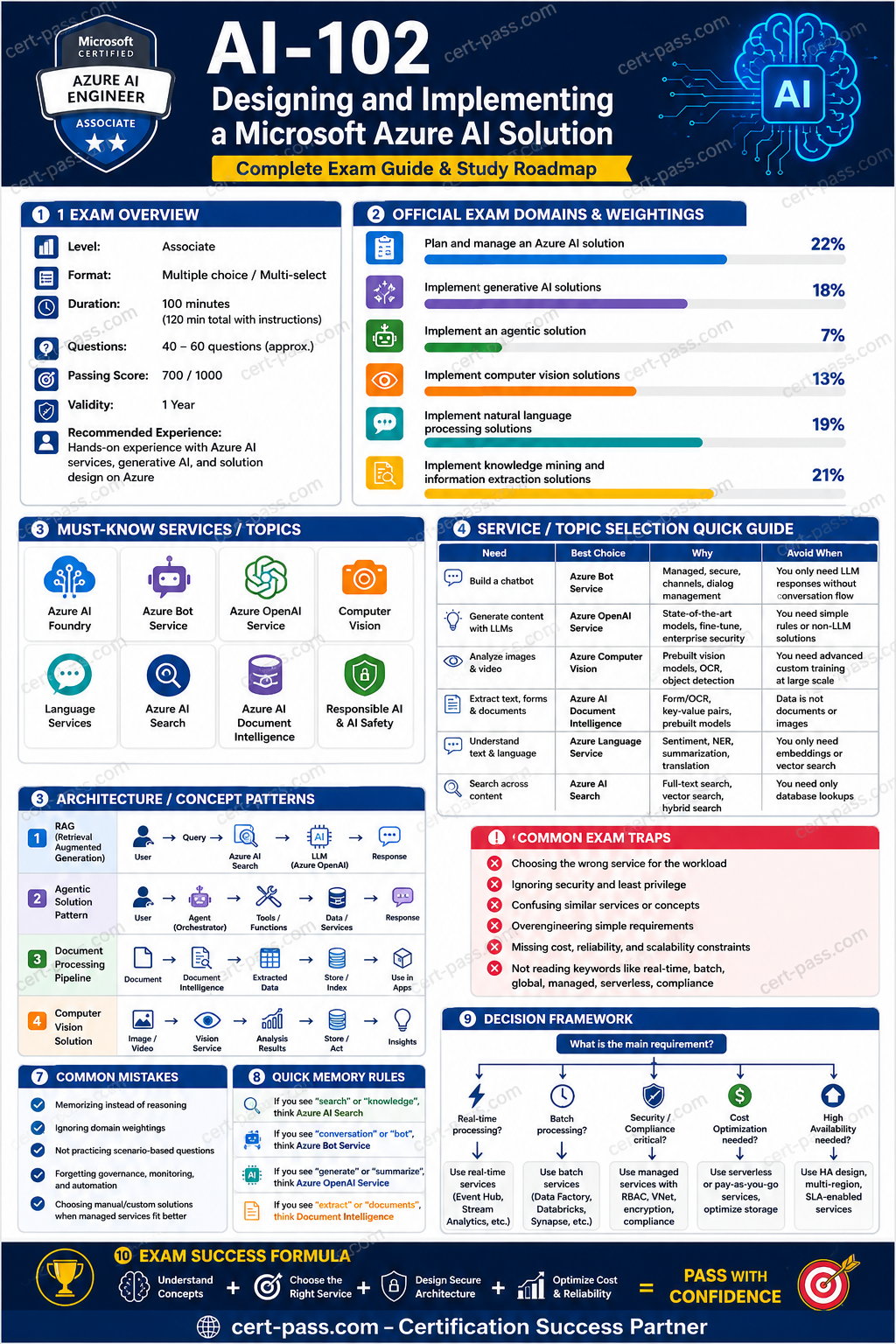
Your AI-102 Azure AI Engineer Associate Roadmap

AI-102 Azure AI Engineer Associate certification preparation infographic

1. Exam Overview

What the exam is testing

AI-102 tests whether you can design, build, deploy, secure, monitor, and integrate Azure AI solutions. The exam is not only about knowing service names. Most questions ask you to choose the best service, architecture, API, deployment model, or security approach for a business scenario.

You should be ready to reason about:

  • Selecting the right Microsoft Foundry / Azure AI service for a requirement.
  • Building generative AI solutions with models, prompts, retrieval, evaluation, safety, and deployment.
  • Creating agentic solutions that use tools, grounding data, workflows, and guardrails.
  • Implementing computer vision, OCR, image analysis, video/image classification, and face-related scenarios.
  • Implementing language, speech, translation, summarization, sentiment, PII detection, and conversational workflows.
  • Building search, enrichment, document extraction, vector retrieval, and knowledge mining pipelines.
  • Applying Responsible AI, content safety, identity, network security, monitoring, cost control, and CI/CD.

How to think like the exam

The exam usually hides the answer in the requirement wording. Look for these clues:

Requirement clue What it usually means
โ€œUse one endpoint and key for multiple AI servicesโ€ Multi-service Azure AI services resource
โ€œLeast privilege, avoid keysโ€ Managed identity + RBAC
โ€œPrivate network onlyโ€ Private endpoint, VNet integration, disable public network access where supported
โ€œExtract fields from invoices/receipts/contracts/formsโ€ Azure AI Document Intelligence or Content Understanding, not generic OCR alone
โ€œSearch across documents with semantic/vector retrievalโ€ Azure AI Search with vector index, semantic ranking, skillsets where needed
โ€œGround model answers on enterprise dataโ€ RAG with Azure AI Search or another retrieval layer
โ€œGenerate or evaluate prompts/workflowsโ€ Microsoft Foundry tooling, prompt flow, evaluation, content safety
โ€œSpeech to text / text to speech / translationโ€ Azure AI Speech / Translator / Language depending on input and output
โ€œModerate harmful text/imagesโ€ Azure AI Content Safety
โ€œNamed entities, key phrases, sentiment, PIIโ€ Azure AI Language

How to use this course

  1. Read the domain overview first.
  2. Study each domain by service-selection logic, not by memorizing isolated facts.
  3. Use the tables to eliminate wrong answers quickly.
  4. Review the traps section before practicing questions.
  5. Use the final checklist as the last-day exam review.

2. Exam Domains

The official AI-102 domains are organized as follows. The CSV question bank was generated to match these priorities and then consolidated into this course.

Domain Official priority Rows in source CSV Source share What matters most
Plan and manage an Azure AI solution 20โ€“25% 230 22.8% Service selection, deployment, security, Responsible AI, monitoring, CI/CD
Implement generative AI solutions 15โ€“20% 180 17.9% Foundry, model deployment, prompts, RAG, grounding, evaluation, content safety
Implement an agentic solution 5โ€“10% 75 7.4% Agents, tools, grounding, orchestration, guardrails, evaluation
Implement computer vision solutions 10โ€“15% 130 12.9% Image analysis, OCR, custom vision concepts, face safety constraints
Implement natural language processing solutions 15โ€“20% 190 18.8% Language, Speech, Translator, PII, sentiment, summarization, conversational language
Implement knowledge mining and information extraction solutions 15โ€“20% 203 20.1% Azure AI Search, Document Intelligence, Content Understanding, indexing, vector search

Priority notes

High-yield areas from the source bank:

  • Security and deployment appear repeatedly across domains, especially managed identity, RBAC, Key Vault, private endpoints, and logging.
  • Azure AI Search is one of the most repeated services because it appears in knowledge mining, RAG, generative AI, and agentic grounding.
  • Document Intelligence is frequently contrasted with OCR, Azure AI Search, and generative AI.
  • Language, Speech, and Translator are commonly confused in scenario questions.
  • Foundry, generative AI, RAG, prompt evaluation, and content safety are emphasized in the latest blueprint.

3. Start-to-Finish Study Path

Foundation phase: know the service map

Study the purpose of each core service:

  • Microsoft Foundry / Azure AI Foundry: build, deploy, evaluate, and manage AI apps, models, prompt flows, and generative AI solutions.
  • Azure OpenAI / model deployment: chat, completions, embeddings, generative AI, summarization, classification, code/text generation.
  • Azure AI Search: lexical, semantic, hybrid, vector search, indexing, enrichment, retrieval for RAG.
  • Azure AI Document Intelligence: structured extraction from documents such as invoices, receipts, IDs, tax forms, and custom forms.
  • Azure AI Content Understanding: multimodal extraction and understanding across content types when the scenario goes beyond simple form extraction.
  • Azure AI Language: sentiment, key phrase extraction, named entity recognition, PII detection, summarization, classification, conversational language understanding.
  • Azure AI Speech: speech-to-text, text-to-speech, speech translation, pronunciation assessment, speaker-related capabilities where supported.
  • Azure AI Translator: text translation and document translation.
  • Azure AI Vision: OCR, image analysis, captions, object/tag detection, spatial/image insights where supported.
  • Azure AI Content Safety: detect harmful user or model-generated text/images.

Intermediate phase: learn decision rules

For each scenario, identify:

  1. Input type: text, speech, image, video, document, mixed content.
  2. Output type: extracted fields, search results, generated text, classification, translation, speech, summary.
  3. Customization level: prebuilt model, custom model, prompt-based, fine-tuned/model deployment, custom extractor.
  4. Security requirements: keyless auth, private network, data isolation, audit logging, compliance.
  5. Integration style: SDK, REST API, container, managed endpoint, CI/CD pipeline, event-driven ingestion.
  6. Operational needs: monitoring, evaluation, cost, latency, failover, versioning.

Advanced phase: master architecture tradeoffs

Practice these tradeoffs:

  • Prebuilt model vs custom model.
  • OCR vs Document Intelligence.
  • Azure AI Search indexing vs direct database query.
  • RAG vs fine-tuning vs prompt engineering.
  • Semantic search vs vector search vs hybrid search.
  • Single-service resource vs multi-service resource.
  • API key vs managed identity.
  • Public endpoint vs private endpoint.
  • Batch ingestion vs real-time inference.
  • Model evaluation vs application monitoring.

Final review phase

Before exam day, focus on:

  • Service selection tables.
  • Domain traps.
  • RAG architecture steps.
  • Azure AI Search indexing pipeline.
  • Document extraction pipeline.
  • Security and Responsible AI controls.
  • Prompt evaluation and content safety.
  • Difference between Language, Speech, Translator, Vision, Search, and Document Intelligence.

4. Core Concepts by Domain

Domain 1: Plan and manage an Azure AI solution

Concepts

This domain tests whether you can design and operate Azure AI solutions safely and correctly. It is not limited to provisioning resources. It includes choosing services, configuring deployment options, securing access, applying Responsible AI principles, monitoring, and integrating AI services into DevOps workflows.

Key concepts:

  • Selecting Microsoft Foundry Services based on task type.
  • Creating Azure AI resources and choosing single-service vs multi-service resources.
  • Choosing model deployment options and default endpoints.
  • Installing and using SDKs and REST APIs.
  • Securing secrets with Key Vault.
  • Using managed identities instead of hardcoded keys.
  • Applying RBAC and least privilege.
  • Configuring private endpoints and network restrictions.
  • Monitoring usage, latency, errors, quotas, and content safety events.
  • Building repeatable CI/CD deployment for AI apps.
  • Applying Responsible AI: fairness, reliability, safety, privacy, transparency, accountability.

Services

Service / capability Use it for Do not use it when
Multi-service Azure AI services resource One endpoint/key for several AI services You need per-service isolation, separate billing, or a service not supported by the multi-service resource
Single-service resource Strong isolation, service-specific settings, separate quotas The scenario requires one shared endpoint/key for many services
Managed identity Keyless authentication to Azure resources The target service does not support Entra ID/RBAC for that action
Key Vault Store API keys, connection strings, secrets, certificates Do not store secrets in app settings, source code, or notebooks
Private endpoint Private network access to AI services Public internet access is acceptable and simpler requirements are stated
Azure Monitor / Log Analytics Metrics, logs, diagnostics, alerting Do not use only application logs when platform metrics are required
Content Safety Moderation and safety filters for user/model content It does not replace identity, authorization, or network security

Patterns

Pattern: secure AI app integration

Recommended architecture:

  1. Application uses managed identity.
  2. Managed identity is granted minimum required RBAC role.
  3. Secrets are stored in Key Vault only when keys are unavoidable.
  4. AI service access is restricted with private endpoint if required.
  5. Diagnostics are sent to Log Analytics.
  6. Content Safety is applied where user-generated or model-generated content is involved.

Why wrong answers fail:

  • API keys in code are fast but insecure.
  • Storage account alone does not protect AI service calls.
  • Public endpoint with unrestricted keys fails private/compliance requirements.

Pattern: containerized AI service

Use containers when:

  • You need edge processing or low latency near data.
  • Connectivity is intermittent but billing/licensing requirements can still be met.
  • The selected service supports containers.

Trap: containers do not eliminate billing, licensing, connectivity, or service-specific limitations.

Traps

  • Choosing Azure Machine Learning when the scenario only needs a prebuilt AI API.
  • Choosing a multi-service resource when strict isolation or unsupported service features are required.
  • Choosing API keys when the requirement says โ€œno secretsโ€ or โ€œleast privilege.โ€
  • Assuming private endpoint automatically handles authorization; it only handles network path.
  • Confusing content moderation with security authorization.
  • Ignoring quotas, region availability, and model deployment constraints.

Domain 2: Implement generative AI solutions

Concepts

This domain tests your ability to build generative AI applications using Microsoft Foundry tooling, deployed models, prompt design, RAG, evaluation, and safety controls.

You must know:

  • Model selection and deployment.
  • Prompt engineering and system messages.
  • Grounding with enterprise data.
  • Retrieval-augmented generation.
  • Embeddings and vector search.
  • Prompt flow / orchestration patterns.
  • Evaluation of generated outputs.
  • Content safety and responsible AI guardrails.
  • Monitoring, cost, latency, and token usage.

Services

Capability Best-fit service or pattern Why
Chatbot over enterprise documents Azure OpenAI/model deployment + Azure AI Search RAG Keeps answers grounded in current internal content
Semantic/vector retrieval Azure AI Search vector index Enables similarity search over embeddings
Harmful content detection Azure AI Content Safety Detects unsafe user or model-generated content
Prompt workflow testing Microsoft Foundry prompt flow/evaluation Supports iterative prompt development and evaluation
Generate embeddings Embedding model deployment Converts text into vectors for retrieval
Need exact source citations RAG with retrieved passages and metadata Model alone cannot guarantee source grounding

Patterns

Pattern: RAG application

Use RAG when the question says:

  • โ€œAnswers must use company documents.โ€
  • โ€œInformation changes frequently.โ€
  • โ€œCitations are required.โ€
  • โ€œDo not retrain the model.โ€
  • โ€œUse private knowledge base.โ€

Typical RAG flow:

  1. Ingest documents into storage.
  2. Chunk documents into meaningful sections.
  3. Generate embeddings for chunks.
  4. Store chunks, metadata, and vectors in Azure AI Search.
  5. At query time, embed the user query.
  6. Retrieve relevant chunks with vector, semantic, or hybrid search.
  7. Pass retrieved context to the model.
  8. Generate grounded answer with citations.
  9. Apply content safety and logging.
  10. Evaluate answer quality and retrieval quality.

Pattern: prompt safety and evaluation

Use:

  • System message to define role, boundaries, format, and refusal behavior.
  • Grounding data to reduce hallucination.
  • Content Safety to detect harmful inputs/outputs.
  • Evaluation datasets to compare prompt versions.
  • Logging and monitoring to detect failures in production.

Traps

  • Fine-tuning when RAG is better for changing knowledge.
  • Prompt engineering alone when source grounding is required.
  • RAG without chunking and metadata, causing poor retrieval.
  • Vector search alone when keyword matching is also important; hybrid search may be better.
  • Storing secrets in prompt flow or code instead of Key Vault.
  • Ignoring content safety for user-generated inputs.
  • Assuming the model can access private documents without retrieval integration.

lock

Module 7 is locked

Unlock all 17 modules, exam traps, cheat sheets, and 1008+ practice questions.

lock

Module 8 is locked

Unlock all 17 modules, exam traps, cheat sheets, and 1008+ practice questions.

lock

Module 9 is locked

Unlock all 17 modules, exam traps, cheat sheets, and 1008+ practice questions.

lock

Module 10 is locked

Unlock all 17 modules, exam traps, cheat sheets, and 1008+ practice questions.

lock

Module 11 is locked

Unlock all 17 modules, exam traps, cheat sheets, and 1008+ practice questions.

lock

Module 12 is locked

Unlock all 17 modules, exam traps, cheat sheets, and 1008+ practice questions.

lock

Module 13 is locked

Unlock all 17 modules, exam traps, cheat sheets, and 1008+ practice questions.

lock

Module 14 is locked

Unlock all 17 modules, exam traps, cheat sheets, and 1008+ practice questions.

lock

Module 15 is locked

Unlock all 17 modules, exam traps, cheat sheets, and 1008+ practice questions.

lock

Module 16 is locked

Unlock all 17 modules, exam traps, cheat sheets, and 1008+ practice questions.

lock

Module 17 is locked

Unlock all 17 modules, exam traps, cheat sheets, and 1008+ practice questions.

Ready to Test Your Knowledge?

Take a practice exam with 1008+ real questions and detailed explanations.

Course Modules

17 modules

Unlock All Modules

Get full access to all 17 modules

auto_stories More Guides