4. Core Concepts by Domain
Domain 1: Databricks Intelligence Platform
Concepts
The platform is a unified environment for data engineering, analytics, BI, and AI workloads. For this exam, the most important platform concepts are:
- Delta Lake: transactional storage layer with ACID guarantees, schema enforcement, schema evolution, time travel, and efficient metadata operations.
- Unity Catalog: centralized governance layer for data, AI assets, permissions, lineage, catalogs, schemas, tables, volumes, and external locations.
- Compute services: job compute, all-purpose compute, SQL warehouses, serverless options, and workload-specific configuration.
- Workspace assets: notebooks, Git Folders, jobs, dashboards, SQL queries, pipelines, and bundles.
- Lakehouse architecture: governed tables in object storage, separating storage from compute while maintaining platform-level governance.
Services
| Service / Feature |
What it is for |
Exam decision rule |
| Delta Lake |
Reliable tables on cloud object storage |
Choose for ACID, rollback/time travel, schema controls, and scalable analytics |
| Unity Catalog |
Central governance and discovery |
Choose for permissions, lineage, row/column security, ABAC, and cross-workspace governance |
| SQL Warehouse |
SQL analytics and BI workloads |
Choose for analyst-facing queries, dashboards, and SQL access to curated tables |
| All-purpose compute |
Interactive development |
Choose for notebooks and exploration, not usually for production scheduled jobs |
| Job compute |
Scheduled production tasks |
Choose for automated Lakeflow Jobs and cost isolation |
| Serverless compute |
Fast startup and lower admin overhead where supported |
Choose when platform-managed scaling/startup is emphasized |
Patterns
- Single source of truth: store curated data as governed Delta tables in Unity Catalog.
- Separate environments: dev, test, prod should be separate targets/configurations, not manual edits in the same workspace objects.
- Use SQL warehouses for analysts: analysts querying gold tables should not need to run shared all-purpose clusters.
- Prefer Delta over raw files: raw CSV or Parquet folders lack transaction semantics and simple governance integration.
Traps
- Choosing DBFS/raw files for curated data when the requirement mentions rollback, auditability, lineage, or governance.
- Using temporary views as a substitute for physical, governed, recoverable tables.
- Choosing cloud IAM alone when the question asks for Databricks-native access control and lineage.
- Treating all compute as interchangeable. Jobs, SQL warehouses, and interactive clusters are optimized for different use cases.
Domain 2: Data Ingestion and Loading
Concepts
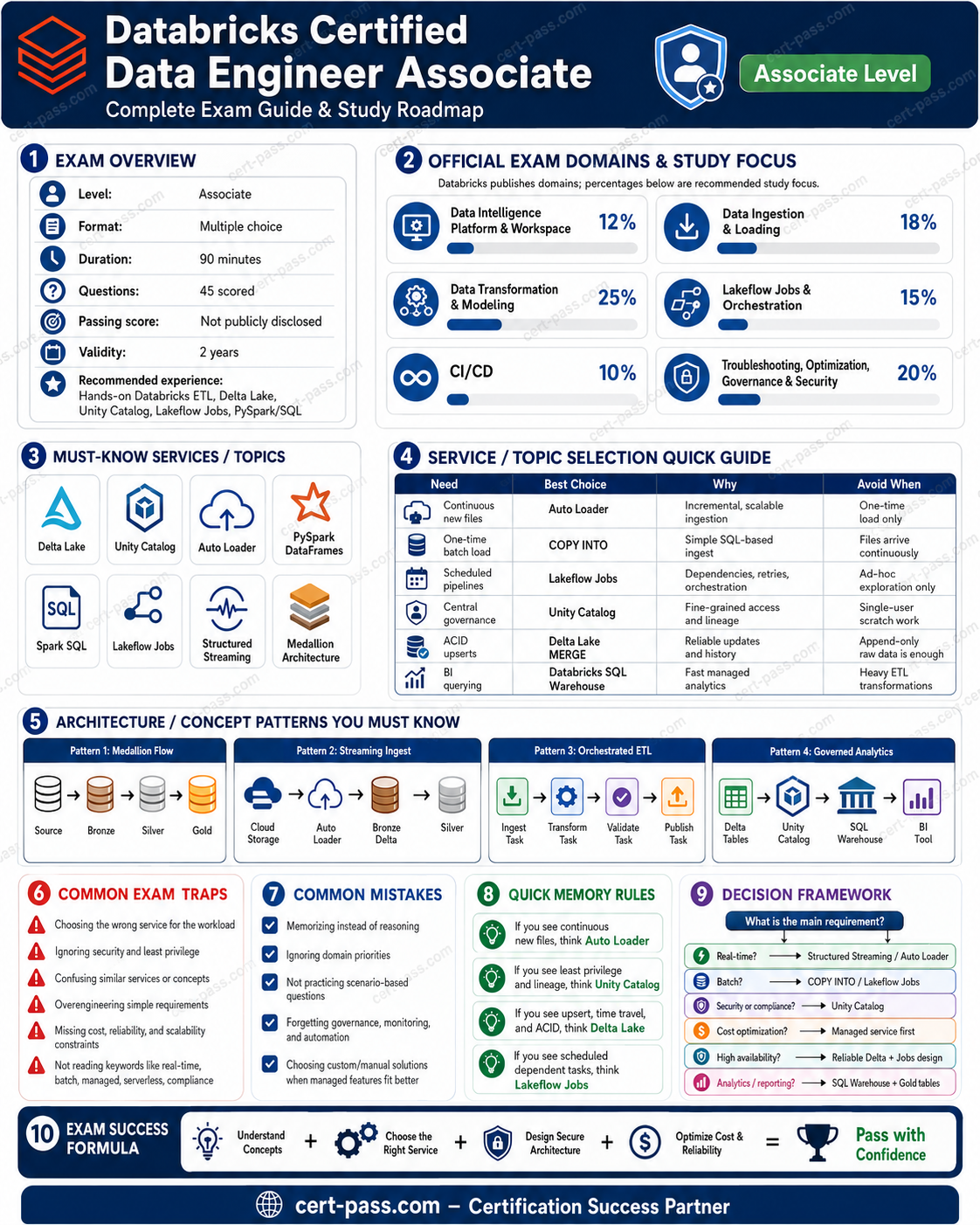
This is one of the highest-value domains. The exam tests whether you can choose the correct ingestion approach based on source and workload characteristics.
Main ingestion dimensions:
- Source type: cloud files, local files, database, SaaS app, APIs, event data, semi-structured files.
- Frequency: one-time, scheduled batch, incremental, near real-time.
- Volume: small manual upload vs large directory of arriving files.
- Schema behavior: stable schema, evolving schema, nested JSON, rescued data.
- Governance: whether data must land directly into Unity Catalog-governed tables.
- Reliability: checkpointing, idempotency, file tracking, retries, and orchestration.
Services
| Ingestion method |
Use when |
Avoid when |
| COPY INTO |
Incrementally loading files from cloud object storage into Delta/UC tables with simple file tracking |
High-frequency file arrival, complex schema evolution, continuous ingestion, or very large dynamic directories |
| Auto Loader |
Scalable file ingestion with checkpointing, schema inference/evolution, directory listing or file notification |
Simple one-off loads where COPY INTO is enough |
| Lakeflow Connect managed connectors |
Enterprise/SaaS/database ingestion where Databricks-managed connectors reduce custom code |
Source is unsupported or custom REST logic is required |
| Lakeflow Connect standard connectors |
Common source connectors and structured ingestion into governed tables |
Highly custom APIs requiring special pagination/auth behavior |
| JDBC/ODBC from notebooks |
Controlled ingestion from databases when custom logic is needed |
Very large production CDC-style workloads better served by managed ingestion patterns |
| REST clients in notebooks |
Custom API ingestion when no connector fits |
When a managed connector exists and reliability/governance are priorities |
| Partner connectors |
Specialized ingestion not covered by native connectors |
When native Lakeflow Connect already covers the use case simply |
Patterns
- Cloud files arriving regularly → Auto Loader with checkpoints and schema evolution.
- Simple incremental batch from object storage → COPY INTO.
- Enterprise SaaS or database source → Lakeflow Connect if supported.
- Custom API → REST client logic orchestrated by Lakeflow Jobs, then write to governed Delta tables.
- Nested JSON → land raw in bronze, parse/explode/clean in silver.
- Schema drift → use schema evolution/rescued data patterns; do not silently overwrite curated schemas.
Traps
- Choosing COPY INTO for continuous high-volume streaming-style ingestion where Auto Loader is more suitable.
- Choosing Auto Loader for a single small manual load where COPY INTO or UI upload is simpler.
- Ignoring checkpoints. Without checkpointing, incremental file processing can duplicate or miss data.
- Writing directly to unmanaged raw folders when the requirement asks for Unity Catalog governance.
- Flattening complex JSON immediately into gold without preserving bronze raw data.
Domain 3: Data Transformation and Modeling
Concepts
This domain has the highest representation in the source file. The exam expects you to understand practical ETL patterns with SQL and PySpark.
Core concepts:
- Bronze: raw or lightly validated ingested data; preserve original structure as much as practical.
- Silver: cleaned, deduplicated, standardized, joined, validated data.
- Gold: business-ready data products: views, materialized views, streaming tables, aggregate tables, dimensional models, BI-ready datasets.
- DataFrames and SQL: select, filter, join, group, aggregate, deduplicate, rename, cast, explode, split, union.
- Joins: inner, left, cross, broadcast, multi-key joins, handling nulls and duplicates.
- Data quality: expectations, validation rules, null checks, uniqueness, referential checks, schema validation.
- Performance tuning: shuffle partitions, broadcast thresholds, executor/driver memory, skew mitigation, re-measuring after changes.
Services and objects
| Object / technique |
Use when |
Avoid when |
| Table |
Durable physical storage for reusable curated datasets |
Ad hoc logic that should not persist data |
| View |
Logical abstraction over tables; always computes from base data |
Expensive query reused heavily where materialization is needed |
| Materialized view |
Precomputed results for faster repeated analytical queries |
Highly volatile logic where freshness must be instant and recomputation cost is unacceptable |
| Streaming table |
Incremental/continuous table from streaming or incremental pipelines |
Static batch result that does not need streaming semantics |
| Broadcast join |
One side is small enough to send to workers |
Both sides are large or broadcast causes memory pressure |
| Repartition |
Increase/decrease parallelism or reduce skew before expensive operations |
Blindly repartitioning without measuring shuffle impact |
| Cache |
Reusing the same DataFrame repeatedly in a session |
One-time transformations or huge data that stresses memory |
Patterns
- Clean data in silver: cast data types, remove invalid records, handle nulls, standardize strings, deduplicate business keys.
- Use bronze for recovery: raw bronze lets you reprocess when silver/gold logic changes.
- Join carefully: decide between inner and left joins based on whether unmatched records must be retained.
- Deduplicate by business key and timestamp: keep latest record using ranking/windowing, not random drop duplicates when ordering matters.
- Explode arrays before aggregating nested records: nested JSON often needs explode/flatten operations.
- Gold objects depend on consumer need: BI dashboards often need materialized or aggregate tables; ad hoc exploration may only need views.
Traps
- Using
union and expecting duplicates to remain. In SQL, UNION removes duplicates; UNION ALL keeps them.
- Choosing inner join when the scenario says keep all customers/orders/left-side records.
- Choosing cross join accidentally; it creates Cartesian products and can explode row counts.
- Ignoring skew. One slow task with huge shuffle read often means skew, not simply “cluster too small.”
- Overusing cache, repartition, or cluster scaling without evidence.
- Building gold directly from raw files without bronze/silver quality gates.
Domain 4: Working with Lakeflow Jobs
Concepts
Lakeflow Jobs orchestrate tasks in a DAG. The exam emphasizes when to use task dependencies, retries, conditional tasks, looping, triggers, and task types.
Important concepts:
- Task graph: tasks run in dependency order, not necessarily sequentially unless dependencies require it.
- Task types: notebook, SQL query, dashboard, pipeline, Python/script/library tasks depending on platform availability.
- Retries: handle transient failures, not bad code or corrupt data.
- Conditional branching: choose paths based on task outcomes or values.
- Looping: repeat logic over parameter sets or batches.
- Triggers: scheduled, file arrival, table update.
- Notifications and run history: operational visibility and troubleshooting.
Services
| Feature |
Best use |
Exam trap |
| Scheduled trigger |
Data arrives on a predictable time cadence |
Wrong when upstream arrival is irregular |
| File arrival trigger |
Start a job when files land |
Wrong when the dependency is a table refresh rather than files |
| Table update trigger |
Start downstream tasks when a table changes |
Wrong when source event is object-storage file arrival |
| Retries |
Transient cluster/network/source issues |
Wrong for deterministic data quality failures |
| Conditional task |
Branch based on status or value |
Wrong if simple dependency ordering is enough |
| Job parameters |
Reusable job logic across dates/sources/environments |
Wrong to hardcode environment-specific values in notebooks |
Patterns
- Data-driven orchestration: use file arrival or table update triggers when freshness depends on upstream availability.
- DAG-based reliability: model dependencies explicitly instead of hiding them in notebook calls.
- Reusable tasks: pass parameters rather than copy-pasting notebooks for each source.
- Operational monitoring: review run history, task graphs, failure rates, and logs.
Traps
- Scheduling a job every hour when the actual requirement is “run after upstream table updates.”
- Retrying indefinitely instead of fixing deterministic logic errors.
- Putting orchestration inside notebooks rather than using Jobs DAG dependencies.
- Using one giant notebook instead of task separation with clear dependencies.
Domain 5: Implementing CI/CD
Concepts
This domain tests whether you can manage Databricks assets with repeatable deployment practices.
Core concepts:
- Databricks Git Folders: connect notebooks/code to Git, create/switch branches, commit, push, and open pull requests.
- Declarative Automation Bundles / Databricks Asset Bundles: package jobs, pipelines, code assets, variables, targets, and environment-specific configuration.
- Targets: dev, test, prod configurations using the same codebase with overrides.
- CLI: validate, deploy, run, and manage bundles/assets in automated workflows.
- Pull request flow: review and merge changes before deployment.
- Separation of code and config: do not hardcode workspace IDs, paths, catalogs, schemas, or secrets in notebooks.
Services
| Tool |
Use when |
Avoid when |
| Git Folders |
Collaborative code development, branches, commits, pull requests |
Using notebook revision history as the main source-control strategy |
| Automation Bundles / Asset Bundles |
Deploying jobs, pipelines, and resources across environments |
Manual clicking in prod for repeatable deployments |
| Databricks CLI |
CI/CD automation, validation, deployment |
Manual-only workflows where repeatability is required |
| Variables and overrides |
Environment-specific config |
Duplicating code per environment |
| Service principals |
Non-human deployment identity |
Using a personal user token for production automation |
Patterns
- Develop in branch → PR → merge → bundle deploy to target.
- Same codebase, different config for dev/test/prod.
- Validate before deploy to catch malformed bundle definitions.
- Promote artifacts, do not manually edit prod notebooks.
- Use secret scopes or secure config, not plaintext credentials in code.
Traps
- Treating workspace notebook history as enough for CI/CD.
- Copy-pasting notebooks between dev/test/prod.
- Hardcoding catalog/schema names that differ by environment.
- Using a personal account for production deployment automation.
- Deploying jobs manually when the scenario asks for repeatability, versioning, or promotion.
Domain 6: Troubleshooting, Monitoring, and Optimization
Concepts
This domain is evidence-driven. The exam often gives symptoms and asks for the best diagnosis or remediation.
Core concepts:
- Lakeflow Jobs run history: compare current and historical execution times, identify failures and trends.
- DAG task graph: find upstream blockers and failed dependencies.
- Spark UI: inspect jobs, stages, tasks, shuffle, skew, spills, and executor behavior.
- Skew: a few tasks take much longer and read much more shuffle data than others.
- Shuffle: expensive data movement caused by joins, aggregations, repartitions, and order operations.
- Disk spilling: memory pressure causing data to spill to disk.
- Cluster startup failures: permissions, policies, libraries, init scripts, instance capacity, network, cloud quota.
- Library conflicts: incompatible package versions or cluster/runtime mismatch.
- OOM: driver/executor memory exceeded, often from collecting too much data, skew, bad joins, or insufficient memory.
- Liquid clustering and predictive optimization: reduce manual table optimization work where supported.
Services and evidence
| Symptom |
Likely cause |
Best first response |
| One task much slower than others; max shuffle read far above median |
Data skew |
Enable AQE/skew handling or salt/repartition skewed keys |
| Many tasks spill to disk |
Memory pressure or poor partitioning |
Check executor memory, partitioning, join strategy, data size |
| Job suddenly slower after new source |
Larger volume, skew, schema/data distribution change |
Compare run history and Spark UI stage metrics |
| Cluster fails to start |
policy/quota/library/init/network issue |
Review cluster event logs and error details |
| SQL queries slow on same predicates |
Poor table layout/statistics |
Consider predictive optimization, liquid clustering, statistics |
| Driver OOM |
collecting large data to driver |
Avoid collect/toPandas on large datasets; aggregate/distribute work |
Patterns
- Use evidence first: Spark UI and run history before changing cluster size.
- Fix skew at data/query level: AQE skew join handling, salting, repartitioning by better keys.
- Optimize tables for query pattern: liquid clustering/predictive optimization where appropriate.
- Scale only after understanding bottleneck: adding workers does not always fix skew or driver OOM.
- Re-measure after each tuning change: the guide expects iterative performance validation.
Traps
- Increasing cluster size for every slow job. This may not fix skew or driver OOM.
- Reducing shuffle partitions blindly. Too few partitions can make tasks larger and slower.
- Disabling stats or optimization to “reduce overhead” when query performance is the goal.
- Ignoring the difference between driver memory and executor memory.
- Confusing file layout problems with compute problems.
Domain 7: Governance and Security
Concepts
Governance is mostly Unity Catalog. The exam tests basic operations and security decisions.
Core concepts:
- Catalog → schema → table/view/function/volume hierarchy.
- Managed tables: Databricks manages table metadata and storage location under managed storage.
- External tables: metadata in Databricks, data stored in external cloud locations.
- External locations and storage credentials: controlled access to cloud storage through Unity Catalog.
- Privileges: GRANT, REVOKE, DENY to users, groups, and service principals.
- Least privilege: grant only what is needed, usually to groups rather than individuals.
- Row-level security: filter rows based on user/group/attribute.
- Column masking: mask sensitive columns such as PII.
- ABAC policies: centrally apply attribute-based access control, masking, and row filtering.
- Lineage and auditability: trace data usage and transformations.
Services
| Feature |
Use when |
Avoid when |
| GRANT |
Allow a principal a privilege |
Granting broad privileges to individuals instead of groups |
| REVOKE |
Remove a privilege previously granted |
Assuming revoke blocks access if another group still grants it |
| DENY |
Explicitly block a privilege where supported |
Using as default instead of designing least privilege clearly |
| Row filter |
Restrict which rows users can see |
Duplicating tables per region/team for security |
| Column mask |
Hide/mask sensitive column values |
Removing the column entirely when analytics still need safe access |
| ABAC policy |
Centralized reusable masking/filtering by attributes |
Per-table manual logic that becomes inconsistent |
| External table |
Govern data in external cloud path |
When Databricks-managed storage lifecycle is desired |
| Managed table |
Let Databricks manage table storage |
When data must remain in a specific external governed path |
Patterns
- Use groups for permissions; avoid user-by-user grants.
- Use service principals for automated jobs and CI/CD.
- Use Unity Catalog controls, not raw cloud IAM access, for Databricks data access patterns.
- Apply row/column security centrally, especially for PII or regional restrictions.
- Do not duplicate data for security when dynamic filters/masks solve the requirement.
Traps
- Choosing cloud IAM-only permissions when Unity Catalog governance is required.
- Duplicating sensitive tables per user group instead of using row filters or masks.
- Granting
ALL PRIVILEGES when the scenario asks for least privilege.
- Confusing managed and external tables.
- Assuming a user loses access after REVOKE when they still inherit from another group.