

Cert-Pass
Log in Sign up
Google Google Certified auto_stories Free Compressed Course : 20% preview

Google Cloud Associate Cloud Engineer Certification Course

bolt Everything you need to pass : in one free course.

15 expert modules derived from 55+ exam-style questions. Covers every domain and scenario : organized by blueprint weight so you study what matters most.

Full access from $ 29 One-time · No subscription
check_circle 5 of 15 modules free · No account needed
15
Modules
55+
Questions
Google Cloud Associate Cloud Engineer
200+ Google Certified 93% First-Attempt Pass Rate 4.9/5 Rating
Google

About This Course

Google Cloud Associate Cloud Engineer · 15 modules

This course covers every domain tested on the Google Cloud Associate Cloud Engineer exam. Based on our 55+ real practice questions and prepared by certification experts.

info What you'll learn:

  • Every exam domain with detailed explanations
  • Common exam traps that catch unprepared candidates
  • Key concepts, syntax, and configurations
  • Real-world scenarios aligned with exam objectives
  • Quick-reference cheat sheets for last-minute review

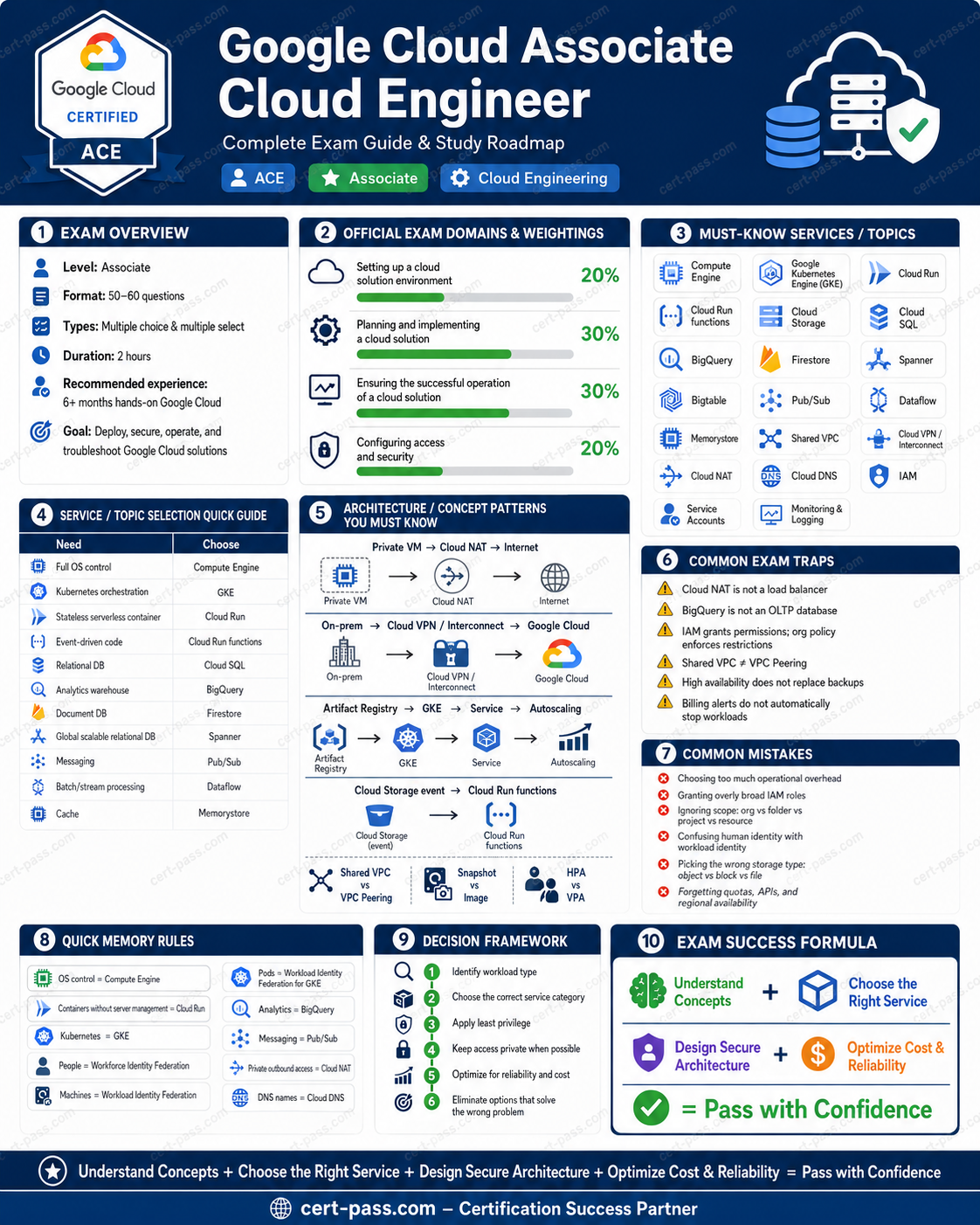
Your Google Cloud Associate Cloud Engineer Roadmap

Google Cloud Associate Cloud Engineer certification preparation infographic

You're viewing 5 of 15 free modules

The remaining 10 modules cover advanced topics, exam traps, and scenarios that appear on the certification exam.

Unlock All : $ 29

1. Exam Overview

The Associate Cloud Engineer exam tests whether you can deploy, secure, operate, and troubleshoot Google Cloud solutions. It is not a pure memorization exam. Most questions describe a workload or operational problem and ask for the best action among several technically possible actions.

Exam format

Item Standard exam
Duration 2 hours
Question count 50–60
Question types Multiple choice and multiple select
Recommended experience 6+ months of hands-on Google Cloud experience
Main skill Choose and operate the simplest correct Google Cloud solution

Updated exam weighting

Domain Weight Priority
Setting up a cloud solution environment ~20% High
Planning and implementing a cloud solution ~30% Very high
Ensuring the successful operation of a cloud solution ~30% Very high
Configuring access and security ~20% High

How to think during the exam

For every scenario, identify five things before reading the options closely:

  1. Workload type: VM, container, Kubernetes, event-driven function, database, object storage, analytics, or AI agent.
  2. Control level: Does the team need operating-system control, Kubernetes control, or minimal operations?
  3. Scope: Organization, folder, project, bucket, subnet, resource, service account, or workload.
  4. Security expectation: Least privilege, private access, short-lived credentials, no public exposure, or customer-managed encryption keys.
  5. Operational goal: Deploy, scale, monitor, troubleshoot, optimize, back up, restore, or route traffic.

A good answer normally satisfies the requirement with the least unnecessary privilege, least operational overhead, and narrowest appropriate scope.


2. Exam Domains

Domain 1: Setting up a cloud solution environment : ~20%

You must understand initial governance, project setup, API activation, quotas, billing, Cloud Identity, Workforce Identity Federation, resource inventory, and observability foundations.

Domain 2: Planning and implementing a cloud solution : ~30%

This is one of the most important domains. You must choose the correct compute, data, storage, network, and infrastructure-as-code solution for a workload.

Domain 3: Ensuring the successful operation of a cloud solution : ~30%

This is the other major domain. You must know how to operate Compute Engine, GKE, Cloud Run, databases, networking, monitoring, logging, diagnostics, backups, and optimization tooling.

Domain 4: Configuring access and security : ~20%

You must apply IAM inheritance correctly, use predefined or custom roles appropriately, manage service accounts, prefer short-lived credentials, and distinguish workforce identities from workload identities.


3. Start-to-Finish Study Path

Use this sequence to prepare efficiently.

Phase 1: Build the foundation

Learn the Google Cloud resource hierarchy:

Organization └── Folder └── Project └── Resources

Practice:

  • Create a project.
  • Link it to a billing account.
  • Enable an API.
  • Set a default project in gcloud.
  • Review quotas.
  • Create a budget alert.
  • Explore IAM roles at organization, folder, project, and resource scope.

Phase 2: Master service selection

Memorize decision rules, not product definitions. You should be able to choose between:

  • Compute Engine, GKE, Cloud Run, Cloud Run functions, and Agent Runtime.
  • Cloud SQL, AlloyDB, Spanner, Firestore, Bigtable, BigQuery, Memorystore, Pub/Sub, Dataflow, and Managed Service for Apache Kafka.
  • Cloud Storage, Persistent Disk, Hyperdisk, Filestore, Google Cloud NetApp Volumes, and Google Cloud Managed Lustre.
  • Shared VPC, VPC Network Peering, Cloud VPN, Cloud Interconnect, Cloud NAT, Cloud DNS, load balancing, and Network Service Tiers.

Phase 3: Practice deployment and scaling

Perform small labs:

  • Create a Compute Engine VM with OS Login.
  • Build an instance template and managed instance group.
  • Create a GKE cluster and inspect nodes, Pods, and Services with kubectl.
  • Deploy a container to Cloud Run and create a new revision.
  • Configure traffic splitting.
  • Review autoscaling options for VMs, Pods, node pools, and Cloud Run.

Phase 4: Practice operations

Perform operational tasks:

  • Create and restore a disk snapshot.
  • Review Cloud Logging entries with filters.
  • Create a Cloud Monitoring alert.
  • Compare built-in and custom metrics.
  • Review Cloud Run revisions and rollback behavior.
  • Review GKE node pools and Pod resource requests.
  • Review database backups and restore options.
  • Reserve static internal and external IP addresses.
  • Configure Cloud NAT for private VM egress.

Phase 5: Master IAM and identity

Practice the differences between:

  • Human users and groups.
  • Service accounts.
  • Service-account impersonation.
  • Short-lived credentials.
  • Workload Identity Federation.
  • Workload Identity Federation for GKE.
  • Workforce Identity Federation.

Phase 6: Simulate exam reasoning

When reviewing practice questions:

  1. State the requirement in one sentence.
  2. Identify the required service category.
  3. Remove answers from the wrong category.
  4. Remove answers with excessive scope or privilege.
  5. Prefer the managed option that meets the requirement directly.
  6. Check whether the question asks for design, deployment, operation, troubleshooting, or optimization.

4. Core Concepts by Domain

Domain 1 : Setting Up a Cloud Solution Environment

4.1 Resource hierarchy

Scope Best use
Organization Company-wide governance
Folder Department, business unit, environment, or policy boundary
Project Workload boundary, billing linkage, API enablement, quotas, and many IAM grants
Resource Narrow access when a project-wide grant is too broad

Decision rule: Apply policy at the highest level that covers the intended resources, but not higher.

Example:

  • All finance projects need the same guardrail → apply it at the Finance folder.
  • Every project in the company must follow the same restriction → apply it at the organization.
  • One bucket must be readable by one workload → apply a bucket-level IAM role.

4.2 Organization policies versus IAM

Mechanism Purpose
IAM allow policy Grants principals permission to perform actions
Organization policy Restricts allowed configurations across the hierarchy
Billing account Controls payment relationship and cost reporting
VPC firewall rule or Cloud NGFW policy Controls network traffic

Common trap: Granting an IAM role does not enforce a resource configuration restriction. If the scenario says “prevent public IP addresses” or “restrict a configuration across projects,” think organization policy.

4.3 Cloud Identity groups

Grant roles to groups rather than editing individual bindings repeatedly.

Use a group when:

  • Team membership changes frequently.
  • Multiple people need the same role.
  • Access should remain stable while membership changes.

Avoid sharing a service account key with a workforce team. A service account represents a workload identity, not a shared human login.

4.4 API enablement

Before creating resources in a project, verify that the required API is enabled.

Typical failure pattern:

Project exists Billing is linked IAM appears correct Deployment still fails → Check whether the service API is enabled

4.5 Quotas and geographical availability

Quotas can apply by project, service, region, or resource type. Check capacity before deployment.

Also verify that the product, accelerator, and required feature exist in the target region or zone. A product name alone does not guarantee regional availability.

4.6 Cloud Asset Inventory and Gemini Cloud Assist

Use Cloud Asset Inventory to inspect and analyze the resource estate across projects. The updated blueprint also includes using Gemini Cloud Assist to assist with resource analysis.

4.7 Workforce Identity Federation

Use Workforce Identity Federation when external human users or groups authenticate through an external identity provider and need controlled access to supported Google Cloud resources.

Do not confuse it with workload federation, which is designed for machines and external workloads.

4.8 Billing configuration

Requirement Correct approach
Link a project to payment responsibility Link the project to a billing account
Separate subsidiary invoicing Use separate billing accounts
Receive spend notifications Create budgets and alerts
Analyze detailed usage and cost Export billing data to BigQuery

Important: A budget alert is not a hard spending cap by default. It notifies; it does not automatically stop workloads.


lock

Domain 2 : Planning and Implementing a Cloud Solution

This module is part of the full course. Unlock all 15 modules + 55+ practice questions.

lock_open Unlock for $ 29

One-time payment · 48h money-back guarantee

lock

Domain 3 : Ensuring the Successful Operation of a Cloud Solution

This module is part of the full course. Unlock all 15 modules + 55+ practice questions.

lock_open Unlock for $ 29

One-time payment · 48h money-back guarantee

lock

Domain 4 : Configuring Access and Security

This module is part of the full course. Unlock all 15 modules + 55+ practice questions.

lock_open Unlock for $ 29

One-time payment · 48h money-back guarantee

lock

5. Service Selection Guide

This module is part of the full course. Unlock all 15 modules + 55+ practice questions.

lock_open Unlock for $ 29

One-time payment · 48h money-back guarantee

lock

6. Architecture Patterns

This module is part of the full course. Unlock all 15 modules + 55+ practice questions.

lock_open Unlock for $ 29

One-time payment · 48h money-back guarantee

lock

7. Exam Traps

This module is part of the full course. Unlock all 15 modules + 55+ practice questions.

lock_open Unlock for $ 29

One-time payment · 48h money-back guarantee

lock

8. Quick Memory Rules

This module is part of the full course. Unlock all 15 modules + 55+ practice questions.

lock_open Unlock for $ 29

One-time payment · 48h money-back guarantee

lock

9. Final Revision Notes

This module is part of the full course. Unlock all 15 modules + 55+ practice questions.

lock_open Unlock for $ 29

One-time payment · 48h money-back guarantee

lock

10. Exam-Day Checklist

This module is part of the full course. Unlock all 15 modules + 55+ practice questions.

lock_open Unlock for $ 29

One-time payment · 48h money-back guarantee

lock

Official Alignment References

This module is part of the full course. Unlock all 15 modules + 55+ practice questions.

lock_open Unlock for $ 29

One-time payment · 48h money-back guarantee

What others say

star star star star star

"The GCP networking and IAM sections were explained perfectly. Passed Google Cloud Associate Cloud Engineer with confidence after this prep."

Sarah M.

Cloud Engineer

Scored 92%
star star star star star

"Every BigQuery and Dataflow concept for Google Cloud Associate Cloud Engineer covered in the study guide. The exam traps section was invaluable."

James K.

Data Engineer

Scored 91%

Unlock the full course

Stop guessing. Start passing.

5 of 15 modules free. The remaining 10 modules contain the exam traps, edge cases, and domain deep-dives that make the difference.

48h money-back guarantee Secure PayPal checkout

Unlock all 15 modules

From $ 29 · One-time payment

Unlock

Course Modules

15 modules

Unlock All Modules

Get full access to all 15 modules

auto_stories More Guides