Official source note
ai-102 common mistakes is the main focus of this page, and the safest way to study it is to keep the exam hub open while you work through the official facts and the service selection patterns. Microsoft describes AI-102 Azure AI Engineer Associate as a certification that validates practical cloud literacy, service selection, and scenario thinking. The main Cert Pass hub remains /exams/azure-ai-102-azure-ai-engineer-associate.
Exam facts
- Exam name: AI-102 Azure AI Engineer Associate
- Exam slug: azure-ai-102-azure-ai-engineer-associate
- Vendor: Microsoft
- Cert Pass landing page: /exams/azure-ai-102-azure-ai-engineer-associate
- Study hub: /exams/azure-ai-102-azure-ai-engineer-associate
- Official vendor page: Microsoft Azure AI Engineer Associate
Why this article exists
The goal here is not to collect trivia. The goal is to build the habit of reading a scenario, identifying the category, and choosing the simplest service that directly fits the requirement.
Fast study map
Use the exam hub twice during review: /exams/azure-ai-102-azure-ai-engineer-associate and /exams/azure-ai-102-azure-ai-engineer-associate. Those internal links should act as the stable anchor for practice, revision, and final review.
Azure AI-102 Common Mistakes: 10 Fail Patterns and Fixes
AI-102 often feels straightforward until a scenario hides the critical detail that changes the best answer. The most useful preparation is therefore not only learning the right services, but also learning the wrong turns that repeatedly lead candidates away from the correct choice.
Microsoft has announced a retirement date of June 30, 2026. That makes mistake driven review especially useful because there is limited time to learn the current exam patterns and then convert them into fast decisions.
Retirement notice: Microsoft AI-102 Azure AI Engineer Associate retires on June 30, 2026. Any preparation plan should treat that date as the deadline for the current exam path.
Exam facts
| Field | Value |
|---|---|
| Exam code | AI-102 |
| Certification | Azure AI Engineer Associate |
| Vendor | Microsoft |
| Question count | 50 |
| Time limit | 100 minutes |
| Passing score | 70 |
| Retirement date | June 30, 2026 |
| Replacement path | Monitor Microsoft Learn for the current successor |
| Best fit | Candidates who build, integrate, and govern Azure AI solutions |
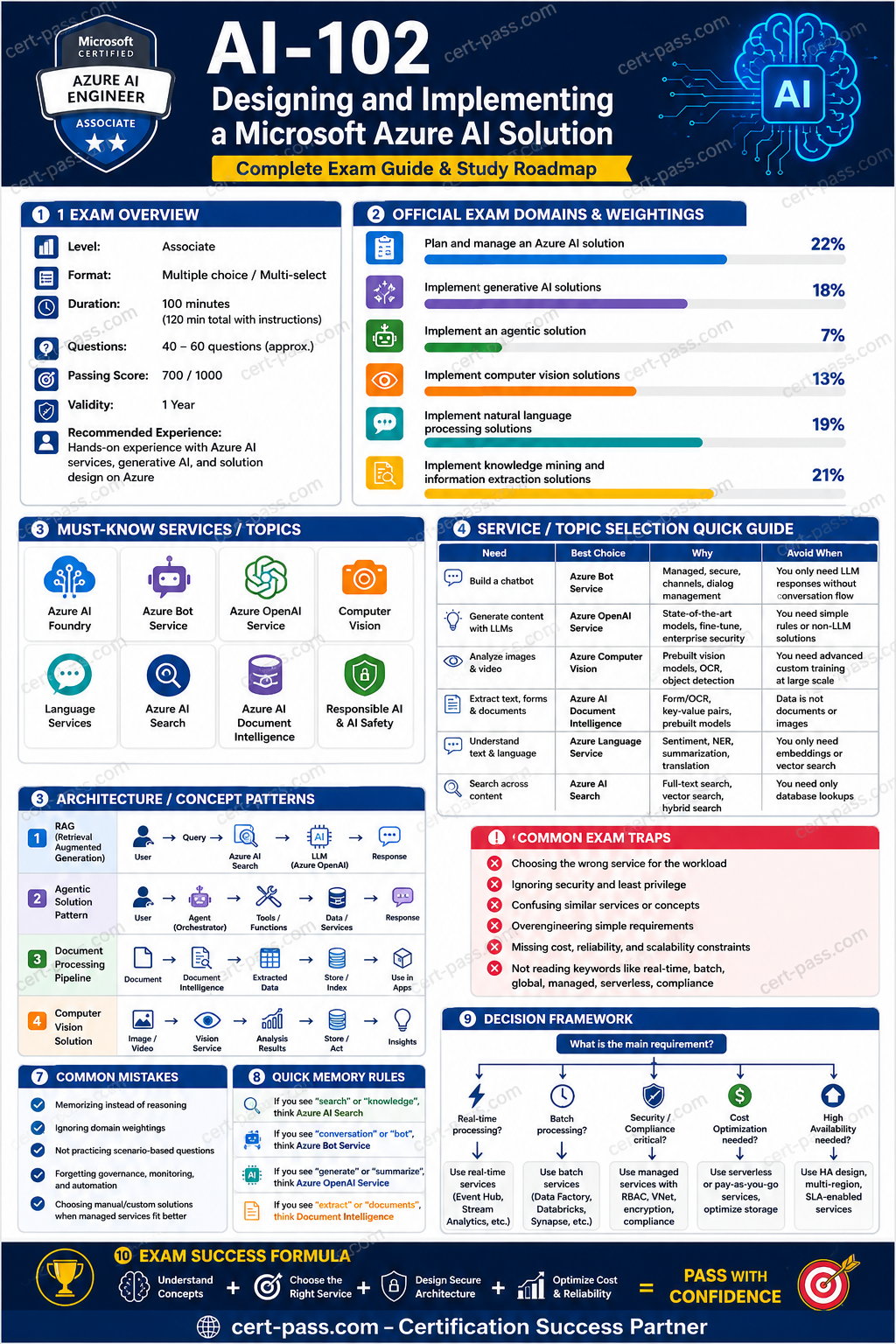
Domain breakdown
| Domain | Weight | What matters most |
|---|---|---|
| Plan and manage an Azure AI solution | 22.8% | Governance, identity, monitoring, pricing, and solution fit |
| Implement knowledge mining and information extraction solutions | 20.1% | Search, indexing, enrichment, chunking, and document extraction |
| Implement natural language processing solutions | 18.8% | Language services, speech scenarios, and conversational design |
| Implement generative AI solutions | 17.9% | Model integration, grounding, safety, and app patterns |
| Implement computer vision solutions | 12.9% | Image analysis, OCR, and video insight scenarios |
| Implement an agentic solution | 7.4% | Orchestration, tool use, memory, and agent boundaries |
Mistake one: confusing OCR with document extraction
OCR reads text from an image or scanned page. Document Intelligence extracts structured fields, tables, and document specific values. Many candidates see a document and immediately think OCR, even when the requirement is clearly about invoice fields or receipt data.
The fix is to ask whether the question wants text, or wants structure. If structure matters, Document Intelligence is usually the better answer.
Mistake two: choosing generation before retrieval
A chatbot that must answer from company content almost always needs retrieval before generation. Candidates sometimes jump straight to a large language model and forget that enterprise content has to be found, chunked, ranked, and grounded first.
The fix is to look for words such as source content, citations, knowledge base, or RAG. Those clues usually point to Azure AI Search plus a generative model.
Mistake three: using the wrong service for audio
Speech scenarios are often mishandled because candidates focus on the words being spoken instead of the audio input itself. Transcription, speech translation, speech synthesis, and keyword recognition are different capabilities.
The fix is to identify the audio task precisely. If the problem is spoken input, Speech is the first place to look.
Mistake four: treating Vision and Video Indexer as interchangeable
Azure AI Vision handles image analysis and OCR. Video Indexer handles richer video content and associated insights. When a scenario includes transcripts, topics, or video search, Vision alone is usually too narrow.
The fix is to separate static image analysis from video analysis before selecting the answer.
Mistake five: ignoring safety and governance in gen AI
Generative AI questions frequently include hints about moderation, filtering, network controls, or controlled deployment. An answer that ignores those concerns may be technically interesting but incomplete.
The fix is to check whether content safety, managed identity, or private access belongs in the design.
Mistake six: overbuilding an agent
Some scenarios only need a grounded assistant. Others need an agent. Candidates sometimes choose an agent when the problem does not need autonomy, tool orchestration, or multi step action.
The fix is to ask whether action is actually required. If not, a simpler retrieval augmented workflow is usually better.
Mistake seven: missing the planning layer
The planning domain is easy to underestimate because it feels less flashy than model work. In practice, many exam questions are decided by governance, cost awareness, and endpoint choices.
The fix is to review deployment, identity, logging, and service fit as carefully as model features.
Mistake eight: memorizing names without scenarios
Many candidates memorize service names but cannot distinguish between near matches. That makes the exam harder because the questions are scenario based, not glossary based.
The fix is to practice with business situations. Each service should be attached to a real use case, not a single phrase.
Mistake nine: skipping domain weights
A study plan that treats every topic equally wastes time. The exam has clear weightings, so preparation should reflect the weighted topics first.
The fix is to spend more time on planning, knowledge mining, NLP, and generative AI, while still reviewing the lower weight domains enough to avoid easy misses.
Mistake ten: failing to review the retirement notice
A surprising number of candidates study the content without checking the timeline. For AI-102, the retirement date changes the urgency of the plan.
The fix is simple. Treat June 30, 2026 as the end date for the current exam path and confirm the latest Microsoft guidance before scheduling.
Next step
Review the current exam landing page here: AI-102 practice exam.
Certification preparation is strongest when the study path stays aligned to the current blueprint and the retirement date. Candidates should use the exam page as the final checkpoint before scheduling any attempt.
Extended official revision notes
Microsoft AI-102 Exam Course: Designing and Implementing a Microsoft Azure AI Solution
Certification: Microsoft Certified: Azure AI Engineer Associate
Exam: AI-102: Designing and Implementing a Microsoft Azure AI Solution
Vendor: Microsoft
1. Exam Overview
What the exam is testing
AI-102 tests whether you can design, build, deploy, secure, monitor, and integrate Azure AI solutions. The exam is not only about knowing service names. Most questions ask you to choose the best service, architecture, API, deployment model, or security approach for a business scenario.
You should be ready to reason about:
- Selecting the right Microsoft Foundry / Azure AI service for a requirement.
- Building generative AI solutions with models, prompts, retrieval, evaluation, safety, and deployment.
- Creating agentic solutions that use tools, grounding data, workflows, and guardrails.
- Implementing computer vision, OCR, image analysis, video/image classification, and face-related scenarios.
- Implementing language, speech, translation, summarization, sentiment, PII detection, and conversational workflows.
- Building search, enrichment, document extraction, vector retrieval, and knowledge mining pipelines.
- Applying Responsible AI, content safety, identity, network security, monitoring, cost control, and CI/CD.
How to think like the exam
The exam usually hides the answer in the requirement wording. Look for these clues:
| Requirement clue | What it usually means |
|---|---|
| “Use one endpoint and key for multiple AI services” | Multi-service Azure AI services resource |
| “Least privilege, avoid keys” | Managed identity + RBAC |
| “Private network only” | Private endpoint, VNet integration, disable public network access where supported |
| “Extract fields from invoices/receipts/contracts/forms” | Azure AI Document Intelligence or Content Understanding, not generic OCR alone |
| “Search across documents with semantic/vector retrieval” | Azure AI Search with vector index, semantic ranking, skillsets where needed |
| “Ground model answers on enterprise data” | RAG with Azure AI Search or another retrieval layer |
| “Generate or evaluate prompts/workflows” | Microsoft Foundry tooling, prompt flow, evaluation, content safety |
| “Speech to text / text to speech / translation” | Azure AI Speech / Translator / Language depending on input and output |
| “Moderate harmful text/images” | Azure AI Content Safety |
| “Named entities, key phrases, sentiment, PII” | Azure AI Language |
How to use this course
- Read the domain overview first.
- Study each domain by service-selection logic, not by memorizing isolated facts.
- Use the tables to eliminate wrong answers quickly.
- Review the traps section before practicing questions.
- Use the final checklist as the last-day exam review.
2. Exam Domains
The official AI-102 domains are organized as follows. The CSV question bank was generated to match these priorities and then consolidated into this course.
| Domain | Official priority | Rows in source CSV | Source share | What matters most |
|---|---|---|---|---|
| Plan and manage an Azure AI solution | 20-25% | 230 | 22.8% | Service selection, deployment, security, Responsible AI, monitoring, CI/CD |
| Implement generative AI solutions | 15-20% | 180 | 17.9% | Foundry, model deployment, prompts, RAG, grounding, evaluation, content safety |
| Implement an agentic solution | 5-10% | 75 | 7.4% | Agents, tools, grounding, orchestration, guardrails, evaluation |
| Implement computer vision solutions | 10-15% | 130 | 12.9% | Image analysis, OCR, custom vision concepts, face safety constraints |
| Implement natural language processing solutions | 15-20% | 190 | 18.8% | Language, Speech, Translator, PII, sentiment, summarization, conversational language |
| Implement knowledge mining and information extraction solutions | 15-20% | 203 | 20.1% | Azure AI Search, Document Intelligence, Content Understanding, indexing, vector search |
Priority notes
High-yield areas from the source bank:
- Security and deployment appear repeatedly across domains, especially managed identity, RBAC, Key Vault, private endpoints, and logging.
- Azure AI Search is one of the most repeated services because it appears in knowledge mining, RAG, generative AI, and agentic grounding.
- Document Intelligence is frequently contrasted with OCR, Azure AI Search, and generative AI.
- Language, Speech, and Translator are commonly confused in scenario questions.
- Foundry, generative AI, RAG, prompt evaluation, and content safety are emphasized in the latest blueprint.
3. Start-to-Finish Study Path
Foundation phase: know the service map
Study the purpose of each core service:
- Microsoft Foundry / Azure AI Foundry: build, deploy, evaluate, and manage AI apps, models, prompt flows, and generative AI solutions.
- Azure OpenAI / model deployment: chat, completions, embeddings, generative AI, summarization, classification, code/text generation.
- Azure AI Search: lexical, semantic, hybrid, vector search, indexing, enrichment, retrieval for RAG.
- Azure AI Document Intelligence: structured extraction from documents such as invoices, receipts, IDs, tax forms, and custom forms.
- Azure AI Content Understanding: multimodal extraction and understanding across content types when the scenario goes beyond simple form extraction.
- Azure AI Language: sentiment, key phrase extraction, named entity recognition, PII detection, summarization, classification, conversational language understanding.
- Azure AI Speech: speech-to-text, text-to-speech, speech translation, pronunciation assessment, speaker-related capabilities where supported.
- Azure AI Translator: text translation and document translation.
- Azure AI Vision: OCR, image analysis, captions, object/tag detection, spatial/image insights where supported.
- Azure AI Content Safety: detect harmful user or model-generated text/images.
Intermediate phase: learn decision rules
For each scenario, identify:
- Input type: text, speech, image, video, document, mixed content.
- Output type: extracted fields, search results, generated text, classification, translation, speech, summary.
- Customization level: prebuilt model, custom model, prompt-based, fine-tuned/model deployment, custom extractor.
- Security requirements: keyless auth, private network, data isolation, audit logging, compliance.
- Integration style: SDK, REST API, container, managed endpoint, CI/CD pipeline, event-driven ingestion.
- Operational needs: monitoring, evaluation, cost, latency, failover, versioning.
Advanced phase: master architecture tradeoffs
Practice these tradeoffs:
- Prebuilt model vs custom model.
- OCR vs Document Intelligence.
- Azure AI Search indexing vs direct database query.
- RAG vs fine-tuning vs prompt engineering.
- Semantic search vs vector search vs hybrid search.
- Single-service resource vs multi-service resource.
- API key vs managed identity.
- Public endpoint vs private endpoint.
- Batch ingestion vs real-time inference.
- Model evaluation vs application monitoring.
Final review phase
Before exam day, focus on:
- Service selection tables.
- Domain traps.
- RAG architecture steps.
- Azure AI Search indexing pipeline.
- Document extraction pipeline.
- Security and Responsible AI controls.
- Prompt evaluation and content safety.
- Difference between Language, Speech, Translator, Vision, Search, and Document Intelligence.
4. Core Concepts by Domain
Domain 1: Plan and manage an Azure AI solution
Concepts
This domain tests whether you can design and operate Azure AI solutions safely and correctly. It is not limited to provisioning resources. It includes choosing services, configuring deployment options, securing access, applying Responsible AI principles, monitoring, and integrating AI services into DevOps workflows.
Key concepts:
- Selecting Microsoft Foundry Services based on task type.
- Creating Azure AI resources and choosing single-service vs multi-service resources.
- Choosing model deployment options and default endpoints.
- Installing and using SDKs and REST APIs.
- Securing secrets with Key Vault.
- Using managed identities instead of hardcoded keys.
- Applying RBAC and least privilege.
- Configuring private endpoints and network restrictions.
- Monitoring usage, latency, errors, quotas, and content safety events.
- Building repeatable CI/CD deployment for AI apps.
- Applying Responsible AI: fairness, reliability, safety, privacy, transparency, accountability.
Services
| Service / capability | Use it for | Do not use it when |
|---|---|---|
| Multi-service Azure AI services resource | One endpoint/key for several AI services | You need per-service isolation, separate billing, or a service not supported by the multi-service resource |
| Single-service resource | Strong isolation, service-specific settings, separate quotas | The scenario requires one shared endpoint/key for many services |
| Managed identity | Keyless authentication to Azure resources | The target service does not support Entra ID/RBAC for that action |
| Key Vault | Store API keys, connection strings, secrets, certificates | Do not store secrets in app settings, source code, or notebooks |
| Private endpoint | Private network access to AI services | Public internet access is acceptable and simpler requirements are stated |
| Azure Monitor / Log Analytics | Metrics, logs, diagnostics, alerting | Do not use only application logs when platform metrics are required |
| Content Safety | Moderation and safety filters for user/model content | It does not replace identity, authorization, or network security |
Patterns
Pattern: secure AI app integration
Recommended architecture:
- Application uses managed identity.
- Managed identity is granted minimum required RBAC role.
- Secrets are stored in Key Vault only when keys are unavoidable.
- AI service access is restricted with private endpoint if required.
- Diagnostics are sent to Log Analytics.
- Content Safety is applied where user-generated or model-generated content is involved.
Why wrong answers fail:
- API keys in code are fast but insecure.
- Storage account alone does not protect AI service calls.
- Public endpoint with unrestricted keys fails private/compliance requirements.
Pattern: containerized AI service
Use containers when:
- You need edge processing or low latency near data.
- Connectivity is intermittent but billing/licensing requirements can still be met.
- The selected service supports containers.
Trap: containers do not eliminate billing, licensing, connectivity, or service-specific limitations.
Traps
- Choosing Azure Machine Learning when the scenario only needs a prebuilt AI API.
- Choosing a multi-service resource when strict isolation or unsupported service features are required.
- Choosing API keys when the requirement says “no secrets” or “least privilege.”
- Assuming private endpoint automatically handles authorization; it only handles network path.
- Confusing content moderation with security authorization.
- Ignoring quotas, region availability, and model deployment constraints.
Domain 2: Implement generative AI solutions
Concepts
This domain tests your ability to build generative AI applications using Microsoft Foundry tooling, deployed models, prompt design, RAG, evaluation, and safety controls.
You must know:
- Model selection and deployment.
- Prompt engineering and system messages.
- Grounding with enterprise data.
- Retrieval-augmented generation.
- Embeddings and vector search.
- Prompt flow / orchestration patterns.
- Evaluation of generated outputs.
- Content safety and responsible AI guardrails.
- Monitoring, cost, latency, and token usage.
Services
| Capability | Best-fit service or pattern | Why |
|---|---|---|
| Chatbot over enterprise documents | Azure OpenAI/model deployment + Azure AI Search RAG | Keeps answers grounded in current internal content |
| Semantic/vector retrieval | Azure AI Search vector index | Enables similarity search over embeddings |
| Harmful content detection | Azure AI Content Safety | Detects unsafe user or model-generated content |
| Prompt workflow testing | Microsoft Foundry prompt flow/evaluation | Supports iterative prompt development and evaluation |
| Generate embeddings | Embedding model deployment | Converts text into vectors for retrieval |
| Need exact source citations | RAG with retrieved passages and metadata | Model alone cannot guarantee source grounding |
Patterns
Pattern: RAG application
Use RAG when the question says:
- “Answers must use company documents.”
- “Information changes frequently.”
- “Citations are required.”
- “Do not retrain the model.”
- “Use private knowledge base.”
Typical RAG flow:
- Ingest documents into storage.
- Chunk documents into meaningful sections.
- Generate embeddings for chunks.
- Store chunks, metadata, and vectors in Azure AI Search.
- At query time, embed the user query.
- Retrieve relevant chunks with vector, semantic, or hybrid search.
- Pass retrieved context to the model.
- Generate grounded answer with citations.
- Apply content safety and logging.
- Evaluate answer quality and retrieval quality.
Pattern: prompt safety and evaluation
Use:
- System message to define role, boundaries, format, and refusal behavior.
- Grounding data to reduce hallucination.
- Content Safety to detect harmful inputs/outputs.
- Evaluation datasets to compare prompt versions.
- Logging and monitoring to detect failures in production.
Traps
- Fine-tuning when RAG is better for changing knowledge.
- Prompt engineering alone when source grounding is required.
- RAG without chunking and metadata, causing poor retrieval.
- Vector search alone when keyword matching is also important; hybrid search may be better.
- Storing secrets in prompt flow or code instead of Key Vault.
- Ignoring content safety for user-generated inputs.
- Assuming the model can access private documents without retrieval integration.
Domain 3: Implement an agentic solution
Concepts
Agentic solutions use a model plus instructions, tools, functions, memory/context, retrieval, and evaluation to perform multi-step tasks. AI-102 focuses on safe, grounded, tool-using agents rather than uncontrolled autonomous systems.
You should understand:
- Agent instructions and system prompts.
- Tool/function calling.
- Grounding with Azure AI Search or enterprise APIs.
- Planning and step execution.
- Human approval for sensitive actions.
- Guardrails and tool permission boundaries.
- Evaluation of agent task success.
- Logging tool calls and outputs.
Services and capabilities
| Requirement | Best pattern |
|---|---|
| Agent answers based on internal documents | Agent + RAG over Azure AI Search |
| Agent performs actions in business systems | Tool/function calling with scoped permissions |
| Agent must not execute destructive actions automatically | Human-in-the-loop approval |
| Agent must follow a specific workflow | Orchestrated prompt flow or explicit tool sequence |
| Agent outputs must be checked for harmful content | Content Safety and policy filters |
| Agent must be evaluated before production | Task-based evaluation with expected outputs and traces |
Patterns
Pattern: safe tool-using agent
- Define agent role and boundaries.
- Register only required tools.
- Give each tool minimal permissions.
- Validate tool inputs and outputs.
- Require approval for irreversible actions.
- Use retrieval for factual grounding.
- Log reasoning traces, tool calls, and final outputs where supported.
- Evaluate with realistic task scenarios.
Traps
- Giving an agent broad credentials when only read access is required.
- Letting an agent write/delete/update records without approval.
- Treating an agent like a simple chatbot when the scenario requires tool calls.
- Using a generic model answer when the agent must call an API.
- Ignoring retrieval quality; a smart agent with poor grounding still fails.
- Failing to monitor tool-call errors and unsafe outputs.
Domain 4: Implement computer vision solutions
Concepts
This domain tests image and visual content processing. Focus on choosing between OCR, image analysis, custom vision scenarios, face capabilities, and document extraction services.
Key concepts:
- Image analysis: tags, captions, object detection, visual features.
- OCR: extract printed/handwritten text from images.
- Document extraction: use Document Intelligence for structured forms/documents.
- Custom image classification/object detection: train custom models where supported.
- Face capabilities: identity/sensitive use cases require careful Responsible AI and service restrictions.
- Batch vs real-time image processing.
- Containers for edge vision where supported.
Services
| Scenario | Use | Avoid |
|---|---|---|
| Read text from a simple image | Azure AI Vision OCR | Full Document Intelligence unless structured fields/forms are required |
| Extract invoice fields like vendor, total, date | Azure AI Document Intelligence prebuilt invoice model | Generic OCR only |
| Generate image tags/captions | Azure AI Vision image analysis | Azure AI Language |
| Detect harmful images | Azure AI Content Safety | Azure AI Vision alone |
| Custom image classifier/object detector | Custom vision/model option where current service supports it | Generic image analysis if custom labels are needed |
| Analyze ID/document with structured fields | Document Intelligence | Vision OCR only |
Patterns
Pattern: simple OCR vs structured document extraction
- If the scenario only asks for text extraction from an image, OCR is enough.
- If the scenario asks for fields, tables, key-value pairs, layout, invoices, receipts, contracts, or forms, use Document Intelligence.
Pattern: image moderation
- Image analysis identifies objects/tags/captions.
- Content Safety assesses harmful or unsafe content.
- For user uploads, moderation often happens before storage, indexing, or model processing.
Traps
- Choosing OCR for invoice field extraction.
- Choosing Document Intelligence when the scenario only needs image tags.
- Choosing Language service for image analysis.
- Ignoring Responsible AI restrictions in face-related scenarios.
- Assuming every Vision capability is available in every region or deployment mode.
Domain 5: Implement natural language processing solutions
Concepts
This domain covers text and speech understanding. The biggest exam skill is selecting the correct service for the input/output type.
You need to know:
- Sentiment analysis and opinion mining.
- Key phrase extraction.
- Named entity recognition.
- PII detection and redaction.
- Text summarization.
- Language detection.
- Custom text classification.
- Conversational language understanding.
- Question answering where applicable.
- Speech-to-text and text-to-speech.
- Translation and document translation.
Services
| Scenario | Best service |
|---|---|
| Detect sentiment in customer reviews | Azure AI Language sentiment analysis |
| Extract organizations, people, locations | Azure AI Language named entity recognition |
| Detect and redact personal data | Azure AI Language PII detection |
| Extract key phrases from text | Azure AI Language key phrase extraction |
| Classify support tickets by custom labels | Azure AI Language custom text classification |
| Understand user intent in a bot | Conversational language understanding |
| Convert audio to text | Azure AI Speech speech-to-text |
| Convert text to natural voice | Azure AI Speech text-to-speech |
| Translate text between languages | Azure AI Translator |
| Translate audio conversations | Speech translation, not text-only Translator |
Patterns
Pattern: support-ticket routing
Use Azure AI Language custom text classification when:
- The input is text.
- You need labels such as Billing, Technical Support, Cancellation, Complaint.
- You have training examples for custom classes.
Use conversational language understanding when:
- You need to detect intents and entities from interactive user utterances.
- The input is part of a bot or conversation.
Pattern: compliance redaction
Use Language PII detection when:
- You need to find names, emails, phone numbers, addresses, government IDs, or other personal data.
- You need redaction before storage, logging, or downstream model calls.
Traps
- Choosing Translator when the requirement is sentiment or PII detection.
- Choosing Speech for text-only translation.
- Choosing Language when the input is audio and no transcription has occurred.
- Choosing generic generative AI for deterministic PII detection when a dedicated Language capability exists.
- Confusing entity extraction with key phrase extraction.
- Confusing text classification with conversational intent recognition.
Domain 6: Implement knowledge mining and information extraction solutions
Concepts
This domain is heavily tested because it combines search, enrichment, document extraction, indexing, and retrieval for generative AI. You must understand how content becomes searchable and how structured data is extracted from unstructured sources.
Key concepts:
- Azure AI Search indexes.
- Data sources, indexers, and skillsets.
- Built-in skills: OCR, entity recognition, key phrase extraction, translation, language detection, image analysis.
- Custom skills for external enrichment.
- Knowledge stores/projections where applicable.
- Semantic search, vector search, hybrid search.
- Scoring profiles, filters, facets, analyzers, synonym maps.
- Document Intelligence models and extraction results.
- Content Understanding for multimodal extraction workflows.
- RAG retrieval patterns.
Services
| Requirement | Best choice |
|---|---|
| Make many documents searchable | Azure AI Search index |
| Enrich documents during indexing | Azure AI Search skillset |
| Extract structured fields from invoices/forms | Azure AI Document Intelligence |
| Extract searchable text from images in documents | OCR skill or Document Intelligence depending on structure |
| Add custom enrichment logic | Custom skill in Azure AI Search pipeline |
| Search by meaning rather than exact words | Vector search or semantic search |
| Combine keyword and vector relevance | Hybrid search |
| Ground generative AI answers | Azure AI Search retrieval + model context |
Patterns
Pattern: indexing pipeline
- Store documents in a supported source such as Azure Blob Storage.
- Create a data source connection.
- Define an index schema with searchable, filterable, facetable, sortable fields.
- Define an indexer.
- Add a skillset if enrichment is required.
- Add vector fields if vector retrieval is required.
- Run the indexer and monitor errors/warnings.
- Query with filters, semantic ranking, vector search, or hybrid search.
Pattern: document extraction pipeline
- Receive document.
- Choose prebuilt or custom Document Intelligence model.
- Extract fields/tables/layout/key-value pairs.
- Validate confidence scores.
- Store structured results.
- Optionally index extracted text/metadata in Azure AI Search.
- Use results in downstream workflows or RAG.
Traps
- Choosing Azure AI Search to extract invoice fields directly; Search indexes content, while Document Intelligence extracts structured document fields.
- Choosing Document Intelligence to rank search results; that is Azure AI Search.
- Using only vector search when exact filters/facets are required.
- Forgetting to mark fields as filterable/facetable/sortable at index design time.
- Forgetting skillset output mappings.
- Expecting an indexer to understand unsupported file formats without enrichment or custom logic.
- Ignoring indexer error monitoring.
5. Service Selection Guide
Core AI service decision table
| If the scenario says... | Choose... | Because... |
|---|---|---|
| Generate text, summarize, reason, chat | Azure OpenAI/model deployment in Foundry | Generative model capability |
| Answer from private documents | RAG with Azure AI Search | Grounds answers in enterprise content |
| Search documents by keyword, semantic meaning, or vector similarity | Azure AI Search | Search/retrieval platform |
| Extract fields from documents | Document Intelligence | Purpose-built document extraction |
| Understand multimodal content | Content Understanding | Works across content types and extraction scenarios |
| Analyze image content | Azure AI Vision | Tags, captions, OCR, image features |
| Moderate harmful content | Content Safety | Safety classification for text/images |
| Analyze text sentiment, entities, PII, key phrases | Azure AI Language | NLP extraction/classification |
| Translate text | Translator | Text translation |
| Convert speech/audio | Speech | Speech-to-text, text-to-speech, speech translation |
| Build tool-using assistant | Agentic solution with tools, RAG, guardrails | Multi-step task execution |
Confusing service comparisons
Azure AI Search vs Document Intelligence
| Feature | Azure AI Search | Document Intelligence |
|---|---|---|
| Main purpose | Index and search content | Extract structured information from documents |
| Output | Search results, rankings, facets, snippets | Fields, tables, key-value pairs, layout, confidence scores |
| Typical input | Documents, metadata, extracted text | PDFs, images, forms, invoices, receipts, contracts |
| Used in RAG | Yes, as retriever | Sometimes, to extract content before indexing |
| Common trap | Treating it as an extraction engine | Treating it as a search engine |
Azure AI Language vs Azure OpenAI
| Requirement | Azure AI Language | Azure OpenAI / generative model |
|---|---|---|
| Deterministic PII detection | Strong fit | Not preferred as primary control |
| Sentiment analysis | Strong fit | Possible but less specialized |
| Custom text classification | Strong fit | Possible with prompt/fine-tune, but not first choice for classic classification |
| Open-ended generation | Not the purpose | Strong fit |
| Summarization | Supported in Language and generative models depending on scenario | Strong fit when flexible generation is needed |
| Need strict safety/moderation | Pair with Content Safety | Pair with Content Safety |
Translator vs Speech
| Requirement | Choose |
|---|---|
| Translate text to another language | Translator |
| Translate documents | Translator document translation |
| Convert audio to text | Speech-to-text |
| Convert text to voice | Text-to-speech |
| Translate spoken audio | Speech translation |
RAG vs fine-tuning vs prompt engineering
| Pattern | Use when | Avoid when |
|---|---|---|
| Prompt engineering | You need better instructions, format, tone, or constraints | You need private/current facts not in the model |
| RAG | You need grounded answers from changing enterprise data | You need to teach a model a stable task style or domain behavior only |
| Fine-tuning | You need consistent style, task behavior, or domain-specific patterns | You need frequently changing facts or citations |
6. Architecture Patterns
Scenario 1: Enterprise document chatbot
Recommended solution: Azure OpenAI/model deployment + Azure AI Search + embeddings + Content Safety + managed identity.
Why:
- Azure AI Search retrieves trusted document chunks.
- Embeddings enable semantic similarity.
- The model generates grounded answers.
- Content Safety checks harmful inputs/outputs.
- Managed identity avoids hardcoded keys.
Wrong alternatives:
- Fine-tuning alone: does not keep current documents fresh.
- Prompt only: cannot access private data.
- Document Intelligence only: extracts content but does not provide full chatbot retrieval and generation.
Scenario 2: Invoice processing workflow
Recommended solution: Document Intelligence prebuilt invoice model or custom model, then store extracted fields and optionally index results.
Why:
- Invoices require structured extraction: vendor, date, total, line items, tax.
- OCR alone gives text, not reliable field mapping.
- Azure AI Search can index extracted results but is not the extraction model.
Scenario 3: Secure banking chatbot
Recommended solution: private endpoint, managed identity, Key Vault only for unavoidable secrets, Content Safety, audit logs, PII detection/redaction where needed, and RAG over approved sources.
Wrong alternatives:
- Public endpoint with unrestricted API key.
- Logs containing raw PII.
- Sending unredacted sensitive data to downstream services without controls.
Scenario 4: Customer support ticket automation
Recommended solution: Azure AI Language for classification, sentiment, PII detection; optionally generative AI for response drafting; human approval before sending sensitive responses.
Wrong alternatives:
- Translator if no translation is needed.
- Speech if the input is text.
- Generative AI alone for compliance-grade PII detection.
Scenario 5: Knowledge mining from PDFs and scanned images
Recommended solution: Azure Blob Storage + Azure AI Search indexer + skillset with OCR/entity/key phrase skills + optional Document Intelligence + index fields designed for filters/facets + monitoring.
Wrong alternatives:
- Search index without enrichment for scanned images.
- Missing field attributes such as filterable/facetable.
- Ignoring skillset output mappings.
Scenario 6: Agent that books appointments
Recommended solution: agent with clear instructions, calendar/tool APIs, least-privilege credentials, validation, human confirmation for booking/cancellation, and logs.
Wrong alternatives:
- Chat model with no tools cannot actually book.
- Agent with full admin rights violates least privilege.
- No approval for destructive or external actions is risky.
7. Exam Traps
Misleading wording patterns
| Wording | Trap | Correct thinking |
|---|---|---|
| “AI solution” | May tempt you to choose Azure ML | Use Azure AI services when prebuilt APIs satisfy the requirement |
| “Search documents” | May tempt Document Intelligence | Search/ranking is Azure AI Search |
| “Extract invoice total” | May tempt OCR | Structured document fields need Document Intelligence |
| “Translate spoken audio” | May tempt Translator | Use Speech translation |
| “Analyze image safety” | May tempt Vision | Use Content Safety for harmful content |
| “No secrets in code” | May still show API key options | Use managed identity/RBAC where supported |
| “Current company policies” | May tempt fine-tuning | Use RAG because facts change |
| “Private access” | May tempt Key Vault only | Use private endpoint/network controls plus identity |
Wrong-but-plausible answers
- Azure Machine Learning appears as a distractor when a prebuilt Azure AI service is enough.
- Azure Storage appears as a distractor for security or AI processing but is only storage.
- API keys appear as easy integration choices but fail least-privilege/no-secret requirements.
- OCR appears as a distractor for document understanding; use it only when raw text is enough.
- Fine-tuning appears as a distractor for private knowledge; RAG is usually better.
- Translator appears in speech scenarios; Speech is needed when audio is involved.
- Azure AI Search appears for field extraction; it indexes and retrieves, it does not replace extraction models.
Elimination strategy
When stuck, ask:
- What is the input format?
- What exact output is required?
- Does the scenario require extraction, search, generation, classification, or translation?
- Does the answer satisfy security wording such as private, least privilege, or no secrets?
- Does the solution use the simplest service that directly satisfies the requirement?
- Does the data change frequently? If yes, prefer retrieval over fine-tuning.
- Is the action risky? If yes, require guardrails and human approval.
8. Quick Memory Rules
Rules of thumb
- Forms/invoices/receipts/contracts → Document Intelligence.
- Search/retrieval/RAG → Azure AI Search.
- Generated answers over private data → RAG.
- Changing facts → RAG, not fine-tuning.
- Style/behavior consistency → prompt engineering or fine-tuning.
- PII/sentiment/entities/key phrases → Azure AI Language.
- Audio in or audio out → Speech.
- Text translation → Translator.
- Image tags/captions/OCR → Vision.
- Unsafe text/images → Content Safety.
- No secrets → managed identity + RBAC.
- Private traffic → private endpoint.
- Secrets unavoidable → Key Vault.
- Multiple AI services, one endpoint → multi-service Azure AI services resource.
“If you see X, think Y” patterns
| If you see... | Think... |
|---|---|
| “Grounded on internal documents” | RAG + Azure AI Search |
| “Citations required” | Retrieve passages with metadata |
| “Hallucination reduction” | Grounding, prompt constraints, evaluation, content safety |
| “Evaluate prompt quality” | Foundry evaluation / prompt flow evaluation |
| “Extract tables from PDFs” | Document Intelligence |
| “Scanned PDFs searchable” | OCR/enrichment + Azure AI Search |
| “Filter by department/date/category” | Search index fields must be filterable |
| “Facet by product/category” | Search index fields must be facetable |
| “Vector similarity” | Embeddings + vector index |
| “Hybrid relevance” | Keyword + vector + optional semantic ranking |
| “Detect customer intent” | Conversational language understanding |
| “Route support tickets” | Custom text classification |
| “Redact emails/phone numbers” | PII detection |
| “Speech pronunciation scoring” | Speech pronunciation assessment |
| “Moderate prompts and completions” | Content Safety |
| “Edge/intermittent connectivity” | Containers, but check service support and billing requirements |
9. Final Revision Notes
Highest-yield review points
- Service selection is the core exam skill. Always match input and output.
- Security wording is decisive. No secrets means managed identity; private means private endpoint; secrets mean Key Vault.
- RAG is the default for private/changing knowledge. Fine-tuning is not a knowledge database.
- Azure AI Search powers retrieval. It is central to knowledge mining and generative AI grounding.
- Document Intelligence extracts structured document data. Do not replace it with OCR when fields/tables are required.
- Language, Speech, Translator, and Vision are separated by input type. Text, audio, translation, and image requirements point to different services.
- Agents need tools and guardrails. A model without tools cannot perform external actions.
- Responsible AI is practical. Use safety filters, monitoring, human review, and evaluation.
- Index design matters. Search fields must be configured correctly before they can be filtered, sorted, faceted, or vectorized.
- Exam answers prefer managed Azure services over custom code unless the scenario explicitly requires custom logic.
Last-day revision list
- Review all six official domains and weightings.
- Memorize the service selection table.
- Practice distinguishing OCR, Document Intelligence, Content Understanding, and Azure AI Search.
- Practice RAG architecture from ingestion to answer generation.
- Review identity and network security patterns.
- Review Language vs Translator vs Speech.
- Review content safety and Responsible AI controls.
- Review agentic solution patterns and human approval.
- Review Azure AI Search field attributes, skillsets, vector fields, semantic ranking, and indexers.
- Review prompt evaluation and monitoring.
10. Exam-Day Checklist
Must-know topics
- Official AI-102 domains and priorities.
- Microsoft Foundry service-selection logic.
- Multi-service vs single-service Azure AI resources.
- Managed identity, RBAC, Key Vault, private endpoint.
- Responsible AI principles and practical controls.
- Content Safety for text and image moderation.
- Generative AI model deployment and prompt design.
- RAG with embeddings and Azure AI Search.
- Prompt flow/evaluation concepts.
- Agentic solutions with tools, grounding, logging, and approval.
- Vision OCR vs image analysis vs document extraction.
- Document Intelligence prebuilt/custom models.
- Azure AI Language: sentiment, NER, PII, key phrases, classification, summarization.
- Speech: speech-to-text, text-to-speech, speech translation.
- Translator: text and document translation.
- Azure AI Search: indexes, indexers, skillsets, vector search, semantic search, filters/facets.
- Knowledge mining enrichment pipeline.
- Monitoring, diagnostics, quotas, latency, cost, and deployment automation.
Final confidence checklist
Before submitting an answer, confirm:
- The selected service matches the required input and output.
- The solution satisfies all security requirements.
- The architecture avoids unnecessary custom development.
- The answer does not use a service for the wrong purpose.
- If facts change often, the answer uses retrieval instead of training.
- If structured document fields are needed, the answer uses Document Intelligence.
- If search/ranking/retrieval is needed, the answer uses Azure AI Search.
- If harmful content is involved, the answer includes Content Safety.
- If an agent takes actions, the answer includes scoped tools and guardrails.
- If the scenario says “least privilege,” the answer avoids broad keys and permissions.
Compact Final Map
| Need | Best answer |
|---|---|
| One endpoint for multiple AI services | Multi-service Azure AI services resource |
| Private document chatbot | RAG + Azure AI Search + model deployment |
| Extract invoice fields | Document Intelligence |
| Make scanned PDFs searchable | OCR/enrichment + Azure AI Search |
| Detect PII | Azure AI Language |
| Translate text | Translator |
| Process audio | Speech |
| Analyze images | Vision |
| Moderate harmful content | Content Safety |
| Avoid secrets | Managed identity + RBAC |
| Store unavoidable secrets | Key Vault |
| Private connectivity | Private endpoint |
| Execute external actions with AI | Agent + tools + guardrails |
| Evaluate prompt/model output | Foundry evaluation/prompt flow |
End of course.
FAQ
What should be learned first?
Start with the official facts, the service families, and the service selection pairs that are easiest to confuse. Use /exams/azure-ai-102-azure-ai-engineer-associate as the home base for practice and revision.
Is the official vendor page useful?
Yes. It provides the vendor baseline for what the certification covers and helps anchor the study plan to official wording.
Final CTA
Return to /exams/azure-ai-102-azure-ai-engineer-associate whenever you need a clean reset before practice or final revision.