Official source note
databricks data engineer interview questions is the main focus of this page, and the safest way to study it is to keep the exam hub open while you work through the official facts and the service selection patterns. Databricks describes Data Engineer Associate as a certification that validates practical cloud literacy, service selection, and scenario thinking. The main Cert Pass hub remains /exams/databricks-data-engineer-associate.
Exam facts
- Exam name: Data Engineer Associate
- Exam slug: databricks-data-engineer-associate
- Vendor: Databricks
- Cert Pass landing page: /exams/databricks-data-engineer-associate
- Study hub: /exams/databricks-data-engineer-associate
- Official vendor page: Databricks certification overview
Why this article exists
The goal here is not to collect trivia. The goal is to build the habit of reading a scenario, identifying the category, and choosing the simplest service that directly fits the requirement.
Fast study map
Use the exam hub twice during review: /exams/databricks-data-engineer-associate and /exams/databricks-data-engineer-associate. Those internal links should act as the stable anchor for practice, revision, and final review.
Extended official revision notes
Databricks Certified Data Engineer Associate - Compressed Exam Preparation Course
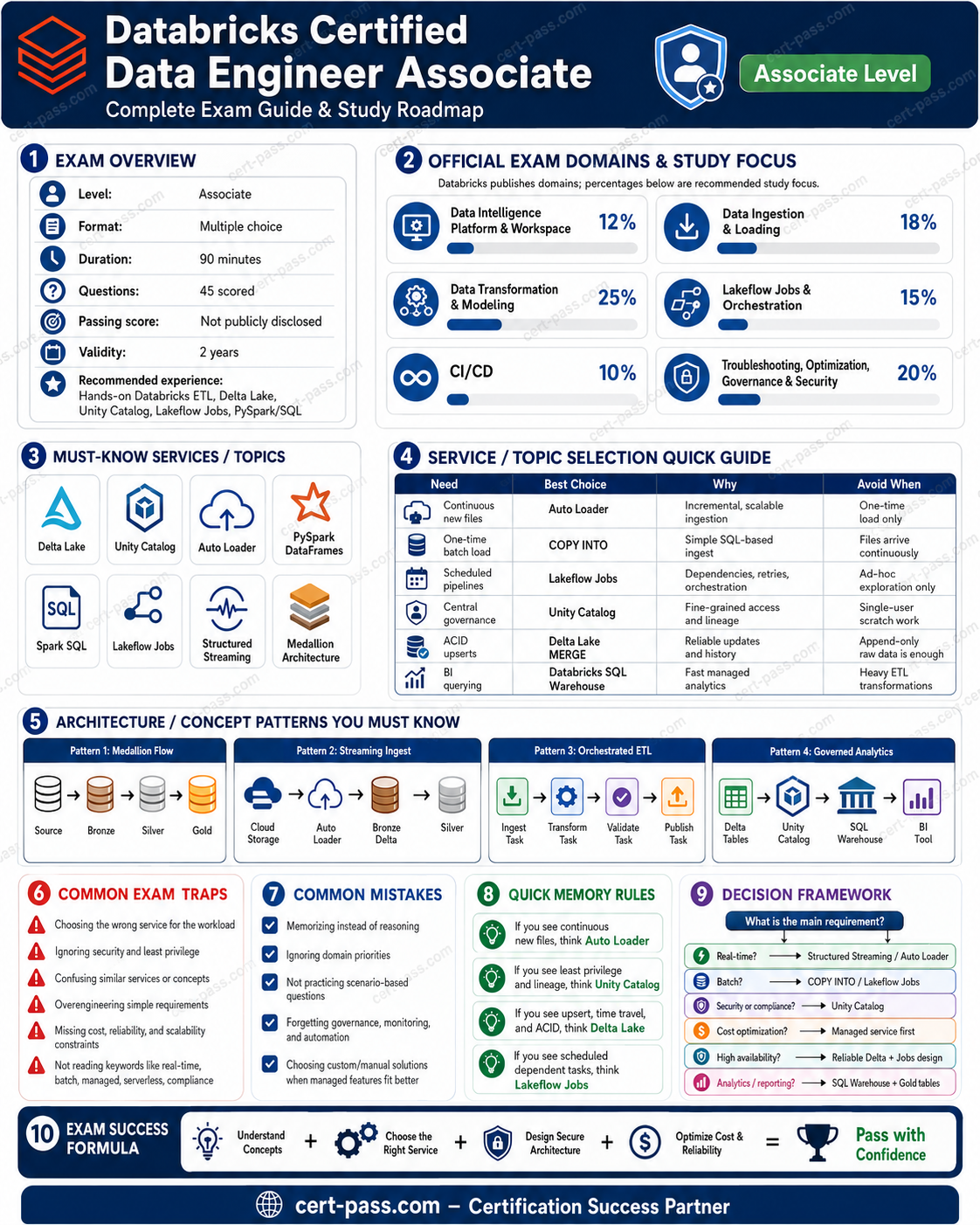
This course consolidates the repeated concepts, traps, and wrong-answer patterns from the question bank into original study notes. It is aligned to the official Databricks Certified Data Engineer Associate exam guide, version current as of May 4, 2026.
Official references to review before the exam:
- Databricks certification page: https://www.databricks.com/learn/certification/data-engineer-associate
- Official exam guide PDF: https://www.databricks.com/sites/default/files/2026-05/databricks-certified-data-engineer-associate-exam-guide-may-2026.pdf
1. Exam Overview
What the exam is testing
The Databricks Certified Data Engineer Associate exam validates whether you can perform foundational data engineering tasks on the Databricks Data Intelligence Platform. The official exam page describes the exam as focused on platform knowledge, workspace architecture, data ingestion, data loading, data transformation and modeling, ETL with PySpark, Lakeflow Jobs, CI/CD, troubleshooting, monitoring, optimization, governance, and security.
Key official exam facts:
| Item | Detail |
|---|---|
| Certification | Databricks Certified Data Engineer Associate |
| Current guide version | May 4, 2026 |
| Scored questions | 45 multiple-choice questions |
| Time | 90 minutes |
| Test aides | None allowed |
| Prerequisite | None required, but hands-on Databricks experience is recommended |
| Validity | 2 years |
| Main question style | Scenario-based multiple choice, mostly service selection and troubleshooting |
How to think like the exam
The exam usually does not ask only “what is this feature?” It asks which feature, configuration, or architecture is most appropriate for a scenario. To answer well, focus on these decision habits:
- Prefer governed Delta tables in Unity Catalog over raw files, unmanaged folders, or direct cloud IAM-only access.
- Prefer managed/platform-native features when the scenario asks for reliability, governance, repeatability, and operational visibility.
- Select ingestion tools based on source type, frequency, volume, schema change behavior, and governance needs.
- Choose orchestration patterns based on dependencies and data availability, not just fixed schedules.
- Diagnose performance using evidence: Spark UI stages, shuffle metrics, skew symptoms, spill, job run history, and cluster events.
- Eliminate distractors that sound powerful but ignore the main requirement: governance, lineage, ACID, checkpointing, schema evolution, CI/CD promotion, or access controls.
How to use this course
Read it in three passes:
- Pass 1 - Understand the platform: read sections 1-5 and build a mental map of Databricks services.
- Pass 2 - Learn the exam decisions: focus on service-selection tables, architecture patterns, and traps.
- Pass 3 - Rapid review: use sections 8-10 the day before the exam.
Do not memorize every command. Memorize the decision rules: when a tool is correct, when it is overkill, and what wrong answers usually miss.
2. Exam Domains
Official domain list
The current official guide lists these exam outline areas:
- Databricks Intelligence Platform
- Data Ingestion and Loading
- Data Transformation and Modeling
- Working with Lakeflow Jobs
- Implementing CI/CD
- Troubleshooting, Monitoring, and Optimization
- Governance and Security
The official 2026 guide lists objectives but does not publish numeric percentages. The question bank used for this course was organized with a practical weighted distribution that emphasizes the most decision-heavy topics.
Priority notes from the source question bank
| Domain | Source rows | Source emphasis | Priority |
|---|---|---|---|
| Databricks Intelligence Platform | 105 | 10% | Foundational |
| Data Ingestion and Loading | 210 | 20% | High |
| Data Transformation and Modeling | 231 | 22% | High |
| Working with Lakeflow Jobs | 126 | 12% | Medium |
| Implementing CI/CD | 105 | 10% | Foundational |
| Troubleshooting, Monitoring, and Optimization | 147 | 14% | Medium |
| Governance and Security | 126 | 12% | Medium |
What matters most
Highest-yield areas from the source file:
- Delta Lake + Unity Catalog as the default governed lakehouse foundation.
- COPY INTO vs Auto Loader vs Lakeflow Connect for ingestion decisions.
- Bronze/Silver/Gold design, especially cleaning, deduplication, joins, streaming tables, materialized views, and BI-ready gold objects.
- Spark performance evidence: skew, shuffle, spilling, partitioning, broadcast joins, adaptive query execution, and Spark UI interpretation.
- Lakeflow Jobs: DAG dependencies, retries, branching, looping, file arrival triggers, table update triggers, and task types.
- Declarative Automation Bundles / Databricks Asset Bundles, Git Folders, branches, pull requests, and environment-specific configuration.
- Unity Catalog security: privileges, managed/external tables, row filters, column masks, ABAC, service principals, and least privilege.
3. Start-to-Finish Study Path
Foundation
Goal: understand the platform and why Databricks choices are usually better than raw storage-only designs.
Study order:
- Data Intelligence Platform, workspaces, catalogs, schemas, tables, SQL warehouses, clusters, jobs, notebooks.
- Delta Lake basics: ACID transactions, schema enforcement/evolution, time travel, transaction log, optimize operations.
- Unity Catalog basics: catalogs, schemas, tables, volumes, grants, lineage, managed vs external storage.
- Medallion architecture: bronze, silver, gold.
Hands-on tasks:
- Create a Unity Catalog table.
- Load files into Delta.
- Query with SQL warehouse.
- Grant access to a group.
- Review table lineage and history.
Intermediate
Goal: answer service-selection and transformation questions.
Study order:
- Ingestion tools: local upload, COPY INTO, Auto Loader, Lakeflow Connect, JDBC/ODBC, REST, partner connectors.
- Transformation patterns: cleaning, joins, arrays, nested JSON, deduplication, aggregation.
- Gold modeling: views, materialized views, streaming tables, physical tables.
- Job orchestration: task dependencies, retry behavior, schedules, triggers, notifications.
Hands-on tasks:
- Use COPY INTO for incremental file loads.
- Use Auto Loader with a checkpoint.
- Build bronze-to-silver transformation with deduplication.
- Create a Lakeflow Job with multiple dependent tasks.
Advanced
Goal: troubleshoot, optimize, and deploy safely.
Study order:
- Spark UI: stages, tasks, shuffle read/write, data skew, spilling, slow tasks.
- Optimization: partitioning, broadcast joins, shuffle partitions, liquid clustering, predictive optimization.
- CI/CD: Git Folders, branches, pull requests, bundles, dev/test/prod targets, variables and overrides.
- Security: GRANT, REVOKE, DENY, row filters, column masks, ABAC policies.
Hands-on tasks:
- Compare a broadcast join vs shuffle join.
- Review Spark UI for a slow job.
- Deploy a job using a bundle pattern.
- Apply column masking and group-based access.
Final review
Goal: eliminate wrong answers quickly.
Focus on:
- Tool selection tables in section 5.
- Architecture patterns in section 6.
- Traps in section 7.
- Memory rules in section 8.
- Checklist in section 10.
4. Core Concepts by Domain
Domain 1: Databricks Intelligence Platform
Concepts
The platform is a unified environment for data engineering, analytics, BI, and AI workloads. For this exam, the most important platform concepts are:
- Delta Lake: transactional storage layer with ACID guarantees, schema enforcement, schema evolution, time travel, and efficient metadata operations.
- Unity Catalog: centralized governance layer for data, AI assets, permissions, lineage, catalogs, schemas, tables, volumes, and external locations.
- Compute services: job compute, all-purpose compute, SQL warehouses, serverless options, and workload-specific configuration.
- Workspace assets: notebooks, Git Folders, jobs, dashboards, SQL queries, pipelines, and bundles.
- Lakehouse architecture: governed tables in object storage, separating storage from compute while maintaining platform-level governance.
Services
| Service / Feature | What it is for | Exam decision rule |
|---|---|---|
| Delta Lake | Reliable tables on cloud object storage | Choose for ACID, rollback/time travel, schema controls, and scalable analytics |
| Unity Catalog | Central governance and discovery | Choose for permissions, lineage, row/column security, ABAC, and cross-workspace governance |
| SQL Warehouse | SQL analytics and BI workloads | Choose for analyst-facing queries, dashboards, and SQL access to curated tables |
| All-purpose compute | Interactive development | Choose for notebooks and exploration, not usually for production scheduled jobs |
| Job compute | Scheduled production tasks | Choose for automated Lakeflow Jobs and cost isolation |
| Serverless compute | Fast startup and lower admin overhead where supported | Choose when platform-managed scaling/startup is emphasized |
Patterns
- Single source of truth: store curated data as governed Delta tables in Unity Catalog.
- Separate environments: dev, test, prod should be separate targets/configurations, not manual edits in the same workspace objects.
- Use SQL warehouses for analysts: analysts querying gold tables should not need to run shared all-purpose clusters.
- Prefer Delta over raw files: raw CSV or Parquet folders lack transaction semantics and simple governance integration.
Traps
- Choosing DBFS/raw files for curated data when the requirement mentions rollback, auditability, lineage, or governance.
- Using temporary views as a substitute for physical, governed, recoverable tables.
- Choosing cloud IAM alone when the question asks for Databricks-native access control and lineage.
- Treating all compute as interchangeable. Jobs, SQL warehouses, and interactive clusters are optimized for different use cases.
Domain 2: Data Ingestion and Loading
Concepts
This is one of the highest-value domains. The exam tests whether you can choose the correct ingestion approach based on source and workload characteristics.
Main ingestion dimensions:
- Source type: cloud files, local files, database, SaaS app, APIs, event data, semi-structured files.
- Frequency: one-time, scheduled batch, incremental, near real-time.
- Volume: small manual upload vs large directory of arriving files.
- Schema behavior: stable schema, evolving schema, nested JSON, rescued data.
- Governance: whether data must land directly into Unity Catalog-governed tables.
- Reliability: checkpointing, idempotency, file tracking, retries, and orchestration.
Services
| Ingestion method | Use when | Avoid when |
|---|---|---|
| COPY INTO | Incrementally loading files from cloud object storage into Delta/UC tables with simple file tracking | High-frequency file arrival, complex schema evolution, continuous ingestion, or very large dynamic directories |
| Auto Loader | Scalable file ingestion with checkpointing, schema inference/evolution, directory listing or file notification | Simple one-off loads where COPY INTO is enough |
| Lakeflow Connect managed connectors | Enterprise/SaaS/database ingestion where Databricks-managed connectors reduce custom code | Source is unsupported or custom REST logic is required |
| Lakeflow Connect standard connectors | Common source connectors and structured ingestion into governed tables | Highly custom APIs requiring special pagination/auth behavior |
| JDBC/ODBC from notebooks | Controlled ingestion from databases when custom logic is needed | Very large production CDC-style workloads better served by managed ingestion patterns |
| REST clients in notebooks | Custom API ingestion when no connector fits | When a managed connector exists and reliability/governance are priorities |
| Partner connectors | Specialized ingestion not covered by native connectors | When native Lakeflow Connect already covers the use case simply |
Patterns
- Cloud files arriving regularly → Auto Loader with checkpoints and schema evolution.
- Simple incremental batch from object storage → COPY INTO.
- Enterprise SaaS or database source → Lakeflow Connect if supported.
- Custom API → REST client logic orchestrated by Lakeflow Jobs, then write to governed Delta tables.
- Nested JSON → land raw in bronze, parse/explode/clean in silver.
- Schema drift → use schema evolution/rescued data patterns; do not silently overwrite curated schemas.
Traps
- Choosing COPY INTO for continuous high-volume streaming-style ingestion where Auto Loader is more suitable.
- Choosing Auto Loader for a single small manual load where COPY INTO or UI upload is simpler.
- Ignoring checkpoints. Without checkpointing, incremental file processing can duplicate or miss data.
- Writing directly to unmanaged raw folders when the requirement asks for Unity Catalog governance.
- Flattening complex JSON immediately into gold without preserving bronze raw data.
Domain 3: Data Transformation and Modeling
Concepts
This domain has the highest representation in the source file. The exam expects you to understand practical ETL patterns with SQL and PySpark.
Core concepts:
- Bronze: raw or lightly validated ingested data; preserve original structure as much as practical.
- Silver: cleaned, deduplicated, standardized, joined, validated data.
- Gold: business-ready data products: views, materialized views, streaming tables, aggregate tables, dimensional models, BI-ready datasets.
- DataFrames and SQL: select, filter, join, group, aggregate, deduplicate, rename, cast, explode, split, union.
- Joins: inner, left, cross, broadcast, multi-key joins, handling nulls and duplicates.
- Data quality: expectations, validation rules, null checks, uniqueness, referential checks, schema validation.
- Performance tuning: shuffle partitions, broadcast thresholds, executor/driver memory, skew mitigation, re-measuring after changes.
Services and objects
| Object / technique | Use when | Avoid when |
|---|---|---|
| Table | Durable physical storage for reusable curated datasets | Ad hoc logic that should not persist data |
| View | Logical abstraction over tables; always computes from base data | Expensive query reused heavily where materialization is needed |
| Materialized view | Precomputed results for faster repeated analytical queries | Highly volatile logic where freshness must be instant and recomputation cost is unacceptable |
| Streaming table | Incremental/continuous table from streaming or incremental pipelines | Static batch result that does not need streaming semantics |
| Broadcast join | One side is small enough to send to workers | Both sides are large or broadcast causes memory pressure |
| Repartition | Increase/decrease parallelism or reduce skew before expensive operations | Blindly repartitioning without measuring shuffle impact |
| Cache | Reusing the same DataFrame repeatedly in a session | One-time transformations or huge data that stresses memory |
Patterns
- Clean data in silver: cast data types, remove invalid records, handle nulls, standardize strings, deduplicate business keys.
- Use bronze for recovery: raw bronze lets you reprocess when silver/gold logic changes.
- Join carefully: decide between inner and left joins based on whether unmatched records must be retained.
- Deduplicate by business key and timestamp: keep latest record using ranking/windowing, not random drop duplicates when ordering matters.
- Explode arrays before aggregating nested records: nested JSON often needs explode/flatten operations.
- Gold objects depend on consumer need: BI dashboards often need materialized or aggregate tables; ad hoc exploration may only need views.
Traps
- Using
unionand expecting duplicates to remain. In SQL,UNIONremoves duplicates;UNION ALLkeeps them. - Choosing inner join when the scenario says keep all customers/orders/left-side records.
- Choosing cross join accidentally; it creates Cartesian products and can explode row counts.
- Ignoring skew. One slow task with huge shuffle read often means skew, not simply “cluster too small.”
- Overusing cache, repartition, or cluster scaling without evidence.
- Building gold directly from raw files without bronze/silver quality gates.
Domain 4: Working with Lakeflow Jobs
Concepts
Lakeflow Jobs orchestrate tasks in a DAG. The exam emphasizes when to use task dependencies, retries, conditional tasks, looping, triggers, and task types.
Important concepts:
- Task graph: tasks run in dependency order, not necessarily sequentially unless dependencies require it.
- Task types: notebook, SQL query, dashboard, pipeline, Python/script/library tasks depending on platform availability.
- Retries: handle transient failures, not bad code or corrupt data.
- Conditional branching: choose paths based on task outcomes or values.
- Looping: repeat logic over parameter sets or batches.
- Triggers: scheduled, file arrival, table update.
- Notifications and run history: operational visibility and troubleshooting.
Services
| Feature | Best use | Exam trap |
|---|---|---|
| Scheduled trigger | Data arrives on a predictable time cadence | Wrong when upstream arrival is irregular |
| File arrival trigger | Start a job when files land | Wrong when the dependency is a table refresh rather than files |
| Table update trigger | Start downstream tasks when a table changes | Wrong when source event is object-storage file arrival |
| Retries | Transient cluster/network/source issues | Wrong for deterministic data quality failures |
| Conditional task | Branch based on status or value | Wrong if simple dependency ordering is enough |
| Job parameters | Reusable job logic across dates/sources/environments | Wrong to hardcode environment-specific values in notebooks |
Patterns
- Data-driven orchestration: use file arrival or table update triggers when freshness depends on upstream availability.
- DAG-based reliability: model dependencies explicitly instead of hiding them in notebook calls.
- Reusable tasks: pass parameters rather than copy-pasting notebooks for each source.
- Operational monitoring: review run history, task graphs, failure rates, and logs.
Traps
- Scheduling a job every hour when the actual requirement is “run after upstream table updates.”
- Retrying indefinitely instead of fixing deterministic logic errors.
- Putting orchestration inside notebooks rather than using Jobs DAG dependencies.
- Using one giant notebook instead of task separation with clear dependencies.
Domain 5: Implementing CI/CD
Concepts
This domain tests whether you can manage Databricks assets with repeatable deployment practices.
Core concepts:
- Databricks Git Folders: connect notebooks/code to Git, create/switch branches, commit, push, and open pull requests.
- Declarative Automation Bundles / Databricks Asset Bundles: package jobs, pipelines, code assets, variables, targets, and environment-specific configuration.
- Targets: dev, test, prod configurations using the same codebase with overrides.
- CLI: validate, deploy, run, and manage bundles/assets in automated workflows.
- Pull request flow: review and merge changes before deployment.
- Separation of code and config: do not hardcode workspace IDs, paths, catalogs, schemas, or secrets in notebooks.
Services
| Tool | Use when | Avoid when |
|---|---|---|
| Git Folders | Collaborative code development, branches, commits, pull requests | Using notebook revision history as the main source-control strategy |
| Automation Bundles / Asset Bundles | Deploying jobs, pipelines, and resources across environments | Manual clicking in prod for repeatable deployments |
| Databricks CLI | CI/CD automation, validation, deployment | Manual-only workflows where repeatability is required |
| Variables and overrides | Environment-specific config | Duplicating code per environment |
| Service principals | Non-human deployment identity | Using a personal user token for production automation |
Patterns
- Develop in branch → PR → merge → bundle deploy to target.
- Same codebase, different config for dev/test/prod.
- Validate before deploy to catch malformed bundle definitions.
- Promote artifacts, do not manually edit prod notebooks.
- Use secret scopes or secure config, not plaintext credentials in code.
Traps
- Treating workspace notebook history as enough for CI/CD.
- Copy-pasting notebooks between dev/test/prod.
- Hardcoding catalog/schema names that differ by environment.
- Using a personal account for production deployment automation.
- Deploying jobs manually when the scenario asks for repeatability, versioning, or promotion.
Domain 6: Troubleshooting, Monitoring, and Optimization
Concepts
This domain is evidence-driven. The exam often gives symptoms and asks for the best diagnosis or remediation.
Core concepts:
- Lakeflow Jobs run history: compare current and historical execution times, identify failures and trends.
- DAG task graph: find upstream blockers and failed dependencies.
- Spark UI: inspect jobs, stages, tasks, shuffle, skew, spills, and executor behavior.
- Skew: a few tasks take much longer and read much more shuffle data than others.
- Shuffle: expensive data movement caused by joins, aggregations, repartitions, and order operations.
- Disk spilling: memory pressure causing data to spill to disk.
- Cluster startup failures: permissions, policies, libraries, init scripts, instance capacity, network, cloud quota.
- Library conflicts: incompatible package versions or cluster/runtime mismatch.
- OOM: driver/executor memory exceeded, often from collecting too much data, skew, bad joins, or insufficient memory.
- Liquid clustering and predictive optimization: reduce manual table optimization work where supported.
Services and evidence
| Symptom | Likely cause | Best first response |
|---|---|---|
| One task much slower than others; max shuffle read far above median | Data skew | Enable AQE/skew handling or salt/repartition skewed keys |
| Many tasks spill to disk | Memory pressure or poor partitioning | Check executor memory, partitioning, join strategy, data size |
| Job suddenly slower after new source | Larger volume, skew, schema/data distribution change | Compare run history and Spark UI stage metrics |
| Cluster fails to start | policy/quota/library/init/network issue | Review cluster event logs and error details |
| SQL queries slow on same predicates | Poor table layout/statistics | Consider predictive optimization, liquid clustering, statistics |
| Driver OOM | collecting large data to driver | Avoid collect/toPandas on large datasets; aggregate/distribute work |
Patterns
- Use evidence first: Spark UI and run history before changing cluster size.
- Fix skew at data/query level: AQE skew join handling, salting, repartitioning by better keys.
- Optimize tables for query pattern: liquid clustering/predictive optimization where appropriate.
- Scale only after understanding bottleneck: adding workers does not always fix skew or driver OOM.
- Re-measure after each tuning change: the guide expects iterative performance validation.
Traps
- Increasing cluster size for every slow job. This may not fix skew or driver OOM.
- Reducing shuffle partitions blindly. Too few partitions can make tasks larger and slower.
- Disabling stats or optimization to “reduce overhead” when query performance is the goal.
- Ignoring the difference between driver memory and executor memory.
- Confusing file layout problems with compute problems.
Domain 7: Governance and Security
Concepts
Governance is mostly Unity Catalog. The exam tests basic operations and security decisions.
Core concepts:
- Catalog → schema → table/view/function/volume hierarchy.
- Managed tables: Databricks manages table metadata and storage location under managed storage.
- External tables: metadata in Databricks, data stored in external cloud locations.
- External locations and storage credentials: controlled access to cloud storage through Unity Catalog.
- Privileges: GRANT, REVOKE, DENY to users, groups, and service principals.
- Least privilege: grant only what is needed, usually to groups rather than individuals.
- Row-level security: filter rows based on user/group/attribute.
- Column masking: mask sensitive columns such as PII.
- ABAC policies: centrally apply attribute-based access control, masking, and row filtering.
- Lineage and auditability: trace data usage and transformations.
Services
| Feature | Use when | Avoid when |
|---|---|---|
| GRANT | Allow a principal a privilege | Granting broad privileges to individuals instead of groups |
| REVOKE | Remove a privilege previously granted | Assuming revoke blocks access if another group still grants it |
| DENY | Explicitly block a privilege where supported | Using as default instead of designing least privilege clearly |
| Row filter | Restrict which rows users can see | Duplicating tables per region/team for security |
| Column mask | Hide/mask sensitive column values | Removing the column entirely when analytics still need safe access |
| ABAC policy | Centralized reusable masking/filtering by attributes | Per-table manual logic that becomes inconsistent |
| External table | Govern data in external cloud path | When Databricks-managed storage lifecycle is desired |
| Managed table | Let Databricks manage table storage | When data must remain in a specific external governed path |
Patterns
- Use groups for permissions; avoid user-by-user grants.
- Use service principals for automated jobs and CI/CD.
- Use Unity Catalog controls, not raw cloud IAM access, for Databricks data access patterns.
- Apply row/column security centrally, especially for PII or regional restrictions.
- Do not duplicate data for security when dynamic filters/masks solve the requirement.
Traps
- Choosing cloud IAM-only permissions when Unity Catalog governance is required.
- Duplicating sensitive tables per user group instead of using row filters or masks.
- Granting
ALL PRIVILEGESwhen the scenario asks for least privilege. - Confusing managed and external tables.
- Assuming a user loses access after REVOKE when they still inherit from another group.
5. Service Selection Guide
Ingestion decision table
| Scenario wording | Best answer | Why | Usually wrong answer |
|---|---|---|---|
| “Incrementally load files from S3/ADLS/GCS into a UC-governed table; simple batch” | COPY INTO | Simple file tracking and incremental load | Auto Loader if the workload is not large/frequent |
| “New files arrive continuously or frequently; need checkpointing and schema evolution” | Auto Loader | Scalable incremental ingestion for file arrival | COPY INTO may be too limited |
| “SaaS/enterprise database source with managed reliability” | Lakeflow Connect | Connector-managed ingestion | Custom REST/JDBC code first |
| “Unsupported custom API with special auth/pagination” | REST client in notebook/job | Custom logic is required | Forcing Lakeflow Connect when unsupported |
| “Need orchestration after ingestion” | Lakeflow Jobs | DAG, triggers, retries, monitoring | Notebook chaining |
| “Need governance on landed data” | Unity Catalog-governed Delta table | Permissions, lineage, policy enforcement | Raw unmanaged folders |
Transformation and modeling decision table
| Requirement | Best object/pattern | Why | Avoid |
|---|---|---|---|
| Preserve raw source for replay | Bronze Delta table | Reprocess when logic changes | Directly writing only gold |
| Clean and standardize fields | Silver table | Quality-controlled reusable layer | BI directly on bronze |
| Fast repeated aggregate query | Materialized view or aggregate table | Precomputed for performance | Plain view over heavy joins |
| Always reflect source logic and low storage | View | Logical abstraction | Materializing everything |
| Incremental/streaming updates | Streaming table | Maintains continuous/incremental result | Batch table if freshness is continuous |
| Keep unmatched left-side rows | Left join | Retains all left records | Inner join drops nonmatches |
| Small dimension joined to huge fact | Broadcast join | Avoids large shuffle | Shuffle join if small side fits broadcast |
Compute selection table
| Workload | Best compute | Reason |
|---|---|---|
| Analyst SQL dashboard | SQL warehouse | Designed for SQL analytics and concurrency |
| Production scheduled ETL | Job compute | Isolated, task-oriented, cost-controlled |
| Interactive notebook development | All-purpose compute | Development and exploration |
| Fast startup with less admin | Serverless where supported | Platform-managed compute |
| Many analysts with concurrent SQL | SQL warehouse/high concurrency SQL environment | Concurrency and BI performance |
CI/CD selection table
| Requirement | Correct choice | Why |
|---|---|---|
| Branch, commit, push code changes | Databricks Git Folders | Git-backed workspace development |
| Promote jobs/pipelines across environments | Declarative Automation Bundles / Databricks Asset Bundles | Versioned infrastructure and workspace resources |
| Use different config per dev/test/prod | Bundle variables and target overrides | Same codebase, environment-specific config |
| Automate deployment | Databricks CLI in CI/CD pipeline | Repeatable validation and deployment |
| Production identity for automation | Service principal | Non-human, auditable deployment identity |
Governance selection table
| Requirement | Correct choice | Why |
|---|---|---|
| Central data permissions | Unity Catalog grants | Platform-native access control |
| PII masking | Column masks / ABAC | Restrict sensitive values dynamically |
| Regional row restrictions | Row filters / ABAC | One table, dynamic visibility |
| Govern data in external cloud path | External table + external location | UC controls metadata and access |
| Databricks-managed storage lifecycle | Managed table | Simpler managed table storage |
| Automated job access | Service principal with least privilege | Avoid personal user credentials |
6. Architecture Patterns
Pattern 1: Governed medallion lakehouse
Scenario: Files, APIs, or enterprise sources feed analytics and BI. The organization needs reliability, access control, lineage, and rollback.
Recommended solution:
- Land raw data into bronze Delta tables governed by Unity Catalog.
- Clean, cast, deduplicate, and validate into silver Delta tables.
- Build gold tables/views/materialized views/streaming tables for BI and downstream consumers.
- Use SQL warehouses for analyst consumption.
- Govern access with groups, row filters, column masks, and ABAC where needed.
Why alternatives are wrong:
- Raw CSV/Parquet folders miss Delta transaction guarantees and governed table behavior.
- Temporary views do not provide durable, governed, recoverable storage.
- Direct cloud IAM-only governance bypasses Databricks-native lineage and fine-grained controls.
Pattern 2: Incremental cloud file ingestion
Scenario: New files arrive in S3/ADLS/GCS and need to be loaded incrementally.
Recommended solution:
- Use COPY INTO for simple batch incremental file loading.
- Use Auto Loader when files arrive frequently, volume is high, schema evolves, or checkpointing/file notification matters.
- Write results to Unity Catalog-governed Delta tables.
Why alternatives are wrong:
- Re-reading all files each run causes duplicates and waste.
- Manual file tracking is error-prone.
- Loading into unmanaged folders weakens governance and query reliability.
Pattern 3: Enterprise source ingestion
Scenario: Data comes from CRM/ERP/SaaS/database sources and must be reliable and governed.
Recommended solution:
- Prefer Lakeflow Connect if a standard or managed connector supports the source.
- Use JDBC/ODBC or REST from jobs only when connector coverage or custom logic requires it.
- Orchestrate ingestion with Lakeflow Jobs.
- Land to bronze or directly to governed Delta tables depending on source and quality requirements.
Why alternatives are wrong:
- Custom notebooks for every source increase maintenance.
- Direct BI access to source systems couples analytics to operational systems.
- Untracked manual exports create duplication and audit problems.
Pattern 4: BI-ready gold layer
Scenario: BI consumers need performant, consistent reporting from curated tables.
Recommended solution:
- Use silver as the trusted clean layer.
- Build gold materialized views or aggregate tables for repeated dashboard queries.
- Use SQL warehouses for serving analysts.
- Apply Unity Catalog permissions and column/row controls.
Why alternatives are wrong:
- BI directly on bronze exposes raw quality issues.
- Recomputing heavy joins in plain views can be slow.
- Duplicating datasets by consumer group complicates governance.
Pattern 5: Data-driven orchestration
Scenario: Downstream pipeline must run only after source data lands or a table updates.
Recommended solution:
- Use file arrival triggers for object-storage file dependencies.
- Use table update triggers for Delta/UC table dependencies.
- Use Lakeflow Jobs DAG dependencies to coordinate tasks.
- Add retries for transient issues.
Why alternatives are wrong:
- Time-based schedules can run too early or too late.
- Notebook-to-notebook chaining hides dependencies.
- Retrying deterministic data errors wastes compute.
Pattern 6: CI/CD promotion across environments
Scenario: A team needs repeatable deployments of jobs and pipelines to dev/test/prod.
Recommended solution:
- Develop in Git branches using Databricks Git Folders.
- Review changes with pull requests.
- Define jobs/pipelines/resources in bundles.
- Use variables and target overrides for environment differences.
- Deploy using Databricks CLI and a service principal.
Why alternatives are wrong:
- Manually editing prod is not repeatable.
- Copying notebooks creates drift.
- Personal tokens are risky for production automation.
Pattern 7: Performance troubleshooting
Scenario: A job becomes slow after a data change.
Recommended solution:
- Compare run history to identify when performance changed.
- Use Spark UI to inspect stages, tasks, shuffle, and spills.
- If one/few tasks are much slower with high max shuffle read, suspect skew.
- Apply AQE skew join handling, salting, better partitioning, or broadcast if appropriate.
- Re-measure after each change.
Why alternatives are wrong:
- Scaling up first may be expensive and ineffective.
- Reducing shuffle partitions can make each task larger.
- Guessing without Spark UI evidence misses root cause.
7. Exam Traps
Misleading wording patterns
| Wording in question | Trap | Better thinking |
|---|---|---|
| “Reliable rollback after bad writes” | Choosing raw files or views | Think Delta Lake time travel/transaction log |
| “Central governance, lineage, access controls” | Choosing cloud IAM only | Think Unity Catalog |
| “Files arrive continuously/frequently” | Choosing COPY INTO automatically | Think Auto Loader with checkpointing |
| “Simple incremental batch from object storage” | Overengineering with streaming | COPY INTO may be enough |
| “Unsupported custom API” | Forcing managed connector | Use REST/JDBC logic in a job |
| “Keep all left records” | Choosing inner join | Use left join |
| “Small lookup/dimension table” | Choosing repartition first | Broadcast join may reduce shuffle |
| “One task much slower than rest” | Scale cluster blindly | Diagnose skew |
| “Deploy same code to dev/test/prod” | Copy notebooks | Use bundles with targets/overrides |
| “Sensitive column visibility” | Duplicate tables | Use column masks/ABAC |
Wrong-but-plausible answers
- “Increase cluster size”: plausible for capacity, wrong when the symptom is skew, driver OOM, bad join, or poor file layout.
- “Use temporary views”: plausible for quick SQL, wrong for durable governed data products.
- “Use raw Parquet/CSV in cloud storage”: plausible because Databricks can query files, wrong when ACID, time travel, governance, or lineage are required.
- “Use a fixed schedule”: plausible for jobs, wrong when the job must wait for file arrival or table update.
- “Grant broad permissions”: plausible for unblocking users, wrong for least privilege.
- “Manual notebook copy to prod”: plausible as a quick release, wrong for CI/CD.
- “Use cloud IAM only”: plausible for storage access, wrong for Unity Catalog-governed Databricks access.
Common distractors
- Raw DBFS or unmanaged storage as a substitute for Unity Catalog tables.
- Manual file versioning as a substitute for Delta time travel.
- Notebook revision history as a substitute for Git.
- Cron schedule as a substitute for data-driven triggers.
- Duplicated tables as a substitute for row filters or column masks.
- Blind repartitioning as a substitute for evidence-based Spark tuning.
- Caching everything as a substitute for optimized query design.
Elimination strategy
When stuck, eliminate answers that:
- Ignore governance when the question mentions security, lineage, or audit.
- Ignore incremental state when the question mentions new files, repeated runs, or avoiding duplicates.
- Use manual processes when the question mentions CI/CD, repeatability, or promotion.
- Use time-based scheduling when the question mentions data availability.
- Use scaling as the first fix when the question provides Spark UI evidence.
- Choose a logical object when durable physical storage is required.
- Duplicate data for security when dynamic policies would solve it.
8. Quick Memory Rules
Rules of thumb
- Governed data product? Delta table + Unity Catalog.
- Rollback bad write? Delta time travel / transaction history.
- BI analytics? Gold layer + SQL warehouse.
- Simple incremental files? COPY INTO.
- Frequent file arrival or schema drift? Auto Loader.
- Enterprise connector? Lakeflow Connect.
- Unsupported API? REST/JDBC in a job, then write Delta.
- Orchestration? Lakeflow Jobs DAG, not notebook chaining.
- Run after data appears? File arrival/table update trigger.
- Code promotion? Git Folders + bundles + CLI.
- Environment config? Variables and target overrides.
- Slow with one huge task? Data skew.
- High shuffle/spill? Join/aggregation/partitioning issue.
- Sensitive column? Column mask.
- Regional/team row access? Row filter or ABAC.
- Automated identity? Service principal.
Fast service mapping
| If you see... | Think... |
|---|---|
| ACID, rollback, time travel | Delta Lake |
| Governance, lineage, grants | Unity Catalog |
| SQL BI users | SQL Warehouse |
| Medallion, cleaned layers | Bronze/Silver/Gold |
| New files in cloud storage | COPY INTO or Auto Loader |
| High-frequency file ingestion | Auto Loader |
| SaaS/database ingestion | Lakeflow Connect |
| Task dependencies | Lakeflow Jobs DAG |
| Same code to dev/test/prod | Automation Bundles / Asset Bundles |
| Branch/commit/PR | Git Folders |
| Stage metrics, slow tasks | Spark UI |
| One giant partition/task | Skew |
| Expensive joins/aggregations | Shuffle tuning |
| Query layout optimization | Liquid clustering / predictive optimization |
| PII hiding | Column masking / ABAC |
| Dynamic row restrictions | Row filters / ABAC |
“If you see X, think Y” patterns
- If you see “single source of truth for BI and AI”, think Delta + Unity Catalog.
- If you see “avoid duplicate file processing”, think checkpointing/file tracking.
- If you see “schema evolves over time”, think Auto Loader schema evolution/rescued data.
- If you see “source system connector exists”, think Lakeflow Connect before custom code.
- If you see “run downstream when upstream is updated”, think table update trigger.
- If you see “run when file arrives”, think file arrival trigger.
- If you see “promote across environments”, think bundle targets and overrides.
- If you see “one task takes 10 minutes, median is 30 seconds”, think skew.
- If you see “mask SSN/email/salary”, think column mask.
- If you see “users see only their region”, think row filter or ABAC.
9. Final Revision Notes
Highest-yield review points
- Delta Lake is the reliability foundation: ACID, transaction log, schema enforcement/evolution, time travel.
- Unity Catalog is the governance foundation: catalogs, schemas, tables, volumes, permissions, lineage, row/column security.
- COPY INTO vs Auto Loader: simple incremental batch vs scalable file ingestion with checkpointing and schema evolution.
- Lakeflow Connect: preferred for supported enterprise/SaaS/database ingestion patterns.
- Medallion architecture: bronze raw, silver clean, gold business-ready.
- Gold object choice: view vs materialized view vs streaming table vs physical table depends on freshness, performance, and storage.
- Lakeflow Jobs: task DAG, dependencies, retries, branching, looping, triggers.
- CI/CD: Git Folders for development; bundles and CLI for deployment; targets/overrides for environments.
- Performance troubleshooting: use run history and Spark UI; diagnose skew/shuffle/spill before scaling.
- Security: use groups, service principals, least privilege, masks, filters, and ABAC.
Last-day revision list
Review these tables and rules:
- Ingestion decision table.
- Compute selection table.
- Transformation object table.
- Governance selection table.
- Exam traps and elimination strategy.
Do a final mental drill:
- What would I choose for simple cloud file incremental load?
- What would I choose for continuous file ingestion with schema changes?
- What would I choose for supported SaaS ingestion?
- What would I choose for BI performance on repeated aggregations?
- What would I choose for slow job with one giant shuffle task?
- What would I choose for masking PII?
- What would I choose for dev/test/prod deployment?
10. Exam-Day Checklist
Must-know topics
Before the exam, confirm you can explain each item in one sentence:
- Delta Lake ACID transactions, time travel, schema enforcement, schema evolution.
- Unity Catalog catalog/schema/table hierarchy.
- Managed table vs external table.
- External locations and storage credentials at a high level.
- GRANT, REVOKE, DENY and least-privilege access.
- Row filters, column masks, and ABAC policies.
- Bronze, silver, and gold layer responsibilities.
- COPY INTO use cases and limits.
- Auto Loader checkpointing, schema inference/evolution, file notification/directory listing.
- Lakeflow Connect for supported source ingestion.
- JDBC/ODBC/REST custom ingestion tradeoffs.
- Joins: inner, left, cross, broadcast, multi-key.
- Union vs union all.
- Deduplication using business keys and ordering.
- Exploding arrays and handling nested JSON.
- Views vs materialized views vs streaming tables vs physical tables.
- Lakeflow Jobs DAG dependencies and task types.
- Scheduled vs file arrival vs table update triggers.
- Retries, branching, and looping.
- Git Folders branch/commit/push/PR workflow.
- Bundles/targets/variables/overrides for CI/CD.
- Databricks CLI validation and deployment basics.
- Spark UI symptoms: skew, shuffle, spilling, slow stage/task.
- Cluster startup, library conflict, and OOM troubleshooting.
- Liquid clustering and predictive optimization purpose.
- SQL warehouses for BI/SQL workloads.
- Job compute vs all-purpose compute.
Final confidence checklist
You are exam-ready when you can:
- Pick the right ingestion tool from a scenario without guessing.
- Explain why raw files are usually wrong for governed curated data.
- Choose the right medallion layer for raw, clean, and business-ready data.
- Select the correct join type from wording like “keep all records.”
- Identify skew from Spark UI symptoms.
- Explain why increasing cluster size is not always the best fix.
- Choose Lakeflow Jobs triggers based on data availability.
- Explain the full Git-to-bundle-to-prod deployment pattern.
- Apply least privilege with Unity Catalog groups/service principals.
- Choose masks/filters/ABAC instead of duplicating sensitive data.
Ultra-Compact One-Page Review
- Delta + UC is the default for reliable, governed data.
- Bronze/Silver/Gold: raw → clean → business-ready.
- COPY INTO: simple incremental files.
- Auto Loader: frequent/scalable files, checkpointing, schema evolution.
- Lakeflow Connect: supported enterprise/SaaS/database ingestion.
- Lakeflow Jobs: DAG orchestration, retries, triggers, monitoring.
- Git Folders + Bundles + CLI: real CI/CD.
- SQL Warehouse: analysts, dashboards, BI.
- Spark UI: diagnose before tuning.
- Skew: one/few slow tasks, max shuffle much larger than median.
- Liquid clustering/predictive optimization: reduce manual table optimization.
- Unity Catalog security: group grants, service principals, row filters, masks, ABAC.
- Eliminate answers that are manual, ungoverned, non-incremental, or ignore the evidence in the scenario.
FAQ
What should be learned first?
Start with the official facts, the service families, and the service selection pairs that are easiest to confuse. Use /exams/databricks-data-engineer-associate as the home base for practice and revision.
Is the official vendor page useful?
Yes. It provides the vendor baseline for what the certification covers and helps anchor the study plan to official wording.
Final CTA
Return to /exams/databricks-data-engineer-associate whenever you need a clean reset before practice or final revision.