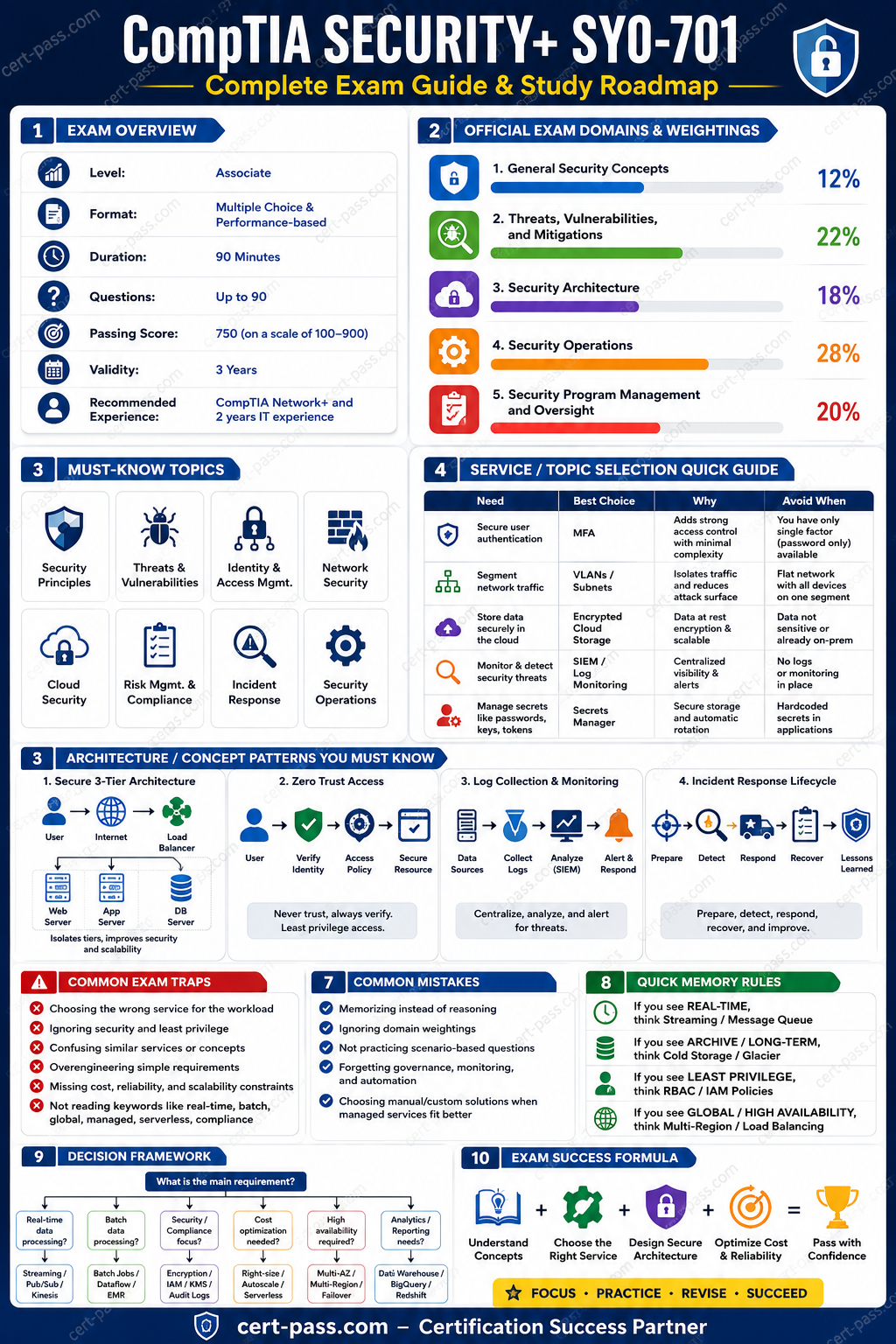

Security+ SY0-701 Study Guide 2026
Security+ SY0-701 is one of the most useful starting points for a candidate who wants to understand modern cybersecurity without getting lost in vendor-specific tools first. The exam is broad, practical, and centered on the everyday decisions that security teams make when they protect users, devices, networks, applications, and data. In 2026, the best way to prepare is not to memorize isolated facts in the abstract. The better approach is to understand how the domains connect, what each one is trying to test, and how a real security professional would think through the problem.
This guide is written for candidates who want a clear study path, not a noisy pile of notes. It explains the official exam facts, breaks down the domain structure, shows what to prioritize first, and gives a realistic way to study without wasting time on the wrong material. If the goal is to pass Security+ SY0-701 with confidence, the best starting point is to understand the exam as a decision-making test, not just a vocabulary test.
Use the official exam page as the anchor point: Security+ SY0-701 exam page. For immediate exam-style practice, use: Try 35 free Security+ SY0-701 practice questions. For a more structured review of the topics, keep the compressed guide nearby: Preview the Security+ SY0-701 compressed guide. For the vendor source, review the current CompTIA page: CompTIA Security+ official page.
Official exam facts
| Detail | Info |
|---|---|
| Exam code | SY0-701 |
| Certification | Security+ |
| Vendor | CompTIA |
| Time limit | 90 minutes |
| Passing score | 70% |
| Official source | CompTIA Security+ official page |
| Cert-Pass exam page | Security+ SY0-701 exam page |
| Free practice CTA | Try 35 free Security+ SY0-701 practice questions |
| Study support | Preview the Security+ SY0-701 compressed guide |
| Retirement date | Not announced |
The official page is the source of truth for any candidate who is checking the current status of the exam, the certification name, or the current CompTIA wording. In Security+ preparation, the details matter because the exam is designed to test current security thinking. That means candidates should focus on the current domain names, the current risk language, and the current way CompTIA frames everyday security decisions.
What Security+ SY0-701 is really testing
Security+ is not a deep specialization exam. It does not expect the candidate to be a penetration tester, a cloud security architect, or a forensic investigator in the sense that those roles would expect. Instead, it checks whether the candidate can recognize security concepts, identify common threats, choose sensible mitigations, interpret operational security problems, and understand the governance layer that sits around technical work.
That makes the exam valuable for several groups:
- candidates starting a cybersecurity career
- IT support and help desk professionals moving into security
- system administrators who want stronger security fundamentals
- junior analysts who need a broader security vocabulary
- managers and coordinators who need to understand risk, policy, and control language
The exam is useful precisely because it sits at the point where technical knowledge meets organizational decision-making. A candidate who studies only definitions will usually feel unprepared when scenario questions start combining identity, endpoints, network behavior, and policy. A candidate who studies only tools will also struggle, because CompTIA likes to ask which control makes the most sense in context.
The right way to approach Security+ is to learn the security story behind each topic. When a question describes a suspicious login, a policy gap, a cloud misconfiguration, or a file encryption issue, the candidate should be asking four things in order:
- What is the asset or process that is at risk?
- What threat or weakness is being described?
- What control would reduce the risk in the simplest valid way?
- What answer is best for the business context, not just the lab context?
That way of thinking is more useful than trying to memorize a long list of buzzwords without context.
Domain priority map for Security+ SY0-701
The official Security+ structure is broad, but not all domains deserve equal study time. The best use of time is to follow the domain weights and also account for how scenario-heavy a topic feels in practice.
| Priority | Domain | Approximate weight | What to master |
|---|---|---|---|
| 1 | Security Operations | 28% | Incident response, logging, monitoring, backups, recovery, and basic forensics |
| 2 | Threats, Vulnerabilities, and Mitigations | 22% | Common attacks, malware, social engineering, scanning, and mitigation choices |
| 3 | Security Program Management and Oversight | 20% | Risk, policy, governance, compliance, awareness, and third-party control |
| 4 | Security Architecture | 18% | Network design, segmentation, secure design, identity, cloud, and platform controls |
| 5 | General Security Concepts | 12% | Core terminology, principles, and baseline security ideas |
The most important insight here is that the largest domain, Security Operations, often produces questions that feel practical and situational. That means candidates should not wait until the end of the study process to learn logs, alerts, incident handling, and recovery concepts. Those ideas should be part of the first review cycle.
General Security Concepts: build the vocabulary first, but do not stop there
General Security Concepts is the smallest domain, but it is still important because it gives the language that the rest of the exam depends on. If a candidate does not know the difference between confidentiality, integrity, and availability, or cannot distinguish a control from a threat, the more advanced questions become harder than they need to be.
The goal in this domain is to understand the backbone of the exam:
- confidentiality, integrity, and availability
- authentication, authorization, and accounting
- least privilege and need to know
- defense in depth
- zero trust basics
- physical, technical, and administrative controls
- common security goals such as resilience, deterrence, prevention, detection, and correction
What to study here
A strong candidate should be able to explain these ideas in plain language:
- why encryption protects confidentiality
- why logging supports accountability and detection
- why segmentation reduces blast radius
- why multifactor authentication is stronger than a password alone
- why policy matters even when the technology is sound
Common traps in this domain
Candidates often overthink the simplest questions. For example, a question might ask which control best protects against someone guessing a password. The best answer is often not a strange technical workaround. It may simply be MFA, a stronger password policy, or account lockout, depending on the wording.
Another common mistake is to confuse prevention with detection. A firewall can help prevent unwanted traffic, while a SIEM can help detect suspicious behavior. Both matter, but they do not serve the same purpose. Security+ likes to test whether the candidate can match the control to the problem.
How to study this domain efficiently
Do not memorize one definition at a time in isolation. Study concept pairs:
- confidentiality versus integrity
- prevention versus detection
- authentication versus authorization
- policy versus standard
- control versus threat
- risk versus vulnerability
These pairs create the mental framework that the rest of the exam uses.
Threats, Vulnerabilities, and Mitigations: learn the attack pattern, then learn the fix
This domain is one of the most testable parts of Security+ because it combines recognition and response. A candidate is expected to identify what sort of attack is being described and then choose a mitigation that makes sense in the scenario.
The good news is that many of the threats follow recognizable patterns. The bad news is that many candidates stop at memorizing names without learning what the names look like in a real question.
Core attack families
Candidates should know how to recognize:
- phishing, spear phishing, whaling, and smishing
- social engineering patterns such as pretexting, baiting, tailgating, and impersonation
- password attacks such as brute force, spraying, and credential stuffing
- malware families such as trojans, ransomware, worms, spyware, and rootkits
- denial of service and distributed denial of service
- man in the middle attacks
- on path attacks
- injection threats and web application risks
- wireless threats, rogue access points, evil twin attacks, and weak encryption issues
- vulnerabilities caused by missing patches, weak configurations, exposed services, and default credentials
How to think about mitigation
The test often wants the candidate to choose the most practical control, not the most dramatic one. For example:
- phishing may be reduced by user awareness, email filtering, and MFA
- credential stuffing may be reduced by MFA, password policy, and rate limiting
- ransomware risk may be reduced by backups, segmentation, patching, and least privilege
- wireless attacks may be reduced by strong encryption, proper configuration, and rogue AP detection
- web injection risks may be reduced by input validation, parameterized queries, and secure coding practices
Notice the pattern. Security+ does not only care about the attack name. It wants the candidate to connect the attack to a control that is realistic and proportionate.
Scanning and vulnerability concepts
Candidates should also be able to distinguish between:
- vulnerability scanning and penetration testing
- authenticated and unauthenticated scans
- internal and external scans
- risk acceptance, risk transfer, risk avoidance, and risk mitigation
- false positives and false negatives
- remediation, mitigation, and compensation
These distinctions matter because many exam questions describe a team that has found an issue and asks what to do next. The answer is not always to fix immediately. Sometimes the question is about reporting, validating, prioritizing, or documenting the issue.
A practical study method for this domain
A useful method is to create a two-column note page:
- left side: attack or vulnerability type
- right side: best mitigation or response
For example:
- phishing -> user awareness, MFA, mail filtering
- ransomware -> backups, EDR, segmentation
- default passwords -> change defaults, harden baseline, disable unnecessary accounts
- open ports -> remove unnecessary services, firewall rule review, least exposure
- weak patching process -> patch management, change control, asset inventory
That format teaches action, not just vocabulary.
Security Architecture: connect the control to the environment
Security Architecture is where many candidates start to see how broad the exam really is. The questions may involve network design, system hardening, access control, virtualization, cloud, or secure deployment patterns. The point is not to become a specialist in every platform. The point is to understand which design choices reduce risk.
What this domain usually includes
Candidates should be comfortable with:
- network segmentation and isolation
- secure protocols versus insecure protocols
- endpoint hardening
- access control models
- identity and federation concepts
- cloud security basics
- virtualization and container basics
- secure baseline configuration
- secure design principles such as redundancy, fault tolerance, and least privilege
Network and access design
A common Security+ theme is how to reduce the impact of a compromise. Segmentation is one of the clearest answers because it limits lateral movement. Network zones, ACLs, firewalls, and isolation patterns all help prevent one compromised system from becoming a large-scale incident.
Candidates should also know the difference between controlling access to a resource and protecting the resource itself. For example, authentication controls decide who can get in, while segmentation and encryption help reduce exposure if a user or device is already inside the environment.
Cloud and platform basics
Security+ is not a cloud architecture exam, but cloud questions are part of modern security thinking. Candidates should know the basic difference between provider responsibility and customer responsibility, especially around identity, configuration, data, and workload protection.
A good rule of thumb is this: when the exam mentions cloud, ask which part is owned by the provider and which part is owned by the customer. Many mistakes happen because candidates assume the cloud provider handles everything.
Secure architecture patterns to remember
These patterns often show up in scenario questions:
- least functionality: disable unneeded services
- defense in depth: multiple protective layers
- fail secure: systems should fail safely, not open
- redundancy: design for continuity
- secure by default: choose safer defaults
- zero trust: do not assume trust based on location alone
- strong identity: use MFA and role-based access control
Why this domain matters
Security Architecture is often the bridge between technical security and operational security. A candidate who understands architecture can explain why a control exists instead of merely naming it. That usually improves performance on scenario questions because the answer choices are often not obviously right or wrong unless the candidate understands how controls work together.
Security Operations: the highest-value study domain
Security Operations is the largest domain, and for good reason. Security teams live in this space every day. They watch logs, respond to alerts, investigate events, contain incidents, coordinate recovery, and communicate with other teams. Security+ uses this domain to see whether the candidate can think in an operational sequence.
Topics to master here
Candidates should know:
- the incident response lifecycle
- alert triage and escalation
- log review and monitoring basics
- backup and recovery concepts
- forensics basics
- quarantine and isolation actions
- containment, eradication, and recovery
- change management in an incident context
- basic disaster recovery ideas
- documentation and chain of custody concepts
Incident response thinking
A scenario often describes a suspicious event, and the candidate has to choose the next best step. The answer may depend on where the team is in the incident response process.
For example:
- if the event is newly discovered, the next step may be triage or validation
- if the incident is confirmed, the next step may be containment
- if containment is complete, the next step may be eradication
- if the threat is removed, the next step may be recovery and monitoring
The sequence matters. Security+ likes order-of-operations questions.
Monitoring and logs
Candidates should be comfortable with the purpose of common monitoring tools and artifacts:
- a SIEM correlates events and helps identify suspicious patterns
- EDR helps detect and respond on endpoints
- IDS and IPS provide network detection and prevention
- logs provide evidence, traceability, and visibility
- baselines help identify abnormal behavior
A classic exam trap is to confuse a detection tool with a prevention tool. Another is to choose a monitoring tool when the question really asks for a response action.
Recovery and resilience
Security operations is not only about stopping attacks. It is also about getting back to normal safely. Candidates should know the difference between backups, snapshots, redundancy, and disaster recovery planning.
The exam may describe a company that needs to recover from ransomware or a hardware failure. In those questions, the best answer is often a combination of backups, tested recovery procedures, and segmentation rather than a single dramatic tool.
Forensics basics
Security+ does not require deep forensic expertise, but it does expect the candidate to understand preservation and evidence handling at a basic level. That means knowing why chain of custody matters, why logs should be preserved, and why investigators should avoid contaminating evidence unnecessarily.
The practical lesson of this domain
Security operations questions often reward calm sequencing. Candidates who ask, "What is the safe and sensible next step?" tend to do better than candidates who look for the most advanced tool in the answer set.
Security Program Management and Oversight: the policy layer that many candidates underestimate
This domain often feels less technical, but it is one of the biggest sources of easy points for candidates who prepare properly. Security Program Management and Oversight covers risk, governance, policy, training, compliance, third-party relationships, and the larger organizational framework around security.
What to study here
Candidates should be able to explain:
- risk identification and treatment
- security policies, standards, procedures, and guidelines
- awareness training and user education
- compliance and regulatory thinking at a high level
- third-party and vendor risk
- data classification and handling
- acceptable use and governance concepts
- security roles and responsibilities
Risk vocabulary
Risk questions often ask the candidate to choose the most appropriate management approach. The candidate should know:
- risk acceptance means acknowledging the risk and deciding to live with it
- risk avoidance means removing the activity that creates the risk
- risk transfer means shifting some of the burden, often through insurance or contract
- risk mitigation means reducing the likelihood or impact
These options appear simple, but they are easy to mix up under exam pressure.
Policy and governance
Security+ likes to ask who should do what, and which document belongs where. A policy is usually high-level direction. A standard is more specific. A procedure is the step-by-step process. A guideline is flexible advice.
Knowing those distinctions helps the candidate avoid answer choices that sound sensible but belong to the wrong level of the documentation stack.
Awareness and behavior
Security is not only technology. Human behavior matters just as much. Security awareness, phishing education, reporting culture, and acceptable use rules all contribute to the security posture. Questions in this area may describe a recurring issue and ask for the best organizational response. In many cases, the answer includes training, policy, or governance rather than a technical gadget.
Third-party and supplier concerns
The modern security environment includes vendors, contractors, service providers, and integrations. Candidates should know that third-party risk is still risk. A business can have strong internal controls and still be exposed through a vendor, partner, or outsourced service.
That is why vendor review, contract language, access control, and due diligence matter. Security+ often uses this domain to check whether the candidate understands that security extends beyond the company walls.
How to build a study plan that actually works
A Security+ study plan should be practical and short enough to follow consistently. The wrong plan is the one that looks impressive on paper but is too large to finish. The better plan is the one the candidate can repeat, review, and improve.
Below is a simple structure that works for most candidates.
| Timeframe | Best use | Study focus |
|---|---|---|
| 7 days | Fast review | Domain overview, weak areas, and repeated practice questions |
| 14 days | Balanced preparation | One domain per day plus mixed practice and review |
| 30 days | Comfortable pace | Full domain study, note building, practice, and revision |
7-day plan
A 7-day plan is best for someone who already has some security or IT experience and needs to organize the material quickly.
- Day 1: General Security Concepts
- Day 2: Threats, Vulnerabilities, and Mitigations
- Day 3: Security Architecture
- Day 4: Security Operations
- Day 5: Security Program Management and Oversight
- Day 6: mixed practice questions and weak-area review
- Day 7: final review, quick notes, and calm rest before the exam
14-day plan
A 14-day plan gives more room for repetition.
- Days 1 to 2: general concepts and security models
- Days 3 to 5: threats and mitigations
- Days 6 to 8: architecture and identity
- Days 9 to 11: operations and incident response
- Days 12 to 13: program management, risk, and governance
- Day 14: mixed review and full practice pass
30-day plan
A 30-day plan is better for candidates who want less pressure and better retention.
In the first week, learn the terms and domain map. In the second week, study threats and architecture. In the third week, focus on operations and governance. In the final week, do repeated practice and review only the mistakes. The key is to keep the cycle moving from understanding to recall to correction.
How to use practice questions correctly
Practice questions are not just a score report. They are a feedback engine. The candidate should review every wrong answer and ask:
- What clue did I miss?
- Did I misread the action being requested?
- Did I choose a tool instead of a process?
- Did I confuse prevention with detection?
- Did I focus on technology when the question wanted policy or sequence?
That review loop is often what turns a near pass into a confident pass.
Common Security+ mistakes that lower scores
Security+ has a predictable set of mistakes. The good news is that once a candidate knows them, they become much easier to avoid.
1. Choosing the most technical answer instead of the best answer
Many candidates assume the hardest sounding answer is automatically the right one. That is rarely true. Security+ often rewards the most appropriate answer, not the most advanced one.
2. Ignoring the action word
Words such as best, first, next, most likely, and most secure matter a lot. The question may not ask what is generally true. It may ask what should happen first in a sequence.
3. Confusing prevention with detection
This is one of the most common errors. Firewalls, MFA, segmentation, and input validation are not the same as logging, alerting, and SIEM review. The answer depends on what the question is asking the team to do.
4. Missing the business context
Security decisions are made in organizations, not in a vacuum. A solution has to be appropriate for the environment. Security+ often favors a control that is reasonable, scalable, and aligned with policy.
5. Forgetting the human factor
A lot of incidents begin with people. A strong candidate does not forget awareness training, policy enforcement, reporting culture, and user behavior.
6. Overlooking simple controls
The simplest fix is often the right one. Stronger passwords, MFA, backup testing, segmentation, patching, and least privilege are common correct answers because they reduce risk without unnecessary complexity.
How to know you are ready for Security+ SY0-701
Readiness is not about finishing a checklist once. It is about being able to answer mixed questions without depending on memory alone.
A candidate is usually ready when they can do most of the following:
- explain the five domains in plain language
- identify common attack types from a short description
- choose sensible mitigations without overthinking
- distinguish detection from prevention
- understand incident response order
- explain risk treatments clearly
- recognize basic governance and policy vocabulary
- score consistently on mixed practice sets
- review mistakes and explain why the correct answer wins
Readiness checklist
Use this checklist before scheduling the exam:
- I can describe each domain without looking at notes.
- I can distinguish the major attack types.
- I can explain why MFA, least privilege, and segmentation matter.
- I can identify when a question wants policy, process, or technology.
- I can review a wrong answer and explain my mistake.
- I can complete mixed practice without panic.
- I have reviewed the official CompTIA page.
- I know where to revisit weak areas during the final week.
If several of those items still feel weak, the best move is not to rush the exam. It is to return to the weak domain and practice again.
How this study guide fits with the rest of the Security+ path
A study guide is only one part of the preparation system. The strongest results usually come from combining a guide with exam-style practice and a compressed revision resource. That is why the most useful links for Security+ are the ones that keep the study path simple.
Start with the exam page: Security+ SY0-701 exam page. Then move into practice: Try 35 free Security+ SY0-701 practice questions. When the candidate needs a fast refresh, the compressed guide is the best quick review: Preview the Security+ SY0-701 compressed guide. If the candidate also wants a broader planning frame, the following support pages can help:
The best strategy is to use the guide, test knowledge with questions, then return to the weak areas. That loop is much more effective than reading the same notes repeatedly without feedback.
Frequently asked questions
Is Security+ SY0-701 a good first cybersecurity certification?
Yes, for many candidates it is a strong first certification because it covers broad security fundamentals without assuming deep specialty knowledge. It helps build the vocabulary and thinking style needed for later security work.
Should I study by domain or by practice questions first?
The best approach is usually both. Start with the domain structure so the material makes sense, then use practice questions to identify gaps. Practice alone can feel random, while domain study alone can feel abstract.
What should I do when I keep missing scenario questions?
Slow down and identify the clue that the question is really testing. Ask whether the question wants prevention, detection, containment, policy, or recovery. Many misses happen because the question is about sequence or business context rather than the technology name.
Do I need to memorize every tool and acronym?
No. Candidates should know the major tools and concepts, but the test is more about recognizing the right control or response than reciting a giant list. Understanding the purpose of the tool is more important than memorizing a long glossary.
How much time should I spend on practice questions?
Enough to see repeated patterns and review every mistake carefully. The value is not in the raw number of questions alone. The value is in learning why one answer is better than the others.
What is the fastest way to review the week before the exam?
Focus on weak areas, domain maps, and repeated practice. Do not try to learn brand-new material at the last minute unless it is a small gap. The final week is for consolidation, not expansion.
Is the official CompTIA page enough on its own?
It is the best source for current certification information, but it is not usually enough to prepare for the exam by itself. A candidate still needs a study guide, practice questions, and a way to review mistakes.
Final study advice
Security+ SY0-701 rewards candidates who can think clearly about risk, controls, and response. The exam is broad, but the logic behind the questions is usually consistent. The candidate who learns the domain structure, understands the most common attack patterns, and practices how to choose the best control will usually feel far more confident than the candidate who only memorizes definitions.
If the next step is to study seriously, use the exam page as the anchor, work through the guide, and then practice until the wrong answers start to look obviously wrong. That is the point where the preparation begins to feel ready.