The exam is broad, but it is not complicated once the core idea is clear. A beginner needs to understand cloud concepts, the shared responsibility model, the most common AWS service families, and the basic billing and support tools that appear in everyday business scenarios. That is enough to make the questions feel organized instead of crowded.
If the goal is to build a real foundation, this page stays focused on one question: what should a beginner learn first for AWS Cloud Practitioner CLF C02? The answer is a simple path that starts with cloud basics, then moves through security, core services, and cost tools in the same order the exam tends to test them. For the official exam hub, use AWS Cloud Practitioner CLF C02 practice exam. For quick reinforcement, use Try 35 free AWS Cloud Practitioner CLF C02 practice questions - no signup required. For a tighter final review, use Preview the compressed AWS Cloud Practitioner CLF C02 course.
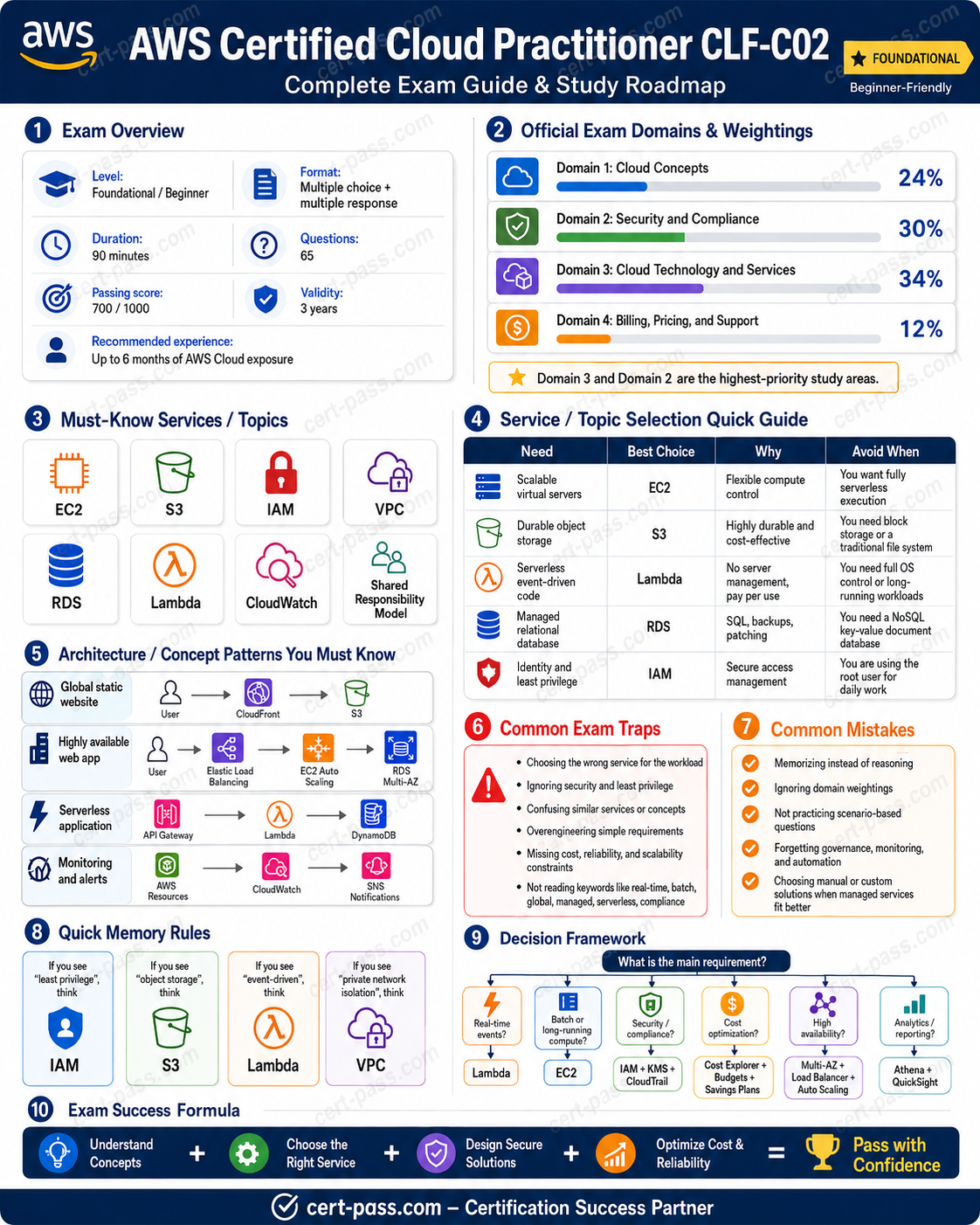
Official exam facts
| Detail | Current info |
|---|---|
| Exam name | AWS Cloud Practitioner CLF-C02 |
| Exam slug | aws-aws-cloud-practitioner-clf-c02 |
| Vendor | AWS |
| Questions | 65 |
| Time limit | 90 minutes |
| Passing score | 70 out of 100 on the scaled score model |
| Prerequisites | None required |
| Domain 1 | Cloud Concepts, 24 percent |
| Domain 2 | Security and Compliance, 30 percent |
| Domain 3 | Cloud Technology and Services, 34 percent |
| Domain 4 | Billing, Pricing, and Support, 12 percent |
| Exam hub | AWS Cloud Practitioner CLF C02 practice exam |
| Official certification page | AWS Certified Cloud Practitioner |
| Cert-Pass QA access | Try 35 free AWS Cloud Practitioner CLF C02 practice questions - no signup required |
| Cert-Pass course preview | Preview the compressed AWS Cloud Practitioner CLF C02 course |
| Last verified | 2026-06-01 |
The official AWS page is the source of truth for the certification description, and it confirms that Cloud Practitioner is a foundational exam. That matters because beginners often overstudy the wrong details. This exam is not asking for deep architecture design or advanced engineering troubleshooting. It is asking whether the candidate can recognize the right cloud concept, the right service family, and the right business fit from a short scenario.
What a beginner should understand first
AWS Cloud Practitioner CLF C02 for beginners is easiest when the learner treats the exam as a literacy check for cloud work. The exam expects a broad understanding of how AWS is used, but not a deep build level knowledge of every service. That means the first study goal is not memorizing a huge product catalog. The first study goal is learning how to think in categories.
The exam becomes easier when the learner can answer these questions quickly:
- Is this problem about cloud value, security, compute, storage, networking, databases, or billing?
- Is the service being used for development, monitoring, governance, or cost control?
- Is the scenario asking about what AWS manages or what the customer manages?
- Is the question about the best fit service, or about the reason the cloud is useful in the first place?
Those are the kinds of questions that keep showing up in beginner level AWS study. If the learner can sort the prompt into the right category, the answer choices usually become much easier to compare.
The best starting rule
Start with the exam flow, not the service list. A beginner usually learns faster when the study order is:
- cloud concepts
- shared responsibility
- core security and compliance tools
- the main compute, storage, database, and networking services
- billing and support tools
- mixed practice questions
That order is simple, but it is also practical. It matches how the exam describes business needs.
Cloud concepts first, because everything else depends on them
The cloud concepts domain is the first thing a beginner should learn because it explains why AWS exists in the first place. If this part is weak, the rest of the exam feels like isolated trivia.
Cloud is a utility model
The core cloud idea is simple: instead of buying a large amount of hardware up front, a company can provision resources when it needs them and pay for what it uses. That changes how teams think about risk, speed, and cost.
A beginner should be able to explain the difference between fixed expense and variable expense. In an on premises setup, a company often commits money before demand is fully known. In the cloud, the company can scale more gradually and reduce the need to guess capacity months in advance.
That is why the cloud is attractive to new teams, fast moving teams, and teams that do not want to spend time maintaining physical infrastructure.
Elasticity and scalability are not the same
These two words appear often, and beginners often mix them up.
- Elasticity means the system can expand or shrink quickly when demand changes.
- Scalability means the system can grow to support more work over time.
If a question says the workload spikes during a promotion, think elasticity. If a question says the business is growing steadily and needs more capacity long term, think scalability.
High availability and fault tolerance
These ideas also matter for beginners.
- High availability means reducing downtime through redundancy and good design.
- Fault tolerance means the system keeps working even if one part fails.
A beginner does not need to design complex infrastructure for this exam, but the learner should know that AWS often solves resilience by spreading work across multiple Availability Zones and by using managed services that reduce single points of failure.
Global infrastructure basics
A beginner should know the meaning of the basic AWS location terms:
| Term | Meaning |
|---|---|
| Region | A geographic area that contains multiple Availability Zones |
| Availability Zone | An isolated location inside a Region |
| Edge location | A site used to deliver cached content closer to users |
| Local Zone | A placement option near a population center for lower latency access |
| Outposts | AWS infrastructure on premises |
| Wavelength Zone | AWS infrastructure at the edge of a telecom network |
These terms are not just vocabulary. They help the learner understand why AWS can support global applications, low latency content, and different types of deployment.
Shared responsibility is a first class topic, not a footnote
Many beginners underestimate the shared responsibility model, but it appears constantly in beginner AWS questions. The basic idea is easy to remember: AWS manages the cloud infrastructure, while the customer manages what they place in the cloud and how they configure access, data, and applications.
A beginner should be able to answer questions such as:
- Who manages the physical security of the data center?
- Who configures IAM policies?
- Who is responsible for application code?
- Who is responsible for securing stored data?
- Who manages the underlying infrastructure for Lambda?
The key is to know which responsibility sits with AWS and which sits with the customer.
A simple rule of thumb
- AWS handles the infrastructure behind the service.
- The customer handles data, identities, and application choices.
That rule is not perfect for every scenario, but it is a strong beginner shortcut and it eliminates a lot of wrong answers.
Where beginners get trapped
The most common mistake is assuming that because AWS manages a service, AWS also manages everything inside it. That is not how the model works. For example, Lambda is serverless, but the customer still writes application code and configures permissions. The cloud removes some operational work, but it does not remove responsibility for the workload.
Security and compliance come early because they are high value points
The security and compliance domain is a large part of the exam, and beginners should learn it early because the services are relatively easy to separate once the purpose is clear.
IAM is the first security service to master
IAM is one of the most important services on the exam. A beginner should know these core ideas:
- users represent people or identities
- groups help organize permissions for users
- roles provide temporary credentials and are often used by services
- policies grant or limit permissions
- MFA adds extra sign in protection
- least privilege means giving only the permissions needed for the task
If a scenario asks about access control, IAM is usually the first thing to consider.
CloudTrail, CloudWatch, and Config are different
Beginners often confuse these three because they all sound like monitoring tools. They are not the same.
| Service | What it does |
|---|---|
| CloudTrail | Records API activity and account events |
| CloudWatch | Monitors metrics, logs, and alarms |
| Config | Tracks configuration changes and helps assess compliance |
A practical way to remember them is:
- CloudTrail answers what was done.
- CloudWatch answers what is happening.
- Config answers whether something changed or drifted from the expected setup.
If a beginner learns only that difference, a lot of security questions become much easier.
KMS, Secrets Manager, WAF, Shield, GuardDuty, Inspector, and Macie
These services sound more advanced than they really are. For Cloud Practitioner, the learner mainly needs the purpose of each one.
| Service | Main use |
|---|---|
| KMS | Manages encryption keys |
| Secrets Manager | Stores and rotates secrets |
| WAF | Filters web requests and helps protect applications from common web attacks |
| Shield | Helps protect against DDoS attacks |
| GuardDuty | Detects suspicious or malicious activity |
| Inspector | Finds vulnerabilities in workloads |
| Macie | Helps discover sensitive data, especially in S3 |
The exam often uses wording that sounds similar, but the underlying purpose is different. A beginner should not try to memorize everything as a flat list. The better approach is to group the services by job:
- identity and access
- monitoring and auditing
- encryption and secrets
- threat detection and protection
- compliance and configuration
That mental grouping is much easier to remember than raw definitions.
AWS Artifact and compliance reports
Artifact is another service beginners should know. It gives access to AWS compliance reports and agreements. If a question asks about compliance documentation from AWS itself, Artifact is often the answer.
That is different from Config, which tracks the configuration of resources in your environment. This distinction shows up often enough that it is worth learning cleanly.
Core AWS services are the largest part of the exam, so learn the families
The biggest beginner mistake is trying to memorize every service in isolation. The better method is to learn service families and the differences inside each family.
Compute services
The common compute services beginners should know are:
- EC2 for virtual machines
- Lambda for event driven serverless code
- ECS for AWS native container orchestration
- EKS for managed Kubernetes
- Fargate for serverless containers
- Elastic Beanstalk for simplified application deployment
- Lightsail for simplified virtual private server style workloads
A beginner does not need deep architecture knowledge of all of these. The learner mainly needs to know which one fits a scenario.
| Scenario | Best fit |
|---|---|
| Full operating system control | EC2 |
| Run code when an event occurs | Lambda |
| Containers without server management | Fargate |
| Managed Kubernetes | EKS |
| AWS native container orchestration | ECS |
| Easy app deployment with managed platform handling | Elastic Beanstalk |
| Simple small scale VPS style setup | Lightsail |
The most important contrast for beginners is EC2 versus Lambda. EC2 gives control over a server. Lambda removes server management and runs code only when triggered.
Storage services
Storage questions appear constantly, and beginners should know the differences clearly.
| Service | Best use |
|---|---|
| S3 | Object storage, files, backups, static website assets, data lakes |
| EBS | Block storage attached to EC2 |
| EFS | Shared file storage across multiple instances |
| FSx | Managed file systems such as Windows File Server or Lustre |
| Glacier | Long term archive storage |
| Storage Gateway | Hybrid storage connection between on premises and AWS |
| DataSync | Move large data sets between environments |
| AWS Backup | Centralized backup orchestration |
The beginner rule is simple:
- S3 stores objects.
- EBS stores blocks.
- EFS stores shared files.
- Glacier stores archives.
If a question asks about a static website or file backup, S3 is often the first choice. If it asks about a boot disk for EC2, EBS is the right answer. If it asks about a shared file system across multiple instances, EFS is usually the right answer.
Database services
A beginner should know these core database choices:
| Service | Best use |
|---|---|
| RDS | Managed relational databases |
| Aurora | AWS optimized relational database |
| DynamoDB | NoSQL key value and document style database |
| Redshift | Data warehouse and analytics |
| ElastiCache | In memory caching |
| Neptune | Graph database |
| DocumentDB | MongoDB compatible document database |
| QLDB | Ledger database |
The most common beginner question is the difference between RDS and DynamoDB.
- RDS is relational and SQL oriented.
- DynamoDB is NoSQL and designed for low latency key value or document access.
The second common question is the difference between RDS and Redshift.
- RDS is for transactional relational workloads.
- Redshift is for analytics and warehousing.
Those three services are enough to answer a large number of starter questions.
Networking and content delivery
A beginner should learn the following networking and delivery services:
| Service | Best use |
|---|---|
| VPC | Private network boundary in AWS |
| Subnets | Segments within a VPC |
| Security Groups | Instance level virtual firewall |
| Network ACLs | Subnet level stateless firewall |
| Route 53 | DNS and domain routing |
| CloudFront | CDN and edge caching |
| Elastic Load Balancing | Distributes traffic across targets |
| Direct Connect | Dedicated private connection to AWS |
| VPN | Encrypted connection over the internet |
| Transit Gateway | Central hub for network connections |
The beginner should especially know that Route 53 is DNS and CloudFront is content delivery. Those are easy to confuse if the learner only glances at the names.
Messaging and integration services
These services show up less often than core compute and storage, but they are still worth knowing.
| Service | Best use |
|---|---|
| SQS | Message queue and decoupling |
| SNS | Pub sub notifications |
| EventBridge | Event routing and orchestration of events |
| Step Functions | Workflow orchestration |
| API Gateway | Managed API front door for applications and Lambda |
| Amazon MQ | Managed broker for existing message oriented applications |
The beginner shortcut here is simple:
- SQS queues work.
- SNS broadcasts notifications.
- EventBridge routes events.
- Step Functions coordinates workflow steps.
Analytics, AI, and application services
Cloud Practitioner does not require deep expertise in these tools, but it does help to know what they are for.
| Service | Best use |
|---|---|
| Athena | Query data in S3 with SQL |
| Glue | Data integration, ETL, and cataloging |
| Kinesis | Streaming data ingestion |
| EMR | Big data processing such as Spark |
| QuickSight | Business intelligence dashboards |
| SageMaker | Machine learning development and deployment |
| Bedrock | Generative AI foundation model access |
| Lex | Chatbots |
| Polly | Text to speech |
| Transcribe | Speech to text |
| Translate | Language translation |
| Comprehend | Text analytics and NLP |
| Connect | Cloud contact center |
| WorkSpaces | Virtual desktop infrastructure |
| AppStream 2.0 | Stream desktop applications |
The exam usually wants recognition at a high level. If the learner can connect the business need to the service family, that is enough for most beginner questions.
Billing, pricing, and support are smaller but easy points
Many beginners ignore this domain because it is smaller than the others. That is a mistake. The questions are often direct, and the tools are easy to separate once the learner studies them deliberately.
Pricing models
| Model | Best for |
|---|---|
| On Demand | Flexible usage without commitment |
| Reserved Instances | Steady usage with commitment |
| Savings Plans | Flexible compute commitment with savings |
| Spot Instances | Fault tolerant workloads that can tolerate interruption |
| Dedicated Hosts | Workloads needing physical server visibility or licensing support |
| Free Tier | Initial exploration and small learning workloads |
Beginners should especially know that On Demand is the simplest default, while Spot is cheap but interruptible. Reserved capacity and Savings Plans are for longer term commitment.
Cost and billing tools
| Tool | Main job |
|---|---|
| Pricing Calculator | Estimate costs before deployment |
| Cost Explorer | Analyze historical and current spend |
| Budgets | Alert on spending thresholds |
| Billing Dashboard | View bills and invoices |
| Cost Allocation Tags | Track spend by team or project |
| Cost and Usage Report | Detailed programmatic cost data |
| Trusted Advisor | Broad best practice checks and some optimization guidance |
| Compute Optimizer | Compute focused recommendations |
| AWS Marketplace | Purchase third party software and services |
The three cost tools that beginners must know are:
- Pricing Calculator for planning
- Cost Explorer for analysis
- Budgets for alerts
That trio appears again and again in exam questions.
Support plans
| Plan | Typical use |
|---|---|
| Basic | Billing help and documentation access |
| Developer | Business hours technical support for development and testing |
| Business | 24/7 technical support for production workloads |
| Enterprise On Ramp | Higher support level for production use cases |
| Enterprise | Mission critical workloads and faster response options |
A beginner should also know the purpose of a Technical Account Manager, or TAM. If the question asks which support tier includes a TAM, the answer is the highest enterprise level support arrangement.
A useful asset: the beginner priority matrix
This is the main decision tool for this article. It helps the learner decide what to study first and what to leave for later.
| Priority | Topic | What the beginner should be able to explain |
|---|---|---|
| 1 | Cloud concepts | Why cloud is useful, and what elasticity and scalability mean |
| 2 | Shared responsibility | What AWS manages and what the customer manages |
| 3 | IAM | Users, groups, roles, policies, MFA, least privilege |
| 4 | Core storage | S3, EBS, EFS, Glacier |
| 5 | Core compute | EC2, Lambda, containers, Elastic Beanstalk |
| 6 | Core databases | RDS, DynamoDB, Redshift, ElastiCache |
| 7 | Monitoring and auditing | CloudTrail, CloudWatch, Config |
| 8 | Security services | KMS, Secrets Manager, WAF, Shield, GuardDuty, Inspector, Macie |
| 9 | Networking | VPC, Route 53, CloudFront, Direct Connect, VPN |
| 10 | Billing and support | Pricing Calculator, Cost Explorer, Budgets, support plans |
This matrix keeps the study path focused. It prevents beginners from getting distracted by advanced services before the foundation is solid.
A simple 30 day beginner plan
A beginner does not need a complicated study system. A month is enough to build a strong foundation if the order stays tight.
Week 1
Learn cloud concepts, the shared responsibility model, and IAM. At the end of the week, the learner should be able to explain the cloud value proposition and the difference between AWS responsibility and customer responsibility.
Week 2
Learn the storage and compute families. Focus on S3, EBS, EFS, Glacier, EC2, Lambda, ECS, EKS, Fargate, and Elastic Beanstalk. The learner should be able to choose the correct service from a simple scenario.
Week 3
Learn security, monitoring, networking, and databases. This is where CloudTrail, CloudWatch, Config, KMS, WAF, Shield, Route 53, CloudFront, RDS, DynamoDB, and Redshift become much easier to separate.
Week 4
Study billing, support, and mixed practice. Review questions slowly and explain why each wrong answer is wrong. That habit matters more than memorizing extra service names.
Daily practice rule
Spend a little time each day explaining services in plain language. If the learner can explain a service without copying a definition, the concept is becoming real.
Common beginner mistakes
Mistake 1: studying services before concepts
If the learner memorizes service names before cloud concepts, the exam feels random. Concepts create the structure.
Mistake 2: confusing similar services
The most common pairings are:
- CloudTrail versus CloudWatch versus Config
- S3 versus EBS versus EFS
- RDS versus DynamoDB versus Redshift
- Route 53 versus CloudFront
- Pricing Calculator versus Cost Explorer versus Budgets
The fix is to compare them side by side.
Mistake 3: overstudying rare services too early
A beginner does not need deep knowledge of every niche product. Core services are higher value than advanced extras.
Mistake 4: ignoring the scenario clue
AWS Cloud Practitioner questions usually hide the answer in the business need. The learner should read for the requirement, not for the flashiest word.
Mistake 5: treating support and billing as unimportant
This domain is small, but it is efficient. These are often the easiest points to earn if the learner studies them deliberately.
How to think during practice questions
When a question feels hard, slow down and ask four quick questions:
- What category is this? security, storage, compute, networking, billing, or concept
- Is the question about planning, running, auditing, or alerting
- Is the need about objects, blocks, files, or archives
- Is the service doing the work, or is it helping manage the work
That habit keeps the learner from choosing a service based only on the name.
One line service clue method
A simple clue method works well for beginners:
- API activity means CloudTrail
- metrics and alarms mean CloudWatch
- configuration drift means Config
- object storage means S3
- block storage means EBS
- shared file storage means EFS
- managed relational database means RDS
- NoSQL low latency access means DynamoDB
- cost estimate means Pricing Calculator
- cost analysis means Cost Explorer
- cost alert means Budgets
If the learner can say these lines out loud, a lot of practice questions become easier to solve.
Related reading in the Cert Pass library
This beginner page is meant to sit at the front of the AWS Cloud Practitioner cluster, not to replace the other pages in the set.
Use these pages after the foundation is in place:
- AWS Cloud Practitioner CLF C02 Study Guide 2026
- AWS Cloud Practitioner CLF C02 Practice Questions: 25 Exam Style Examples
- AWS Cloud Practitioner CLF C02 FAQ: 20 Common Questions Answered
- AWS Cloud Practitioner CLF C02 Salary 2026: Career Value and Compensation Factors
- AWS Cloud Practitioner CLF C02 practice exam
If the learner wants the fastest path back to the official route, the best next step is still the exam hub: AWS Cloud Practitioner CLF C02 practice exam.
FAQ
Is AWS Cloud Practitioner CLF C02 good for absolute beginners?
Yes. It is one of the best entry points into AWS because it focuses on cloud literacy, service recognition, and basic business scenarios instead of deep engineering detail.
What should a beginner learn first?
Start with cloud concepts, shared responsibility, IAM, S3, EC2, Lambda, CloudTrail, CloudWatch, and the billing tools. That sequence covers the most common exam language.
Is this exam more about memorization or understanding?
It is more about understanding. Memorization helps, but the best answers usually come from matching the scenario to the service purpose.
Do beginners need to know every AWS service?
No. Beginners should know the main families and the services that appear often in exam scenarios. Deep knowledge of every product is not necessary.
What is the difference between CloudTrail and CloudWatch?
CloudTrail records API activity and account events. CloudWatch collects metrics, logs, and alarms.
What is the difference between S3 and EBS?
S3 is object storage. EBS is block storage attached to EC2.
What is the difference between Pricing Calculator and Cost Explorer?
Pricing Calculator estimates planned costs before deployment. Cost Explorer analyzes historical and current spend.
Is the official AWS certification page worth checking before studying?
Yes. The official page is the source of truth for the exam description and is worth reviewing before the first practice set.
Final answer
AWS Cloud Practitioner CLF C02 for beginners is easiest when the learner studies in the order that the exam actually uses. Start with cloud concepts and shared responsibility. Then learn IAM and the core security tools. After that, focus on the main compute, storage, database, networking, and billing services. Finish with mixed practice and slow review of wrong answers.
The point is not to collect every AWS name. The point is to build a clean mental map of the platform so scenario questions become easy to categorize. If the learner can say what each service does, where it fits, and why it is the right choice, the exam becomes much more manageable.
Use the official path here: AWS Cloud Practitioner CLF C02 practice exam. If the next step should be free practice, use Try 35 free AWS Cloud Practitioner CLF C02 practice questions - no signup required. If the learner wants a tighter review, use Preview the compressed AWS Cloud Practitioner CLF C02 course.